This example explains how to Delete Multiple Rows Records In Gridview With CheckBox And Delete Confirmation Using C# And VB.NET In Asp.Net.
Several times while developing web applications we need to implement functionality to delete bulk / multiple rows or records in Gridview using checkbox to select rows / records to be deleted with confirmation dialog box.
In this example i am showing how to achieve it.
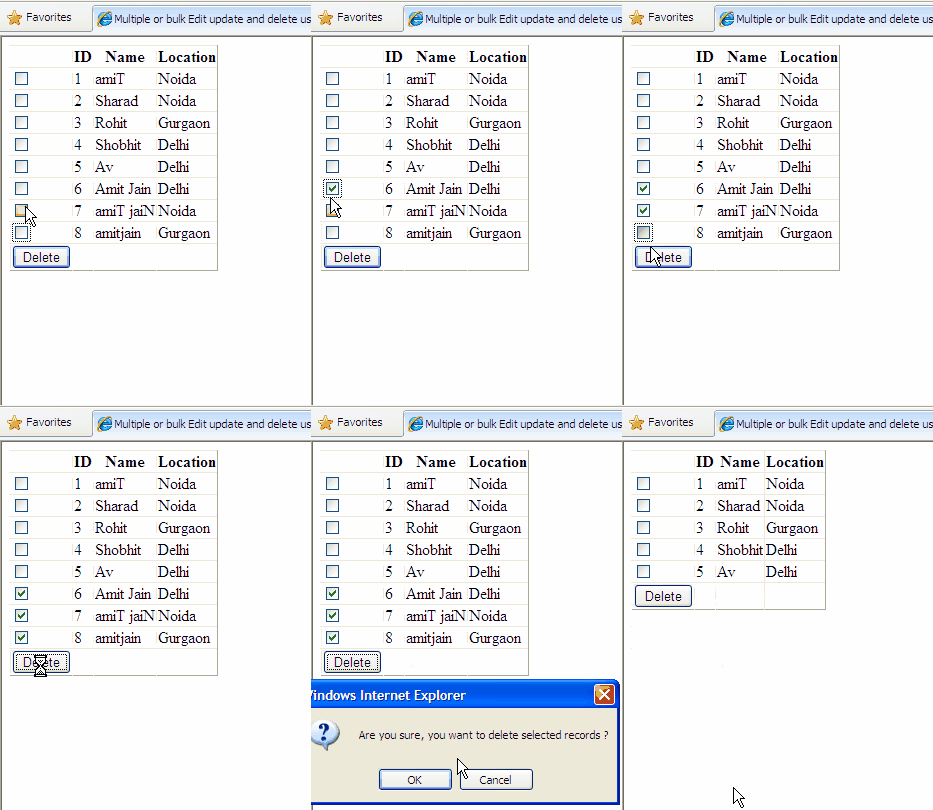
You can also read how to Edit or update multiple records/rows in gridview with checkbox using C#
I've put a Delete Button in Footer row of gridview and checkbox columns using ItemTemaplate.
Html markup of the gridview is like
<asp:GridView ID="GridView1" runat="server"
              AutoGenerateColumns="False"
              DataSourceID="SqlDataSource1"
              ShowFooter="true">
     <Columns>
     <asp:TemplateField>
     <ItemTemplate>
     <asp:CheckBox ID="chkSelect" runat="server" />
     </ItemTemplate>
     <FooterTemplate>
     <asp:Button ID="btnDelete" runat="server" Text="Delete"
              OnClick="btnDelete_Click"
              OnClientClick="return DeleteConfirmation();"/>
      </FooterTemplate>
      </asp:TemplateField>
      <asp:BoundField DataField="ID"
                      HeaderText="ID"
                      SortExpression="ID" />
      <asp:BoundField DataField="Name"
                      HeaderText="Name"
                      SortExpression="Name" />
      <asp:BoundField DataField="Location"
                      HeaderText="Location"
                      SortExpression="Location" />
      </Columns>
</asp:GridView>
<asp:SqlDataSource ID="SqlDataSource1" runat="server"
  ConnectionString="<%$ ConnectionStrings:ConnectionString %>"
     SelectCommand="SELECT [ID], [Name], [Location]
                    FROM [Details]"></asp:SqlDataSource>
The JavaScript for delete confirmation of records is
<script type="text/javascript" language="javascript">
function DeleteConfirmation()
{
if (confirm("Are you sure,"
            "you want to delete selected records ?")==true)
   return true;
else
   return false;
}
</script>
Call this javascript by assigning on OnClientClick attribute to delete button in html markup like this
<FooterTemplate>
<asp:Button ID="btnDelete" runat="server"
            Text="Delete"
            OnClick="btnDelete_Click"
            OnClientClick="return DeleteConfirmation();"/>
</FooterTemplate>
In the code behind i'm using StringCollection to store ID of records to be deleted by looping through gridview rows and checking which row is selected.
C# code behind
public partial class _Default : System.Web.UI.Page
{
//Define global Connection String
string strConnection = ConfigurationManager.ConnectionStrings
                       ["ConnectionString"].ConnectionString;
protected void Page_Load(object sender, EventArgs e)
{

}
protected void btnDelete_Click(object sender, EventArgs e)
{
//Create String Collection to store
//IDs of records to be deleted
  StringCollection idCollection = new StringCollection();
  string strID = string.Empty;

  //Loop through GridView rows to find checked rows
   for (int i = 0; i < GridView1.Rows.Count; i++)
   {
    CheckBox chkDelete = (CheckBox)
       GridView1.Rows[i].Cells[0].FindControl("chkSelect");
            if (chkDelete != null)
            {
                if (chkDelete.Checked)
                {
                 strID = GridView1.Rows[i].Cells[1].Text;
                 idCollection.Add(strID);
                }
            }
        }

        //Call the method to Delete records
        DeleteMultipleRecords(idCollection);

        // rebind the GridView
        GridView1.DataBind();
    }
    /// <summary>
    /// This is to Delete multiple records in gridview
    /// </summary>
    /// <param name="idCollection">stringCollection</param>
private void DeleteMultipleRecords
                            (StringCollection idCollection)
{
//Create sql Connection and Sql Command
 SqlConnection con = new SqlConnection(strConnection);
 SqlCommand cmd = new SqlCommand();
 string IDs = "";

foreach (string id in idCollection)
{
  IDs += id.ToString() + ",";
}
          try
            {
               string strIDs =
                IDs.Substring(0, IDs.LastIndexOf(","));
                   string strSql = "Delete from Details
                           WHERE ID in (" + strIDs + ")";
                cmd.CommandType = CommandType.Text;
                cmd.CommandText = strSql;
                cmd.Connection = con;
                con.Open();
                cmd.ExecuteNonQuery();
            }
            catch (SqlException ex)
            {
                string errorMsg = "Error in Deletion";
                errorMsg += ex.Message;
                throw new Exception(errorMsg);
            }
            finally
            {
                con.Close();
            }
}

}
Another Method
We can also use sqlDataSource delete method to delete multiple records in following way
add delete command and delete Parameters in SqlDataSource html markup
<asp:GridView ID="GridView1" runat="server"
              AutoGenerateColumns="False"
              DataSourceID="SqlDataSource1"
              ShowFooter="true" DataKeyNames="ID">
<asp:SqlDataSource ID="SqlDataSource1" runat="server"
  ConnectionString="<%$ ConnectionStrings:ConnectionString %>"
     SelectCommand="SELECT [ID], [Name], [Location]
                    FROM [Details]
         DeleteCommand="Delete from [Details] where [ID]=@ID">
<DeleteParameters>
<asp:Parameter Name="ID"/>
</DeleteParameters>">
</asp:SqlDataSource>
foreach(GridViewRow row in GridView1. Rows)
{
CheckBox chkDelete = (CheckBox)row.FindControl
                                ("chkSelect");
if(chkDelete.Checked)
{
int id = Convert.ToInt32(GridView1.DataKeys
                       [row.RowIndex].Value);
SqlDataSource1.DeleteParameters["ID"]
         .DefaultValue = customerid.ToString();
SqlDataSource1.Delete();
}

}
VB.NET code
Public Partial Class _Default
    Inherits System.Web.UI.Page
    'Define global Connection String
    Private strConnection As String
                   = ConfigurationManager.ConnectionStrings
        ("ConnectionString").ConnectionString
    Protected Sub Page_Load
(ByVal sender As Object, ByVal e As EventArgs)

    End Sub
    Protected Sub btnDelete_Click
(ByVal sender As Object, ByVal e As EventArgs)
        'Create String Collection to store
        'IDs of records to be deleted
        Dim idCollection As New StringCollection()
        Dim strID As String = String.Empty

        'Loop through GridView rows to find checked rows
        For i As Integer = 0 To GridView1.Rows.Count - 1
            Dim chkDelete As CheckBox =
DirectCast(GridView1.Rows(i).Cells(0).FindControl
              ("chkSelect"), CheckBox)
            If chkDelete IsNot Nothing Then
                If chkDelete.Checked Then
                    strID = GridView1.Rows(i).Cells(1).Text
                    idCollection.Add(strID)
                End If
            End If
        Next

        'Call the method to Delete records
        DeleteMultipleRecords(idCollection)

        ' rebind the GridView
        GridView1.DataBind()
    End Sub
    ''' <summary>
    ''' This is to Delete multiple records in gridview
    ''' </summary>
    ''' <param name="idCollection">stringCollection</param>
    Private Sub DeleteMultipleRecords
(ByVal idCollection As StringCollection)
        'Create sql Connection and Sql Command
        Dim con As New SqlConnection(strConnection)
        Dim cmd As New SqlCommand()
        Dim IDs As String = ""

        'Create string builder to store
        'delete commands separated by ;

        For Each id As String In idCollection
            IDs += id.ToString() & ","
        Next

        Try
            Dim strIDs As String =
IDs.Substring(0, IDs.LastIndexOf(","))
            Dim strSql As String =
("Delete from Details" & +" WHERE ID in (") + strIDs & ")"
            cmd.CommandType = CommandType.Text
            'cmd.CommandText = sbStrCommand.ToString();
            cmd.CommandText = strSql
            cmd.Connection = con
            con.Open()
            cmd.ExecuteNonQuery()
        Catch ex As SqlException
            Dim errorMsg As String = "Error in Deletion"
            errorMsg += ex.Message
            Throw New Exception(errorMsg)
        Finally
            con.Close()


        End Try
    End Sub

End Class
Hope this helps
Other Posts on ASP.NET:
1. ASP.NET-Populating dropdown based on the selection of first drop down in DetailsView using FindControl and ItemTemplate
2. Data Transfer to other aspx pages using Query String Session cookies and cross page posting
3. Data Transfer Using Cookies Session Variables Cross page posting and QueryStrings in ASP.NET
4. Cross page posting, Submit Form and Server.Transfer methods in ASP .NET for data transfer
5. Pouplating Multiple DetailsView based on single GridView using DataKeyNames in ASP.NET
Delete Multiple Rows Records Gridview CheckBox Confirmation
Save Insert Export Import Excel Data Into Sql Server SqlBulkCopy ASP.NET
This post explains How To Save Insert Or Export Import Excel Data In to Sql Server Database Table Using SqlBulkCopy In ASP.NET
First of all create a Excel workbook as shown in image below and insert some data into it.

Create a table in SQL database with following schema

Now write this code to insert data into SQL table
public partial class _Default : System.Web.UI.Page
{
string strConnection = ConfigurationManager.ConnectionStrings
["ConnectionString"].ConnectionString;
protected void Page_Load(object sender, EventArgs e)
{

}
protected void Button1_Click(object sender, EventArgs e)
{
//Create connection string to Excel work book
string excelConnectionString =
@"Provider=Microsoft.Jet.OLEDB.4.0;
Data Source=C:\Details.xls;
Extended Properties=""Excel 8.0;HDR=YES;""";

//Create Connection to Excel work book
OleDbConnection excelConnection =
new OleDbConnection(excelConnectionString);

//Create OleDbCommand to fetch data from Excel
OleDbCommand cmd = new OleDbCommand
("Select [ID],[Name],[Location] from [Detail$]",
excelConnection);

excelConnection.Open();
OleDbDataReader dReader;
dReader = cmd.ExecuteReader();

SqlBulkCopy sqlBulk = new SqlBulkCopy(strConnection);
sqlBulk.DestinationTableName = "Details";
//sqlBulk.ColumnMappings.Add("ID", "ID");
//sqlBulk.ColumnMappings.Add("Name", "Name");
sqlBulk.WriteToServer(dReader);
}
}
If there are more columns in your database table or excel workbook and you want to insert data in some of them than you need to add ColumnMappings like this
sqlBulk.ColumnMappings.Add("Name", "Name");
End result will be like this

Hope this helps
Download the sample code attached

Other Posts:
1. Detecting Session Timeout and Redirect to Login Page in ASP.NET
2. JavaScript window.close() not working / does not work in firefox
3. Merging GridView Headers to have multiple Headers in GridView
4. Detect Browser refresh to avoid events getting fired again in ASP .NET
5. Search records in GridView and highlight result with AJAX
Other SQL Server articles:
The backup set holds a backup of a database other than the existing database-Sql Server Error 3154
Install configure and troubleshooting sql server reporting services 2005
Ms sql server bulk insert method to import bulk csv data into database
Find Track mobile phone number location in india
If you want to find or trace mobile phone number location in India operator or circle name than simple go to link mentioned below
Click this link to trace mobile phone location and operator in India
Just enter 10 digits phone number in the search box and click on Trace
Have fun
Related posts:
Track Mobile Phone number location and operator in India
Trace Mobile Number Location Operator in India
Several times we feel the need to trace or track any mobile phone number , it's location and Operator name , for various reasons.
If you are one of them then this will definitely help you to find any mobile phone number location and operator in India
Enter mobile phone number in the search box and click on Trace.
If you have any problems, feedback or suggestions, than do leave me a comment
Have fun
.
Bypass Forms Authentication Or Skip Authorization Asp.Net
Bypass Forms Authentication Or Skip Authorization for selected pages in asp.net
In my previous articles i explained how to use forms authentication in asp.net
1. C# Forms Authentication using ticket and managing user roles in asp.net
2. ASP.NET 2.0 - Forms Authentication with C# and managing folder lavel access with multiple web.config files
And i also explained about how to validate use across pages using session and redirect to login page if user is not logged in
User validation across pages using session after login in ASP.NET using C sharp
Some readers ask me how to skip or bypass forms authentication or Authorization for selected pages in asp.net or a scenario where only few pages on site needs user to log in rest can be accessed without login.
For this we need to set HttpContext.Current.SkipAuthorization property to true in global application class called Global.asax
You can write code like this
string Url = Request.RawUrl;
int count = Url.Length - 10 ;
string TestUrl = Url.Substring(count);
string SessionData = Session["Authenticate"].ToString();
if (TestUrl != "Admin.aspx")
{
HttpContext.Current.SkipAuthorization = true;
}
Here i'm checking if the page url is not Admin.aspx than skip the authentication check
You can use multiple && (and) or || (or) conditions with this
Download the sample code attached

Related posts:
ASP.NET Submit form on Enter Key Default submit Button
Register custom controls dlls and user controls ascx in ASP.NET
Search records in GridView with searchbox in footer and highlight results using AJAX
User validation across pages using session after login in ASP.NET
Creating OpenFileDialog in winforms to open or browse for the file in .NET windows application using C#
Backup Set Holds A Backup Of A Database Other Than The Existing
If you are getting Error 3154 or The Backup Set Holds A Backup Of A Database Other Than The Existing Database Error while restoring backup of sql server from one system to another,
Than you need use following command to get rid of this error and restore the Sql server database
FROM DISK = 'C:\BackupFileName.bak'
WITH REPLACE
This will hopefully fix the error and restore the database
Related Posts:
Finding IP address behind Proxy using C# in ASP.NET
Export GridView to Pdf using iTextSharp in asp.net
Hide GridView columns in normal mode and visible in edit mode
Change Mode of DetailsView or FormView when Default Mode is Set to Insert in ASP.NET
Other SQL Server articles:
1.Import/Export Excel Data into Sql Server using SqlBulkCopy-ASP.NET
2.Install configure and troubleshooting sql server reporting services 2005
3.Ms sql server bulk insert method to import bulk csv data into database
4.Combine Multiple Records Comma Separated In One Column MSSQL
LinkButton in GridView and QueryString in ASP.NET
This example explains how to use LinkButton in GridView and QueryString in ASP.NET to pass or transfer variable data to other page using QueryString and QueryStringParameters.
I've put a searchbox at the top of page and based on search text entered in textbox, gridview is populated, In the gridview i've put a Link Button in ItemTemplate column.
LinkButton field is hyperlink which points to Details.aspx and sends RecordID as QueryString to Details.aspx page where another gridview is populated to show Details of selected record by retrieving the QueryString variable using QueryStringParameters.
HTML SOURCE OF DEFAULT.ASPX
<asp:TextBox ID="txtSearch" runat="server"/>
<asp:Button ID="btnSearch" runat="server"
Text="Search" OnClick="btnSearch_Click"/>
<asp:GridView ID="GridView1" runat="server"
AutoGenerateColumns="False"
DataSourceID="SqlDataSource1">
<Columns>
<asp:TemplateField HeaderText="Name">
<ItemTemplate>
<asp:LinkButton ID="lnkname" runat="server"
Text='<%#Eval("Name") %>'
PostBackUrl='<%#"~/Details.aspx?ID="+Eval("ID")%>'>
</asp:LinkButton>
</ItemTemplate>
</asp:TemplateField>
<asp:BoundField DataField="City" HeaderText="City"/>
</Columns>
</asp:GridView>
<asp:SqlDataSource ID="SqlDataSource1" runat="server"
ConnectionString="<%$ ConnectionStrings:ConnectionString %>"
SelectCommand="SELECT [ID], [Name], [City], [Country]
FROM [Location]
WHERE ([Name] LIKE '%' + @Name + '%')">
<SelectParameters>
<asp:ControlParameter ControlID="txtSearch" Name="Name"
PropertyName="Text" Type="String"/>
</SelectParameters>
</asp:SqlDataSource>
HTML SOURCE OF DETAILS.ASPX
1: <asp:GridView ID="GridView1" runat="server"
2: AutoGenerateColumns="False"
3: DataSourceID="SqlDataSource1">
4: <Columns>
5: <asp:BoundField DataField="ID" HeaderText="ID"/>
6: <asp:BoundField DataField="Name" HeaderText="Name"/>
7: <asp:BoundField DataField="City" HeaderText="City"/>
8: <asp:BoundField DataField="Country" HeaderText="Country"/>
9: </Columns>
10: </asp:GridView>
11:
12: <asp:SqlDataSource ID="SqlDataSource1" runat="server"
13: ConnectionString="<%$ ConnectionStrings:ConnectionString %>"
14: SelectCommand="SELECT [ID], [Name], [City], [Country]
15: FROM [Location] WHERE ([ID] = @ID)">
16:
17: <SelectParameters>
18: <asp:QueryStringParameter Name="ID" QueryStringField="ID"
19: Type="Decimal"/>
20: </SelectParameters>
21: </asp:SqlDataSource>
Related Posts:
Creating winforms AutoComplete TextBox using C# in Windows application
Disable copy paste cut and right click in textbox on aspx page using javascript
Ajax autocomplete extender textbox in EditItemTemaplate of GridView
ASP.NET-Exporting paging enabled GridView to pdf using iTextSharp and C#

Unable To Attach Binding Handle Invalid Error Visual Studio
If you are getting Unable To Attach Binding Handle Invalid Error In Visual Studio while running the web application in visual studio and unable to debug. Than you need to take these steps to fix this error
1. Go to control panel in windows xp
2. Go to administrative tools
3. Double click on services
4. Scroll down to terminal services
Right click on it and select properties
now go to startup type and change it to Automatic
On top left of window see whether service is started or not ?, if nit than start it
This should fix you problem and you will be able to debug the application using break points
Have fun
Related Posts:
Forms Authentication with C# and managing folder lavel access with multiple web.config files
Ajax Cascading DropDownList in GridView with databse in ASP.NET
Forms Authentication using ticket and managing user roles in asp.net
Method Error 500/12031 In Ajax CascadingDropdown
If you are getting Method Error 500 or 12031 In Ajax CascadingDropdown, than you may have missed to include below mentioned line of code in code behind of your asmx (webservice) file
Add this line in webservice's code behind
It should look like this
[WebService(Namespace = "http://tempuri.org/")]
[WebServiceBinding(ConformsTo = WsiProfiles.BasicProfile1_1)]
[System.Web.Script.Services.ScriptService()]
public class CascadingDropDown : System.Web.Services.WebService {
It should fix the error
This also occurs if there is any error in your sql statements or webservice code, you need to check them as well
You would also like to read
Implementing Ajax Cascading DropDownList in GridView with databse in ASP.NET
Have fun
Related Posts:
Failed to access IIS metabase error
Blogger - Add dotnetshoutout button to all posts autometically
C#.NET articles - creating online examination system in asp.net using master page and sql server
Disable Browser Back Button Using Javascript ASP.NET
This example explains how to Disable Browser Back Button Using Javascript In ASP.NET. to avoid user going to previous page by clicking on back button of browser, for this we need to use javascript to prevent user navigating to previous page by hitting back button.
Just put this javascript on the html section of aspx page above head section
function disableBackButton()
{
window.history.forward();
}
setTimeout("disableBackButton()", 0);
</script>
We need to put it on the html section of the page which we want to prevent user to visit by hitting the back button
Complete code of the page looks like this
CodeFile="Default.aspx.cs" Inherits="_Default" %>
<!DOCTYPE html PUBLIC "-//W3C//DTD XHTML 1.0 Transitional//EN"
"http://www.w3.org/TR/xhtml1/DTD/xhtml1-transitional.dtd">
<html xmlns="http://www.w3.org/1999/xhtml" >
<head runat="server">
<title>Untitled Page</title>
<script type = "text/javascript" >
function disableBackButton()
{
window.history.forward();
}
setTimeout("disableBackButton()", 0);
</script>
</head>
<body onload="disableBackButton()">
<form id="form1" runat="server">
<div>
This is First page <br />
<br />
Go to Second page
<br />
<br />
<asp:LinkButton ID="LinkButton1" runat="server"
PostBackUrl="~/Default2.aspx">Go to Second Page
</asp:LinkButton></div>
</form>
</body>
</html>
If you want to disable back button using code behind of aspx page,than you need to write below mentioned code
C# code behind
protected override void OnPreRender(EventArgs e)
{
base.OnPreRender(e);
string strDisAbleBackButton;
strDisAbleBackButton = "";
ClientScript.RegisterClientScriptBlock(this.Page.GetType(), "clientScript", strDisAbleBackButton);
}
VB.NET code behind
Protected Overloads Overrides Sub OnPreRender(ByVal e As EventArgs)
MyBase.OnPreRender(e)
Dim strDisAbleBackButton As String
strDisAbleBackButton = ""
ClientScript.RegisterClientScriptBlock(Me.Page.[GetType](), "clientScript", strDisAbleBackButton)
End Sub
We can also achieve this by disabling browser caching or cache by writing this line of code either in Page_load event or in Page_Init event
{
Response.Cache.SetCacheability(HttpCacheability.NoCache);
Response.Cache.SetExpires(DateTime.Now.AddSeconds(-1));
Response.Cache.SetNoStore();
}
Have fun
Download the sample code attached

Other articles on javascript:
1. Highlight gridview row on mouse over using javascript in asp.net and C# c-sharp
2. Disable copy paste cut and right click in textbox on aspx page using javascript
3 .Mozilla firefox JavaScript window.close() not working / does not work in firefox

Highlight GridView Row On MouseOver Using Javascript
For this we need to create a css class and define the color we want to use for highlighting in html source of page.

Add following css style in head section of page.
HTML SOURCE OF PAGE
1: <asp:ScriptManager ID="ScriptManager1" runat="server"/>
2:
3: <asp:GridView ID="GridView1" runat="server"
4: AutoGenerateColumns="False"
5: DataSourceID="SqlDataSource1"
6: OnRowCreated="GridView1_RowCreated">
7: <SelectedRowStyle BackColor="BurlyWood"/>
8: <Columns>
9: <asp:CommandField ShowSelectButton="True"/>
10: <asp:BoundField DataField="Name" HeaderText="Name"/>
11: <asp:BoundField DataField="City" HeaderText="City"/>
12: <asp:BoundField DataField="Country" HeaderText="Country"/>
13: </Columns>
14: </asp:GridView>
15: <asp:SqlDataSource ID="SqlDataSource1" runat="server"
16: ConnectionString="<%$ ConnectionStrings:ConnectionString %>"
17: SelectCommand="SELECT [Name], [City], [Country] FROM [Location]">
18: </asp:SqlDataSource>
Add onmouseover and onmouseout attributes to gridview rows in RowCreated event in code behind.
C#
protected void Page_Load(object sender, EventArgs e)
    {
        if (!IsPostBack)
        {
            GridView1.DataBind();
        }
    }
    protected void GridView1_RowCreated(object sender, GridViewRowEventArgs e)
    {
        if (e.Row.RowType == DataControlRowType.DataRow)
        {
            e.Row.Attributes.Add("onmouseover", "this.className='highlight'");
            e.Row.Attributes.Add("onmouseout", "this.className='normal'");
        }
    }
VB.NET
Protected Sub Page_Load(sender As Object, e As EventArgs)
 If Not IsPostBack Then
  GridView1.DataBind()
 End If
End Sub
Protected Sub GridView1_RowCreated(sender As Object, e As GridViewRowEventArgs)
 If e.Row.RowType = DataControlRowType.DataRow Then
  e.Row.Attributes.Add("onmouseover", "this.className='highlight'")
  e.Row.Attributes.Add("onmouseout", "this.className='normal'")
 End If
End Sub
Now row will be highlighted on mouse hover
