This example explains how to use Check All Checkbox In GridView To Bulk Edit Or Update in ASP.NET with C# and VB.NET. I have put a checkBox in header Template of gridview which on checking will check all rows in gridview using server side code to implement CheckAll CheckBox functionality.
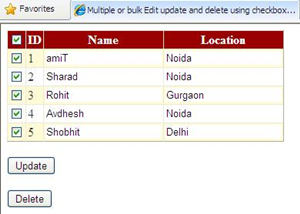
Html SOURCE OF GRIDVIEW
C# CODE
VB.NET
Hope this helps.

Html SOURCE OF GRIDVIEW
<asp:GridView ID="GridView1" runat="server"
              DataSourceID="SqlDataSource1"
              AutoGenerateColumns="false"
              CellPadding="2" ForeColor="#333333"
              GridLines="Both"
              DataKeyNames="ID"
              OnRowDataBound="GridView1_RowDataBound">
<Columns>
<asp:TemplateField HeaderText="CheckAll">
<HeaderTemplate>
<asp:CheckBox ID="chkSelectAll" runat="server"
              AutoPostBack="true"
              OnCheckedChanged="chkSelectAll_CheckedChanged"/>
</HeaderTemplate>
<ItemTemplate>
<asp:CheckBox ID="chkSelect" runat="server"
              AutoPostBack="true"
              OnCheckedChanged="chkSelect_CheckedChanged"/>
</ItemTemplate>
</asp:TemplateField>

<asp:BoundField DataField="ID" HeaderText="ID"
                SortExpression="ID"/>
<asp:TemplateField HeaderText="Name" SortExpression="Name">
<ItemTemplate>
<asp:TextBox ID="txtName" runat="server"
             Text='<%# Bind("Name") %>' ForeColor="Blue"
             BorderStyle="none" BorderWidth="0px"
             ReadOnly="true" >
</asp:TextBox>
</ItemTemplate>
</asp:TemplateField>

<asp:TemplateField HeaderText="Location" SortExpression
="Location">
<ItemTemplate>
<asp:TextBox ID="txtLocation" runat="server"
             Text='<%# Bind("Location") %>'
             ForeColor="Blue" BorderStyle="none"
             ReadOnly="true">
</asp:TextBox>
</ItemTemplate>
</asp:TemplateField>
</Columns>
</asp:GridView>

<asp:SqlDataSource ID="SqlDataSource1" runat="server"
ConnectionString="<%$ ConnectionStrings:ConnectionString %>"
SelectCommand="SELECT [ID], [Name], [Location] FROM [Details]"
DeleteCommand="DELETE FROM Details WHERE (ID = @ID)"
UpdateCommand="UPDATE [Details] SET [Name] = @Name,
               [Location] = @Location WHERE [ID] = @ID">
<DeleteParameters>
<asp:Parameter Name="ID" />
</DeleteParameters>

<UpdateParameters>
<asp:Parameter Name="Name" />
<asp:Parameter Name="Location" />
<asp:Parameter Name="ID" />
</UpdateParameters>
</asp:SqlDataSource>

<asp:Button ID="btnUpdate" runat="server"
            OnClick="btnUpdate_Click" Text="Update" />
<asp:Button ID="btnDelete" runat="server"
            OnClick="btnDelete_Click"
            Text="Delete" />
C# CODE
protected void chkSelectAll_CheckedChanged
                               (object sender, EventArgs e)
{
 CheckBox chkAll =
    (CheckBox)GridView1.HeaderRow.FindControl("chkSelectAll");
 if (chkAll.Checked == true)
 {
   foreach (GridViewRow gvRow in GridView1.Rows)
   {
    CheckBox chkSel =
         (CheckBox)gvRow.FindControl("chkSelect");
    chkSel.Checked = true;
    TextBox txtname = (TextBox)gvRow.FindControl("txtName");
    TextBox txtlocation = (TextBox)gvRow.FindControl("txtLocation");
    txtname.ReadOnly = false;
    txtlocation.ReadOnly = false;
    txtname.ForeColor = System.Drawing.Color.Black;
    txtlocation.ForeColor = System.Drawing.Color.Black;
   }
 }
 else
 {
  foreach (GridViewRow gvRow in GridView1.Rows)
  {
   CheckBox chkSel = (CheckBox)gvRow.FindControl("chkSelect");
   chkSel.Checked = false;
   TextBox txtname = (TextBox)gvRow.FindControl("txtName");
   TextBox txtlocation = (TextBox)gvRow.FindControl("txtLocation");
   txtname.ReadOnly = true;
   txtlocation.ReadOnly = true;
   txtname.ForeColor = System.Drawing.Color.Blue;
   txtlocation.ForeColor = System.Drawing.Color.Blue;
   }
  }
}
VB.NET
Protected Sub chkSelectAll_CheckedChanged(ByVal sender As Object, ByVal e As EventArgs)
    Dim chkAll As CheckBox = DirectCast(GridView1.HeaderRow.FindControl("chkSelectAll"), CheckBox)
    If chkAll.Checked = True Then
        For Each gvRow As GridViewRow In GridView1.Rows
            Dim chkSel As CheckBox = DirectCast(gvRow.FindControl("chkSelect"), CheckBox)
            chkSel.Checked = True
            Dim txtname As TextBox = DirectCast(gvRow.FindControl("txtName"), TextBox)
            Dim txtlocation As TextBox = DirectCast(gvRow.FindControl("txtLocation"), TextBox)
            txtname.[ReadOnly] = False
            txtlocation.[ReadOnly] = False
            txtname.ForeColor = System.Drawing.Color.Black
            txtlocation.ForeColor = System.Drawing.Color.Black
        Next
    Else
        For Each gvRow As GridViewRow In GridView1.Rows
            Dim chkSel As CheckBox = DirectCast(gvRow.FindControl("chkSelect"), CheckBox)
            chkSel.Checked = False
            Dim txtname As TextBox = DirectCast(gvRow.FindControl("txtName"), TextBox)
            Dim txtlocation As TextBox = DirectCast(gvRow.FindControl("txtLocation"), TextBox)
            txtname.[ReadOnly] = True
            txtlocation.[ReadOnly] = True
            txtname.ForeColor = System.Drawing.Color.Blue
            txtlocation.ForeColor = System.Drawing.Color.Blue
        Next
    End If
End Sub
Hope this helps.
that was really grat .. awsome.. jst awsom..
ReplyDeleteinfact .. m newbie ,, nn i cd't eva expect tat as i ld run this code,, it ld run widout any exception ..
Nnn Mr Amit ,, u did it ..
Thanks Amit
ReplyDeleteCan anyone recommend the top performing Remote Management & Monitoring system for a small IT service company like mine? Does anyone use Kaseya.com or GFI.com? How do they compare to these guys I found recently: N-able N-central network security
ReplyDelete? What is your best take in cost vs performance among those three? I need a good advice please... Thanks in advance!
In this article the code for delete and update is done with asp.net. but can u please provide me the c# code for update and delete button.
ReplyDeletewhen we check on check box the name and location fields are become updatable mode. then the user enter some txt, now we have to update that text into database. can u plz provide that code for me my email id is:hemanth43@gmail.com
Thanks..helped me a lot...
ReplyDeletethanxxx after searching 2 hours i got the best code
ReplyDeleteit's very nice
ReplyDeleteThis is great, an example that is very clear and in the correct languages. It was extremely useful Bev
ReplyDeletefudu...... BM
ReplyDeleteThanks Amit.
ReplyDeleteUnquestionably, I love it, useful and well-founded thoughts. Make sure you come up with more fascinating content in your.
ReplyDeleteAbsolutely, I love it, important and well-founded thoughts. Remember to create more appealing content articles in your.
ReplyDeleteHi Amitji,
ReplyDeleteI need your favour please do let me know that is how to update selected rows in database using Gridview checkbox. and also i want to get seleted checkbox should be checked when i get refresh the page.
i shall be ever remain your grateful if u help out.
regards
Santa
santalai@rediffmail.com
i want to connect the database using connection string.....wat are the changes shld i do in the above coding...
ReplyDeleteregards
karthik
@Kappal Vyabari:
ReplyDeleteHi kappal,
Read Edit Update Multiple Records/Rows In Gridview With Checkbox .. to know how to use connection string with gridview
Reakky thank you so much
ReplyDeleteit helps true
can u please sed me c# code for the same example but the problem is that i have grid view and retrieve data from database can u do it ? plz help i want it badly.
ReplyDeletemail me on mansoob.baig@gmail.com
@Mansoob: You can download source from download link at the end of post and i too have used database in this example
ReplyDeleteit Is Not The Best Way To Mark All CheckBox. .. It Cost Server Postback ...Using Javascript It Can Done Easily & Without WAIT
ReplyDeletewhen i update my record its not updated in table so plz
ReplyDelete