Ajax ModalPopUpExtender In GridView Example To Show Master Detail Or Parent Child Data As PopUp. In this sample code i am showing how to implement or use ModalPopUp Extender in Gridview using sqlDataSource, AjaxControlToolkit,Sql Server 2008 and visual studio 2008.
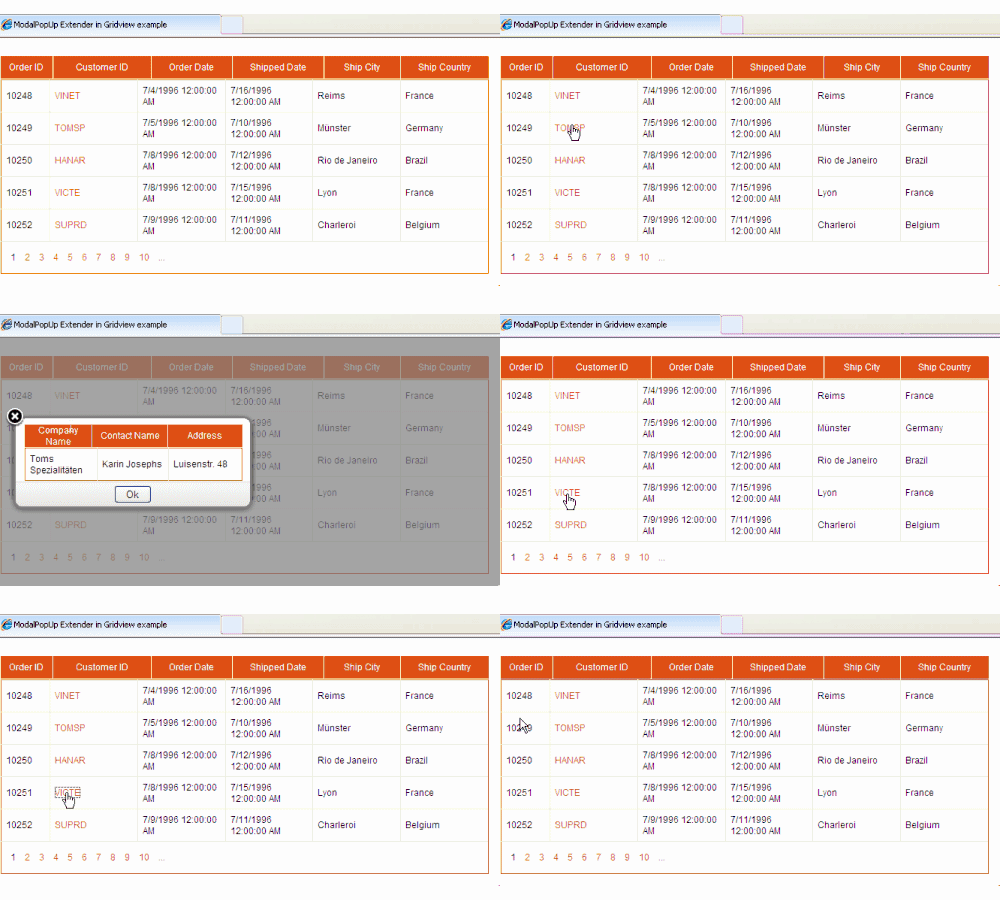
I have used "Orders" and "Customers" table of Northwind database for this example.
You can install Northwind database on sql server 2008 If you don't have.
Create new website in VS2008 and Create BIN folder by right clicking and selecting Add ASP.NET folder option in solution explorer.
Put AjaxControlToolkit.dll in this BIN folder and add reference to it.
Open Default.aspx page source and register AjaxControlToolkit in page directive.
Add following CSS style in head section of page to show modal background.
Switch to design view and drag toolkitScriptManager on the page Or add it in html source.
Drag and place an Update Panel on the page. we will put gridview and modal popup inside it in later part of this post
Now let's create SQLDataSource to populate the gridview and display orders table data.
switch to design view and drag sqldatasource control on the page and configure it according to pictures below.


Now drag and place a GridView inside content template of Update panel and specify sqldatasource as datasource.
Now add ModalPopUp extender and specify it's properties as mentioned below
Now add one panel and one gridview inside this panel to display details
Complete HTML source of page
Write following code in Click Event of link Button in gridview to populate details or child gridview
C#
VB.NET
I have used "Orders" and "Customers" table of Northwind database for this example.
You can install Northwind database on sql server 2008 If you don't have.
Create new website in VS2008 and Create BIN folder by right clicking and selecting Add ASP.NET folder option in solution explorer.
Put AjaxControlToolkit.dll in this BIN folder and add reference to it.
Open Default.aspx page source and register AjaxControlToolkit in page directive.
<%@ Register Assembly="AjaxControlToolkit"
             Namespace="AjaxControlToolkit"
             TagPrefix="AjaxToolkit" %>
Add following CSS style in head section of page to show modal background.
<style>
.modalBackground
{
background-color:Gray;filter:alpha(opacity=70);opacity:0.7;
}
</style>
Switch to design view and drag toolkitScriptManager on the page Or add it in html source.
<AjaxToolkit:ToolkitScriptManager ID="scriptManager"
                                      runat="server">
    </AjaxToolkit:ToolkitScriptManager>
Drag and place an Update Panel on the page. we will put gridview and modal popup inside it in later part of this post
<asp:UpdatePanel ID="UpdatePanel1" runat="server">
            <ContentTemplate>
            </ContentTemplate>
</asp:UpdatePanel>
Now let's create SQLDataSource to populate the gridview and display orders table data.
switch to design view and drag sqldatasource control on the page and configure it according to pictures below.


<asp:SqlDataSource ID="SqlDataSource1" runat="server"
ConnectionString="<%$ ConnectionStrings:ModalPopUpConnectionString %>"
SelectCommand="SELECT [OrderID], [CustomerID], [OrderDate],
[ShippedDate], [ShipCity], [ShipCountry] FROM [Orders]">
</asp:SqlDataSource>
Now drag and place a GridView inside content template of Update panel and specify sqldatasource as datasource.
<asp:GridView ID="GridView1" runat="server"
              AllowPaging="True" AutoGenerateColumns="False"
              DataKeyNames="OrderID"
              DataSourceID="SqlDataSource1"
              CssClass="Gridview"
              Width="650px" ShowHeader="false" PageSize="5">
<Columns>
<asp:BoundField DataField="OrderID" HeaderText="OrderID"/>
<asp:TemplateField HeaderText="CustomerID">
<ItemTemplate>
<asp:LinkButton runat="server" ID="lnkCustomer"
                Text='<%#Eval("CustomerID") %>'
                OnClick="lnkCustomer_Click">
</asp:LinkButton>
</ItemTemplate>
</asp:TemplateField>
<asp:BoundField DataField="OrderDate" HeaderText="OrderDate"/>
<asp:BoundField DataField="ShippedDate" HeaderText="ShippedDate"/>
<asp:BoundField DataField="ShipCity" HeaderText="ShipCity"/>
<asp:BoundField DataField="ShipCountry" HeaderText="ShipCountry"/>
</Columns>
</asp:GridView>
Now add ModalPopUp extender and specify it's properties as mentioned below
<AjaxToolkit:ModalPopupExtender ID="modalPopUpExtender1"
                           runat="server"
                           TargetControlID="btnModalPopUp"
                           PopupControlID="pnlPopUp"
                           BackgroundCssClass="modalBackground"
                           OkControlID="btnOk"
                           X="20"
                           Y="100">
</AjaxToolkit:ModalPopupExtender>
Now add one panel and one gridview inside this panel to display details
<asp:Panel runat="Server" ID="pnlPopUp" CssClass="confirm-dialog">
<asp:GridView ID="GridView2" runat="server"
              CssClass="Gridview" Width="290px"
              AutoGenerateColumns="false">
</asp:GridView>
</asp:UpdatePanel>
Complete HTML source of page
<form id="form1" runat="server">
    <div>

<AjaxToolkit:ToolkitScriptManager ID="scriptManager"
                                  runat="server">

</AjaxToolkit:ToolkitScriptManager>

<asp:UpdatePanel ID="UpdatePanel1" runat="server">
<ContentTemplate>
<asp:GridView ID="GridView1" runat="server" AllowPaging="True"
              AutoGenerateColumns="False" DataKeyNames="OrderID"
              DataSourceID="SqlDataSource1" CssClass="Gridview"
              Width="650px" ShowHeader="false" PageSize="5">
<Columns>
<asp:BoundField DataField="OrderID" HeaderText="OrderID"/>
<asp:TemplateField HeaderText="CustomerID">
<ItemTemplate>
<asp:LinkButton runat="server" ID="lnkCustomer"
                Text='<%#Eval("CustomerID") %>'
                OnClick="lnkCustomer_Click">
</asp:LinkButton>
</ItemTemplate>
</asp:TemplateField>
<asp:BoundField DataField="OrderDate" HeaderText="OrderDate"/>
<asp:BoundField DataField="ShippedDate" HeaderText="ShippedDate"/>
<asp:BoundField DataField="ShipCity" HeaderText="ShipCity"/>
<asp:BoundField DataField="ShipCountry" HeaderText="ShipCountry"/>
</Columns>
</asp:GridView>

<asp:Button runat="server" ID="btnModalPopUp"
            style="display:none"/>

<AjaxToolkit:ModalPopupExtender ID="modalPopUpExtender1"
             runat="server"
             TargetControlID="btnModalPopUp"
             PopupControlID="pnlPopUp"
             BackgroundCssClass="modalBackground"
             OkControlID="btnOk"
             X="20"
             Y="100">
</AjaxToolkit:ModalPopupExtender>

<asp:Panel runat="Server" ID="pnlPopUp" CssClass="confirm-dialog">
<asp:GridView ID="GridView2" runat="server">
</asp:GridView>
</asp:Panel>
</ContentTemplate>
</asp:UpdatePanel>
<br />
<asp:SqlDataSource ID="SqlDataSource1" runat="server"
ConnectionString="<%$ ConnectionStrings:ModalPopUpConnectionString %>"
SelectCommand="SELECT [OrderID], [CustomerID], [OrderDate],
[ShippedDate], [ShipCity], [ShipCountry] FROM [Orders]">
</asp:SqlDataSource>

    </div>
    </form>
Write following code in Click Event of link Button in gridview to populate details or child gridview
C#
protected void lnkCustomer_Click(object sender, EventArgs e)
    {
        //Retrieve Customer ID
        LinkButton lnkCustomerID = sender as LinkButton;
        string strCustomerID = lnkCustomerID.Text;

        //Create sql connection and fetch data from database based on CustomerID
        string strConnectionString = ConfigurationManager.ConnectionStrings["ModalPopUpConnectionString"].ConnectionString;
        string strSelect = "SELECT CompanyName, ContactName, Address FROM Customers WHERE CustomerID = @customerID";
        SqlConnection sqlCon = new SqlConnection();
        sqlCon.ConnectionString = strConnectionString;
        SqlCommand cmdCustomerDetails = new SqlCommand();
        cmdCustomerDetails.Connection = sqlCon;
        cmdCustomerDetails.CommandType = System.Data.CommandType.Text;
        cmdCustomerDetails.CommandText = strSelect;
        cmdCustomerDetails.Parameters.AddWithValue("@customerID", strCustomerID);
        sqlCon.Open();

        //Create DataReader to read the record
        SqlDataReader dReader = cmdCustomerDetails.ExecuteReader();
        GridView2.DataSource = dReader;
        GridView2.DataBind();
        sqlCon.Close();
        modalPopUpExtender1.Show();
}
VB.NET
Protected Sub lnkCustomer_Click(sender As Object, e As EventArgs)
 'Retrieve Customer ID
 Dim lnkCustomerID As LinkButton = TryCast(sender, LinkButton)
 Dim strCustomerID As String = lnkCustomerID.Text

 'Create sql connection and fetch data from database based on CustomerID
 Dim strConnectionString As String = ConfigurationManager.ConnectionStrings("ModalPopUpConnectionString").ConnectionString
 Dim strSelect As String = "SELECT CompanyName, ContactName, Address FROM Customers WHERE CustomerID = @customerID"
 Dim sqlCon As New SqlConnection()
 sqlCon.ConnectionString = strConnectionString
 Dim cmdCustomerDetails As New SqlCommand()
 cmdCustomerDetails.Connection = sqlCon
 cmdCustomerDetails.CommandType = System.Data.CommandType.Text
 cmdCustomerDetails.CommandText = strSelect
 cmdCustomerDetails.Parameters.AddWithValue("@customerID", strCustomerID)
 sqlCon.Open()

 'Create DataReader to read the record
 Dim dReader As SqlDataReader = cmdCustomerDetails.ExecuteReader()
 GridView2.DataSource = dReader
 GridView2.DataBind()
 sqlCon.Close()
 modalPopUpExtender1.Show()
End Sub
i wonder you it fails when i tried to change the gridview2 to listview2?
ReplyDelete@OMIT.Co: Have you made changes in C# Code in Code behind to populate your Listview ?
ReplyDeletei want to download complete code how to do it?
ReplyDeletehi...
ReplyDeletecan u mail ur source code to me...10q
bella882008@hotmail.com
hi....
ReplyDeletehow can i change the customer id link button to image button..
Hi,...I have tried your code....but i dont get the output...iam using VS2008.downloaded ajax toolkit.added refernce to it.......but nothng is wrkng for me....i tried so many other codes also.......but it dont wrk for me...whether i missed any thng?...ajax is not wrkng for me.......plz tell me a soulution ASAP........thanks Anu
ReplyDeletevery nice article!
ReplyDeletecould you emailme your code please?
hector.espinosa@kerry.com
thanks!
Anonymous said...
ReplyDeletecan u send complete code to me, i hope i can learn your code, thanks..
a_zaenudin1788@yahoo.co.id
Ade Ruyani
VERY nice article!
ReplyDeletecould you emailme your entire code please?
to
tempaftoronto@yahoo.ca
Thank you!
-Alex
Its a cool article.
ReplyDeleteCan i get the full course code please on
irfanhabib06@gmail.com
Thank a lot in Advance...!
This comment has been removed by a blog administrator.
ReplyDeleteNice article. However, I can not able to download the source code from the office.
ReplyDeletenice one dear
ReplyDeleteI want data source: Microsoft Access Database.
ReplyDeleteHow can I do it?
Thanks!
Hi , add accessdatasource on the page and configure select command, then in code behind use OLEDBConnection and OLEDBCommand instead of sqlconnection and sqlcommand
ReplyDeleteLet me know if u find any problems in using access database
COULD YOU EMAIL ME SOURCE CODE PLEASE!
ReplyDeletezaglulu@gmail.com
Top post
This seems to not be in modal mode as you can hit another grid record behind and the modal panel changes!
ReplyDeleteWhere is the CSS file ?
ReplyDelete