Showing posts with label Excel. Show all posts
8

Upload And Read Excel File Into DataTable DataSet Asp.Net

This example explains How To Upload And Read Excel File Data Into DataTable DataSet Using FileUpload and display in gridview using C# and VB.NET in Asp.Net.
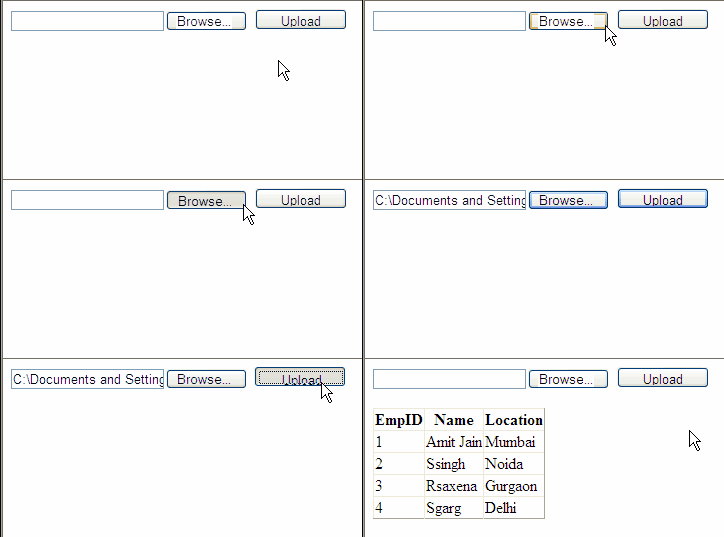
Upload and Read Excel File Data into datatable Asp.Net
First of all put a fileUpload control, and a GridView in design view of aspx page to upload and display excel file data.

Now place a button on the page, in click even of this button we will be uploading the excel file in a folder on server and read it's content.


HTML SOURCE OF PAGE
<form id="form1" runat="server">
<div>
    
<asp:FileUpload ID="FileUpload1" runat="server" />
<asp:Button ID="btnUpload" runat="server" 
            Height="21px" Text="Upload" 
            Width="92px" onclick="btnUpload_Click"/>
</div>
<asp:GridView ID="GridView1" runat="server">
</asp:GridView>
</form>

Add these namespaces in code behind of page

using System.IO;
using System.Data.OleDb;
using System.Data;

Write below mentioned code in Click Event of Upload Button

C# CODE
protected void btnUpload_Click(object sender, EventArgs e)
    {
        string connectionString ="";
        if (FileUpload1.HasFile)
        {
            string fileName = Path.GetFileName(FileUpload1.PostedFile.FileName);
            string fileExtension = Path.GetExtension(FileUpload1.PostedFile.FileName);
            string fileLocation = Server.MapPath("~/App_Data/" + fileName);
            FileUpload1.SaveAs(fileLocation);
            
            //Check whether file extension is xls or xslx

            if (fileExtension == ".xls")
            {
                connectionString = "Provider=Microsoft.Jet.OLEDB.4.0;Data Source=" + fileLocation + ";Extended Properties=\"Excel 8.0;HDR=Yes;IMEX=2\""; 
            }
            else if (fileExtension == ".xlsx")
            {
                connectionString = "Provider=Microsoft.ACE.OLEDB.12.0;Data Source=" + fileLocation + ";Extended Properties=\"Excel 12.0;HDR=Yes;IMEX=2\"";
            }

            //Create OleDB Connection and OleDb Command

            OleDbConnection con = new OleDbConnection(connectionString);
            OleDbCommand cmd = new OleDbCommand();
            cmd.CommandType = System.Data.CommandType.Text;
            cmd.Connection = con;
            OleDbDataAdapter dAdapter = new OleDbDataAdapter(cmd);
            DataTable dtExcelRecords = new DataTable();
            con.Open();
            DataTable dtExcelSheetName = con.GetOleDbSchemaTable(OleDbSchemaGuid.Tables, null);
            string getExcelSheetName = dtExcelSheetName.Rows[0]["Table_Name"].ToString();
            cmd.CommandText = "SELECT * FROM [" + getExcelSheetName +"]";
            dAdapter.SelectCommand = cmd;
            dAdapter.Fill(dtExcelRecords);
            con.Close();
            GridView1.DataSource = dtExcelRecords;
            GridView1.DataBind();
        }
    }

VB.NET CODE

Protected Sub btnUpload_Click(sender As Object, e As EventArgs)
 Dim connectionString As String = ""
 If FileUpload1.HasFile Then
  Dim fileName As String = Path.GetFileName(FileUpload1.PostedFile.FileName)
  Dim fileExtension As String = Path.GetExtension(FileUpload1.PostedFile.FileName)
  Dim fileLocation As String = Server.MapPath("~/App_Data/" & fileName)
  FileUpload1.SaveAs(fileLocation)

  'Check whether file extension is xls or xslx

  If fileExtension = ".xls" Then
   connectionString = "Provider=Microsoft.Jet.OLEDB.4.0;Data Source=" & fileLocation & ";Extended Properties=""Excel 8.0;HDR=Yes;IMEX=2"""
  ElseIf fileExtension = ".xlsx" Then
   connectionString = "Provider=Microsoft.ACE.OLEDB.12.0;Data Source=" & fileLocation & ";Extended Properties=""Excel 12.0;HDR=Yes;IMEX=2"""
  End If

  'Create OleDB Connection and OleDb Command

  Dim con As New OleDbConnection(connectionString)
  Dim cmd As New OleDbCommand()
  cmd.CommandType = System.Data.CommandType.Text
  cmd.Connection = con
  Dim dAdapter As New OleDbDataAdapter(cmd)
  Dim dtExcelRecords As New DataTable()
  con.Open()
  Dim dtExcelSheetName As DataTable = con.GetOleDbSchemaTable(OleDbSchemaGuid.Tables, Nothing)
  Dim getExcelSheetName As String = dtExcelSheetName.Rows(0)("Table_Name").ToString()
  cmd.CommandText = "SELECT * FROM [" & getExcelSheetName & "]"
  dAdapter.SelectCommand = cmd
  dAdapter.Fill(dtExcelRecords)
  con.Close()
  GridView1.DataSource = dtExcelRecords
  GridView1.DataBind()
 End If
End Sub

Build and run the application.


In this code if the excel sheet contains text characters or special characters in numeric field like EmpID, then it's not read by C# or VB.NET and display blank in gridview as shown in Image.

ReadExcel Error
The reason for this is excel doesn't handle mixed data format very well, entry like 1A or 1-A etc doesn't get read by this code.

To fix this error we need to make some changes in connection string of excel, and need to add some extended properties, change the connection string as shown below.


connectionString = "Provider=Microsoft.Jet.OLEDB.4.0;Data Source=" + fileLocation + @";Extended Properties=" + Convert.ToChar(34).ToString() + @"Excel 8.0;Imex=1;HDR=Yes;" + Convert.ToChar(34).ToString();

Now it will read the excel sheet without any errors.


Download Sample Code


0

Export Selected GridView Rows To Excel

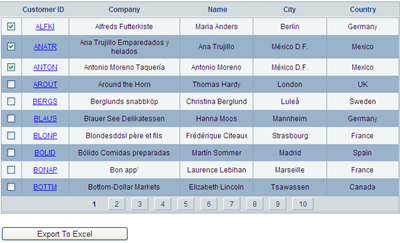
This example explains how to Export Selected GridView Rows To Ms Excel Using CheckBox In Asp.Net 2.0,3.5,4.0 C# And VB.NET.
Place a gridview on aspx page, add checkbox control in it using TemplateField and ItemTemplate to select rows and populate gridview from database, add one button for exporting gridview rows to excel.

Export Selected GridView Rows to excel
I have used Northwind Database and customers table to populate gridview.
you can follow link to know how to install it on sql server 2008.

in one of my previous posts Export Gridview To Excel, i described how to export gridview containing controls like linkbutton, checkbox,dropdown etc to excel. I'll be using this code further to export selected rows.

Set DataKeyNames property of gridview to CustomerID.

HTML MARKUP
<asp:GridView ID="GridView1" runat="server" AllowPaging="True" 
              DataSourceID="sqlDataSourceGridView" 
              DataKeyNames="CustomerID" 
              AutoGenerateColumns="False"
              onpageindexchanging="GridView1_PageIndexChanging" 
              onrowdatabound="GridView1_RowDataBound" >
<Columns>
<asp:TemplateField>
     <ItemTemplate>
          <asp:CheckBox ID="chkSelect" runat="server" />
     </ItemTemplate>
</asp:TemplateField>
<asp:TemplateField HeaderText="Customer ID">
     <ItemTemplate>
          <asp:LinkButton ID="lButton" runat="server" 
                          Text='<%#Eval("CustomerID") %>' 
                          PostBackUrl="~/Default.aspx" >
          </asp:LinkButton>
     </ItemTemplate>
</asp:TemplateField>
<asp:BoundField DataField="CompanyName" HeaderText="Company">
</asp:BoundField>
<asp:BoundField DataField="ContactName" HeaderText="Name">
</asp:BoundField>
<asp:BoundField DataField="City" HeaderText="city">
</asp:BoundField>
<asp:BoundField DataField="Country" HeaderText="Country" 
&lt;/asp:BoundField>
</Columns>
</asp:GridView>
       
<asp:SqlDataSource ID="sqlDataSourceGridView" runat="server" 
ConnectionString="<%$ ConnectionStrings:northWindConnectionString %>" 
SelectCommand="SELECT [CustomerID], [CompanyName], [ContactName], 
               [City], [Country] FROM [Customers]">
</asp:SqlDataSource>

<asp:Button ID="btnExportToExcel" runat="server" 
            Text="Export To Excel" 
            onclick="btnExportToExcel_Click"/>


We need to write a method to find checked rows and maintane their state across postbacks or across gridview paging.

This method stores to customerID of selected row in viewstate using arraylist.

C#
private void FindCheckedRows()
    {
        ArrayList checkedRowsList;
        if (ViewState["checkedRowsList"] != null)
        {
            checkedRowsList = (ArrayList)ViewState["checkedRowsList"];
        }
        else
        {
            checkedRowsList = new ArrayList();
        }

        foreach (GridViewRow gvRow in GridView1.Rows)
        {
            if (gvRow.RowType == DataControlRowType.DataRow)
            {
                string rowIndex = 

Convert.ToString(GridView1.DataKeys[gvRow.RowIndex]["CustomerID"]);
                //int rowIndex = Convert.ToInt32(gvRow.RowIndex) + 

Convert.ToInt32(GridView1.PageIndex);
                CheckBox chkSelect = 

(CheckBox)gvRow.FindControl("chkSelect");
                if ((chkSelect.Checked) && 

(!checkedRowsList.Contains(rowIndex)))
                {
                    checkedRowsList.Add(rowIndex);
                }
                else if ((!chkSelect.Checked) && 

(checkedRowsList.Contains(rowIndex)))
                {
                    checkedRowsList.Remove(rowIndex);
                }
            }

        }
        ViewState["checkedRowsList"] = checkedRowsList;
    }

VB.NET
Private Sub FindCheckedRows()
 Dim checkedRowsList As ArrayList
 If ViewState("checkedRowsList") IsNot Nothing Then
  checkedRowsList = 

DirectCast(ViewState("checkedRowsList"), ArrayList)
 Else
  checkedRowsList = New ArrayList()
 End If

 For Each gvRow As GridViewRow In GridView1.Rows
  If gvRow.RowType = DataControlRowType.DataRow Then
   Dim rowIndex As String = 

Convert.ToString(GridView1.DataKeys(gvRow.RowIndex)("CustomerID"))
   'int rowIndex = Convert.ToInt32(gvRow.RowIndex) 

+ Convert.ToInt32(GridView1.PageIndex);
   Dim chkSelect As CheckBox = 

DirectCast(gvRow.FindControl("chkSelect"), CheckBox)
   If (chkSelect.Checked) AndAlso (Not 

checkedRowsList.Contains(rowIndex)) Then
    checkedRowsList.Add(rowIndex)
   ElseIf (Not chkSelect.Checked) AndAlso 

(checkedRowsList.Contains(rowIndex)) Then
    checkedRowsList.Remove(rowIndex)
   End If

  End If
 Next
 ViewState("checkedRowsList") = checkedRowsList
End Sub


Call this method whenever gridview pageindex changes.

protected void GridView1_PageIndexChanging(object sender, 

GridViewPageEventArgs e)
    {
        FindCheckedRows();
    }


Find the checkbox state and implement it whenever gridview is refreshed while paging.

To implement this write code in RowDataBound event of gridview.

C#
protected void GridView1_RowDataBound(object sender, 

GridViewRowEventArgs e)
    {
        if (ViewState["checkedRowsList"] != null)
        {
            ArrayList checkedRowsList = 

(ArrayList)ViewState["checkedRowsList"];
            GridViewRow gvRow = e.Row;
            if (gvRow.RowType == DataControlRowType.DataRow)
            {
                CheckBox chkSelect = 

(CheckBox)gvRow.FindControl("chkSelect");
                string rowIndex = 

Convert.ToString(GridView1.DataKeys[gvRow.RowIndex]["CustomerID"]);
                //int rowIndex = Convert.ToInt32(gvRow.RowIndex) + 

Convert.ToInt32(GridView1.PageIndex);
                if(checkedRowsList.Contains(rowIndex))
                {
                    chkSelect.Checked = true;
                }


            }
        }

        
    }

VB.NET
Protected Sub GridView1_RowDataBound(sender As Object, e As 

GridViewRowEventArgs)
 If ViewState("checkedRowsList") IsNot Nothing Then
  Dim checkedRowsList As ArrayList = 

DirectCast(ViewState("checkedRowsList"), ArrayList)
  Dim gvRow As GridViewRow = e.Row
  If gvRow.RowType = DataControlRowType.DataRow Then
   Dim chkSelect As CheckBox = 

DirectCast(gvRow.FindControl("chkSelect"), CheckBox)
   Dim rowIndex As String = 

Convert.ToString(GridView1.DataKeys(gvRow.RowIndex)("CustomerID"))
   'int rowIndex = Convert.ToInt32(gvRow.RowIndex) 

+ Convert.ToInt32(GridView1.PageIndex);
   If checkedRowsList.Contains(rowIndex) Then
    chkSelect.Checked = True


   End If
  End If
 End If


End Sub


To export these selected rows to excel write following code in Click event of export button.

C#
protected void btnExportToExcel_Click(object sender, EventArgs e)
    {
        FindCheckedRows();
        GridView1.ShowHeader = true;
        GridView1.GridLines = GridLines.Both;
        GridView1.AllowPaging = false;
        GridView1.DataBind();
        GridView1.HeaderRow.Cells.RemoveAt(0);
        if (ViewState["checkedRowsList"] != null)
        {
            ArrayList checkedRowsList = 

(ArrayList)ViewState["checkedRowsList"];
            foreach (GridViewRow gvRow in GridView1.Rows)
            {
                gvRow.Visible = false;
                if (gvRow.RowType == DataControlRowType.DataRow)
                {
                    string rowIndex = 

Convert.ToString(GridView1.DataKeys[gvRow.RowIndex]["CustomerID"]);
                    if(checkedRowsList.Contains(rowIndex))
                    {
                        gvRow.Visible = true;
                        gvRow.Cells[0].Visible = false;
                        
                    }
                }
            }
        }

        ChangeControlsToValue(GridView1);
        Response.ClearContent();

        Response.AddHeader("content-disposition", "attachment; 

filename=GridViewToExcel.xls");

        Response.ContentType = "application/excel";

        StringWriter sWriter = new StringWriter();

        HtmlTextWriter hTextWriter = new HtmlTextWriter(sWriter);

        HtmlForm hForm = new HtmlForm();

        GridView1.Parent.Controls.Add(hForm);

        hForm.Attributes["runat"] = "server";

        hForm.Controls.Add(GridView1);

        hForm.RenderControl(hTextWriter);

        Response.Write(sWriter.ToString());

        Response.End();
    }

VB.NET
Protected Sub btnExportToExcel_Click(sender As Object, e As EventArgs)
 FindCheckedRows()
 GridView1.ShowHeader = True
 GridView1.GridLines = GridLines.Both
 GridView1.AllowPaging = False
 GridView1.DataBind()
 GridView1.HeaderRow.Cells.RemoveAt(0)
 If ViewState("checkedRowsList") IsNot Nothing Then
  Dim checkedRowsList As ArrayList = 

DirectCast(ViewState("checkedRowsList"), ArrayList)
  For Each gvRow As GridViewRow In GridView1.Rows
   gvRow.Visible = False
   If gvRow.RowType = DataControlRowType.DataRow 

Then
    Dim rowIndex As String = 

Convert.ToString(GridView1.DataKeys(gvRow.RowIndex)("CustomerID"))
    If checkedRowsList.Contains(rowIndex) 

Then
     gvRow.Visible = True

     gvRow.Cells(0).Visible = False
    End If
   End If
  Next
 End If

 ChangeControlsToValue(GridView1)
 Response.ClearContent()

 Response.AddHeader("content-disposition", "attachment; 

filename=GridViewToExcel.xls")

 Response.ContentType = "application/excel"

 Dim sWriter As New StringWriter()

 Dim hTextWriter As New HtmlTextWriter(sWriter)

 Dim hForm As New HtmlForm()

 GridView1.Parent.Controls.Add(hForm)

 hForm.Attributes("runat") = "server"

 hForm.Controls.Add(GridView1)

 hForm.RenderControl(hTextWriter)

 Response.Write(sWriter.ToString())

 Response.[End]()
End Sub


This is how exported rows will look like in excel.


Download Sample Code


17

Export GridView To Excel ASP.NET

In this example i'm explaining how to Create Or Export GridView to Excel In Asp.Net 2.0,3.5 using C# and VB.NET. Place one button on the page for exporting data to ms excel file.

Export Gridview To Excel Asp.Net
I have used Northwind database to populate GridView.

I have also explained how we can Create PDF From Gridview in one of my previous articles.


Write following code in Click Event of button
Response.ClearContent();

        Response.AddHeader("content-disposition", "attachment; filename=GridViewToExcel.xls");

        Response.ContentType = "application/excel";

        StringWriter sWriter = new StringWriter();

        HtmlTextWriter hTextWriter = new HtmlTextWriter(sWriter);

        GridView1.RenderControl(hTextWriter);

        Response.Write(sWriter.ToString());

        Response.End();


httpexception error
But when we try to execute this code on we get this httpexception error.

to get past this error we can write this method in code behind.


public override void VerifyRenderingInServerForm(Control control)
{
}

or we can add a html form and render it after adding gridview in it, i'll be using this.

RegisterForEventValidation error
If paging is enabled or Gridview contains controls like linkbutton, DropDownLists or checkboxes etc then we get this error.

we can fix this error by setting event validation property to false in page directive.


<%@ Page Language="C#" AutoEventWireup="true"  EnableEventValidation="false" CodeFile="Default.aspx.cs" Inherits="_Default" %>


Hyperlinks or other controls in gridview are not desireable in excel sheet, we should display their display text instead, for this write a method to remove controls and display their respective text property as mentioned below.

private void ChangeControlsToValue(Control gridView)
    {
        Literal literal = new Literal();
        
        for (int i = 0; i < gridView.Controls.Count; i++)
        {
            if (gridView.Controls[i].GetType() == typeof(LinkButton))
            {

                literal.Text = (gridView.Controls[i] as LinkButton).Text;
                gridView.Controls.Remove(gridView.Controls[i]);
                gridView.Controls.AddAt(i,literal);
            }
            else if (gridView.Controls[i].GetType() == typeof(DropDownList))
            {
                literal.Text = (gridView.Controls[i] as DropDownList).SelectedItem.Text;

                gridView.Controls.Remove(gridView.Controls[i]);

                gridView.Controls.AddAt(i,literal);

            }
            else if (gridView.Controls[i].GetType() == typeof(CheckBox))
            {
                literal.Text = (gridView.Controls[i] as CheckBox).Checked ? "True" : "False";
                gridView.Controls.Remove(gridView.Controls[i]);
                gridView.Controls.AddAt(i,literal);
            }
            if (gridView.Controls[i].HasControls())
            {

                ChangeControlsToValue(gridView.Controls[i]);

            }

        }

    }


HTML SOURCE
<asp:GridView ID="GridView1" runat="server" AllowPaging="True" 
              DataSourceID="sqlDataSourceGridView" 
              AutoGenerateColumns="False"
              CssClass="GridViewStyle" 
              GridLines="None" Width="650px" 
              ShowHeader="False">
<Columns>
<asp:TemplateField HeaderText="Customer ID" ItemStyle-Width="75px">
<ItemTemplate>
<asp:LinkButton ID="lButton" runat="server" Text='<%#Eval("CustomerID") %>' 
                PostBackUrl="~/Default.aspx">
</asp:LinkButton>
</ItemTemplate>
<ItemStyle Width="75px"></ItemStyle>
</asp:TemplateField>
<asp:BoundField DataField="CompanyName" HeaderText="Company" 
                ItemStyle-Width="200px" >
<ItemStyle Width="200px"></ItemStyle>
</asp:BoundField>
<asp:BoundField DataField="ContactName" HeaderText="Name" 
                ItemStyle-Width="125px">
<ItemStyle Width="125px"></ItemStyle>
</asp:BoundField>
<asp:BoundField DataField="City" HeaderText="city" ItemStyle-Width="125px" >
<ItemStyle Width="125px"></ItemStyle>
</asp:BoundField>
<asp:BoundField DataField="Country" HeaderText="Country" 
                ItemStyle-Width="125px" >
<ItemStyle Width="125px"></ItemStyle>
</asp:BoundField>
</Columns>
<RowStyle CssClass="RowStyle" />
<PagerStyle CssClass="PagerStyle" />
<SelectedRowStyle CssClass="SelectedRowStyle" />
<HeaderStyle CssClass="HeaderStyle" />
<AlternatingRowStyle CssClass="AltRowStyle" />
</asp:GridView>

<asp:SqlDataSource ID="sqlDataSourceGridView" runat="server" 
ConnectionString="<%$ ConnectionStrings:northWindConnectionString %>" 
SelectCommand="SELECT [CustomerID], [CompanyName], [ContactName], 
               [City], [Country] FROM [Customers]">
</asp:SqlDataSource>

<table align="left" class="style1">
<tr>
<td class="style2">
<asp:RadioButtonList ID="RadioButtonList1" runat="server" AutoPostBack="True" 
                     RepeatDirection="Horizontal" RepeatLayout="Flow">
<asp:ListItem Value="0">All Pages</asp:ListItem>
</asp:RadioButtonList>
</td>
<td>
<asp:Button ID="btnExportToExcel" runat="server" Text="Export To Excel" 
            Width="215px" onclick="btnExportToExcel_Click"/>
</td>
</tr>
</table>

C# CODE
protected void btnExportToExcel_Click(object sender, EventArgs e)
    {
        if (RadioButtonList1.SelectedIndex == 0)
        {
            GridView1.ShowHeader = true;
            GridView1.GridLines = GridLines.Both;
            GridView1.AllowPaging = false;
            GridView1.DataBind();
        }
        else
        {
            GridView1.ShowHeader = true;
            GridView1.GridLines = GridLines.Both;
            GridView1.PagerSettings.Visible = false;
            GridView1.DataBind();
        }

        ChangeControlsToValue(GridView1);
        Response.ClearContent();

        Response.AddHeader("content-disposition", "attachment; filename=GridViewToExcel.xls");

        Response.ContentType = "application/excel";

        StringWriter sWriter = new StringWriter();

        HtmlTextWriter hTextWriter = new HtmlTextWriter(sWriter);

        HtmlForm hForm = new HtmlForm();

        GridView1.Parent.Controls.Add(hForm);

        hForm.Attributes["runat"] = "server";

        hForm.Controls.Add(GridView1);

        hForm.RenderControl(hTextWriter);

        // Write below code to add cell border to empty cells in Excel file
        // If we don't add this line then empty cells will be shown as blank white space

         StringBuilder sBuilder = new StringBuilder();
        sBuilder.Append("<html xmlns:v="urn:schemas-microsoft-com:vml" xmlns:o="urn:schemas-microsoft-com:office:office" xmlns:x="urn:schemas-microsoft-com:office:excel" xmlns="http://www.w3.org/TR/REC-html40"> <head><meta http-equiv="Content-Type" content="text/html;charset=windows-1252"><!--[if gte mso 9]><xml><x:ExcelWorkbook><x:ExcelWorksheets><x:ExcelWorksheet><x:Name>ExportToExcel</x:Name><x:WorksheetOptions><x:Panes></x:Panes></x:WorksheetOptions></x:ExcelWorksheet></x:ExcelWorksheets></x:ExcelWorkbook></xml><![endif]--></head> <body>");
        sBuilder.Append(sWriter + "</body></html>");
        Response.Write(sBuilder.ToString());
        Response.End();
    }

    private void ChangeControlsToValue(Control gridView)
    {
        Literal literal = new Literal();
        
        for (int i = 0; i < gridView.Controls.Count; i++)
        {
            if (gridView.Controls[i].GetType() == typeof(LinkButton))
            {

                literal.Text = (gridView.Controls[i] as LinkButton).Text;
                gridView.Controls.Remove(gridView.Controls[i]);
                gridView.Controls.AddAt(i,literal);
            }
            else if (gridView.Controls[i].GetType() == typeof(DropDownList))
            {
                literal.Text = (gridView.Controls[i] as DropDownList).SelectedItem.Text;

                gridView.Controls.Remove(gridView.Controls[i]);

                gridView.Controls.AddAt(i,literal);

            }
            else if (gridView.Controls[i].GetType() == typeof(CheckBox))
            {
                literal.Text = (gridView.Controls[i] as CheckBox).Checked ? "True" : "False";
                gridView.Controls.Remove(gridView.Controls[i]);
                gridView.Controls.AddAt(i,literal);
            }
            if (gridView.Controls[i].HasControls())
            {

                ChangeControlsToValue(gridView.Controls[i]);

            }

        }

    }

VB.NET
Protected Sub btnExportToExcel_Click(sender As Object, e As EventArgs)
 If RadioButtonList1.SelectedIndex = 0 Then
  GridView1.ShowHeader = True
  GridView1.GridLines = GridLines.Both
  GridView1.AllowPaging = False
  GridView1.DataBind()
 Else
  GridView1.ShowHeader = True
  GridView1.GridLines = GridLines.Both
  GridView1.PagerSettings.Visible = False
  GridView1.DataBind()
 End If

 ChangeControlsToValue(GridView1)
 Response.ClearContent()

 Response.AddHeader("content-disposition", "attachment; filename=GridViewToExcel.xls")

 Response.ContentType = "application/excel"

 Dim sWriter As New StringWriter()

 Dim hTextWriter As New HtmlTextWriter(sWriter)

 Dim hForm As New HtmlForm()

 GridView1.Parent.Controls.Add(hForm)

 hForm.Attributes("runat") = "server"

 hForm.Controls.Add(GridView1)

 hForm.RenderControl(hTextWriter)

 Dim sBuilder As New StringBuilder()
sBuilder.Append("<html xmlns:v="urn:schemas-microsoft-com:vml" xmlns:o="urn:schemas-microsoft-com:office:office" xmlns:x="urn:schemas-microsoft-com:office:excel" xmlns="http://www.w3.org/TR/REC-html40"> <head><meta http-equiv="Content-Type" content="text/html;charset=windows-1252"><!--[if gte mso 9]><xml><x:ExcelWorkbook><x:ExcelWorksheets><x:ExcelWorksheet><x:Name>ExportToExcel</x:Name><x:WorksheetOptions><x:Panes></x:Panes></x:WorksheetOptions></x:ExcelWorksheet></x:ExcelWorksheets></x:ExcelWorkbook></xml><![endif]--></head> <body>")
sBuilder.Append(sWriter & "</body></html>")
Response.Write(sBuilder.ToString())

 Response.[End]()
End Sub

Private Sub ChangeControlsToValue(gridView As Control)
 Dim literal As New Literal()

 For i As Integer = 0 To gridView.Controls.Count - 1
  If gridView.Controls(i).[GetType]() = GetType(LinkButton) Then

   literal.Text = TryCast(gridView.Controls(i), LinkButton).Text
   gridView.Controls.Remove(gridView.Controls(i))
   gridView.Controls.AddAt(i, literal)
  ElseIf gridView.Controls(i).[GetType]() = GetType(DropDownList) Then
   literal.Text = TryCast(gridView.Controls(i), DropDownList).SelectedItem.Text

   gridView.Controls.Remove(gridView.Controls(i))


   gridView.Controls.AddAt(i, literal)
  ElseIf gridView.Controls(i).[GetType]() = GetType(CheckBox) Then
   literal.Text = If(TryCast(gridView.Controls(i), CheckBox).Checked, "True", "False")
   gridView.Controls.Remove(gridView.Controls(i))
   gridView.Controls.AddAt(i, literal)
  End If
  If gridView.Controls(i).HasControls() Then


   ChangeControlsToValue(gridView.Controls(i))

  End If
 Next

End Sub

This is how exported excel sheet will look like. Hope this helps.

Download Sample Code


45

Save Insert Export Import Excel Data Into Sql Server SqlBulkCopy ASP.NET

This post explains How To Save Insert Or Export Import Excel Data In to Sql Server Database Table Using SqlBulkCopy In ASP.NET

First of all create a Excel workbook as shown in image below and insert some data into it.

Export Import Insert Excel Data Into Sql Server Using SqlBulkCopy

Create a table in SQL database with following schema


Now write this code to insert data into SQL table

public partial class _Default : System.Web.UI.Page
{
string strConnection = ConfigurationManager.ConnectionStrings
["ConnectionString"].ConnectionString;
protected void Page_Load(object sender, EventArgs e)
{

}
protected void Button1_Click(object sender, EventArgs e)
{
//Create connection string to Excel work book
string excelConnectionString =
@"Provider=Microsoft.Jet.OLEDB.4.0;
Data Source=C:\Details.xls;
Extended Properties=""Excel 8.0;HDR=YES;""";

//Create Connection to Excel work book
OleDbConnection excelConnection =
new OleDbConnection(excelConnectionString);

//Create OleDbCommand to fetch data from Excel
OleDbCommand cmd = new OleDbCommand
("Select [ID],[Name],[Location] from [Detail$]",
excelConnection);

excelConnection.Open();
OleDbDataReader dReader;
dReader = cmd.ExecuteReader();

SqlBulkCopy sqlBulk = new SqlBulkCopy(strConnection);
sqlBulk.DestinationTableName = "Details";
//sqlBulk.ColumnMappings.Add("ID", "ID");
//sqlBulk.ColumnMappings.Add("Name", "Name");
sqlBulk.WriteToServer(dReader);
}
}


If there are more columns in your database table or excel workbook and you want to insert data in some of them than you need to add ColumnMappings like this
sqlBulk.ColumnMappings.Add("ID", "ID");
sqlBulk.ColumnMappings.Add("Name", "Name");


End result will be like this


Hope this helps

Download the sample code attached


Other Posts:
1. Detecting Session Timeout and Redirect to Login Page in ASP.NET
2. JavaScript window.close() not working / does not work in firefox
3. Merging GridView Headers to have multiple Headers in GridView
4. Detect Browser refresh to avoid events getting fired again in ASP .NET
5. Search records in GridView and highlight result with AJAX

Other SQL Server articles:
The backup set holds a backup of a database other than the existing database-Sql Server Error 3154
Install configure and troubleshooting sql server reporting services 2005
Ms sql server bulk insert method to import bulk csv data into database

Find More Articles