Showing posts with label Sql Server. Show all posts
0

Move Copy Table From One DataBase To Another In SQL Server

Several Times We need to know How To Move Or Copy SqlServer Database Table Schema And Data From One DataBase to Another In Sql Server We can do it in following ways.

Method 1.
Open Sql Server management studio

Right Click on Database name > Tasks > Export Data.

Provide login credentials and Select Database

In next screen select database where table is to be copied

Copy data from one or more tables or views

check tables you want to copy

finish the wizard


Method 2.
We can write this query to copy tables.

SELECT * INTO DestinationDB.dbo.tableName FROM SourceDB.dbo.SourceTable

SELECT * INTO testDB.dbo.test FROM pubs.dbo.authors
This command only copies table schema and data

If you want to copy all objects,indexes,triggers,constraints etc then do it as mentioned below.
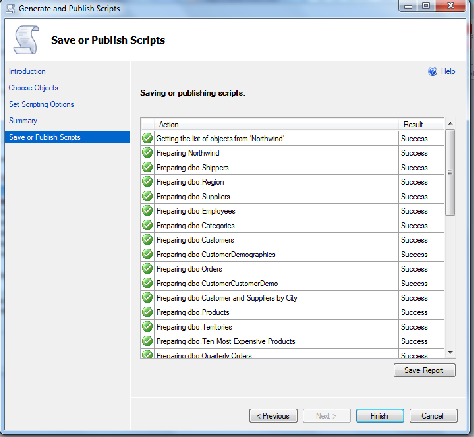
Right click on DB name > Tasks > Generate Scripts

Copy Table And Data From One DataBase to Another


Click on Advance button and select Schema And Data From Type of Data to Script section


Hope this helps.

3

Reset Identity Column Value In Sql Server Table

How To Reset Identity Column In Sql Server Table To Start Auto Increment Or Seed From Desired Number

If we delete All data from Sql Server table having Identity Column with Identity Seed as 1 and insert new data Identity column value doesn't get reset and it starts from last number.

If table were having 10 records and we insert new records after deleting all records in table, identity column would start from 11 if identity seed is 1.

we can use below mentioned command to reset Identity Column.


DBCC CHECKIDENT('YouTableName', RESEED, 0)


0

Install Sql Server 2008 Management Studio Express On Windows 7

How To Install Sql Server 2008 Management Studio Express On Windows 7
Install sqlserver 2008 management studio express on windows 7
In this post i'm explaining how to install microsoft Sql Server 2008 Management Studio Express on windows 7.


Case 1. If you have not installed Visual studio 2008
Step 1.  Install .Net FrameWork 3.5 SP1 On Windows 7
Step 2. Download Microsoft SQL Server 2008 Management Studio Express
Step 3. Proceed to installation as mentioned later in this post.


If you get error shown below during installation, then you might have visual studio 2008 or some of it's component installed on your system which you can check by opening control panel > programs.


Case 2. If you have Visual studio 2008 installed
If you have Visual Studio 2008 or some of it's component installed as shown in above image follow steps mentioned below.

Continue to step 1 and 2 mentioned above
Step 3.  Download Visual Studio 2008 Service Pack 1 either as online installer or as ISO image
Step 4. Install Visual Studio 2008 SP1


Step 5.  Proceed to installation of Microsoft SQL Server 2008 Management Studio Express as shown in images below.


Hope this helps

2

Remove Delete Duplicate Records Or Rows-Sql Server

This post explains how to Remove Delete Duplicate Records Or Rows From Ms Sql Server Database Table.

Different methods of deleting duplicate records.

Delete Duplicate Records In Sql Server
I am using Employees table with FirstName and Department columns.


Remove Duplicate Rows In Sql
First Method.

Delete duplicate records/rows by creating identity column.


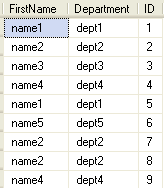
duplicate records in table looks like shown in first image.

First of all we need to create a identity column in our table by using code mentioned below.

And table will look like image on the left.


ALTER TABLE dbo.Employees ADD ID INT IDENTITY(1,1) 

Now write this query to delete duplicate rows.

DELETE FROM dbo.Employees
WHERE ID NOT IN (SELECT MIN(ID)
FROM dbo.Employees GROUP BY FirstName,Department) 

This should remove all duplicate records from table.


Second Method.

Delete duplicate records using Row_Number()


If you do not want to make any changes in table design or don't want to create identity column on table then you can remove duplicate records using Row_Number in sql server 2005 onwards.

for this write below mentioned code and execute.

WITH DuplicateRecords AS
(
SELECT *,row_number() OVER(PARTITION BY FirstName,Department ORDER BY 

FirstName) 
AS RowNumber FROM dbo.Employees
)
DELETE FROM DuplicateRecords WHERE RowNumber>1

This should remove all duplicate records from table.


Third Method.

Remove duplicate rows/Records using temporary table


Use below mentioned code to delete duplicates by moving them to temporary table using DISTINCT.

SELECT DISTINCT * INTO TempTable FROM dbo.Employees
GROUP BY FirstName,Department
HAVING COUNT(FirstName) > 1

DELETE dbo.Employees WHERE FirstName
IN (SELECT FirstName FROM TempTable)

INSERT dbo.Employees SELECT * FROM TempTable
DROP TABLE TempTable


Remove delete Duplicate Rows In Sql
And result will be as shown.

Have fun.


0

Sql Query Optimization

Sql Query Optimization in MS SQL Server To Improve Performance of ASP.NET web applications.

Data retrieval FROM database in asp.net applications is a most common task and writing optimized queries can have a huge impact on perfirmance of application if database is huge or containing thousands of records in table.

Here i am mentioning few tips to remember while writing sql queries for optimal performance.

1. Use columns name instead of * in SELECT statements.

Use:

SELECT column1,column2,column3 FROM TableName

Insted of 

SELECT * FROM TableName

by doing so we reduce 1 extra step of converting * into column names by sql server when query is processed.


2. Always create primary key in table.

Making primary key in table ensures that table has a clustered index created.
By doing this SELECT statements using the primary key will make data retrieval very fast because of clustered index on it.


3. Create non-clustered indexes on columns

Columns frequently used in search criteria,joins,foreign keys or used in ORDER BY clause should have index on.

the following query perform better if it has index on column department.

SELECT firstname,lastname FROM Employee 
WHERE department ='HR'


4. Avoid using function calls in queries.

function calls prevent sql server to use indexes.

SELECT OrderId,Amount FROM Orders 
WHERE OrderDate > GetDate()

In this query despite of having index on OrderDate, a full table scan will be performed to search each and every record of table because of function call, hence no advantage of indexes and a huge loss in performance.

better solution for this query would be to avoid calling get date in query like this

Declare @DTime DateTime Set @DTime = GetDate()
SELECT OrderId,Amount FROM Orders 
WHERE OrderDate > @DTime


5. avoid using COUNT() in a query to check existance of record.


COUNT() counts all matching values by doing a table scan.
In case of EXISTS,When it finds the first matching value, it returns TRUE and stops.

SELECT column1 FROM TableName WHERE 0 < (SELECT count(*) FROM TableName2 WHERE condition)
better solution would be:
SELECT column1 FROM TableName WHERE EXISTS (SELECT * FROM TableName2 WHERE condition)


6. Always try to use joins on indexed fields.

7. Avoid triggers as much as possible.

8. Use table variables insted of temporary tables.

Table variables reside in memory while temporary tables reside in the TempDb database So temporary tables require interaction with tempdb database.

9. Use UNION ALL instead of Using UNION.

UNION ALL is faster than UNION as it does not sort the result set for distinguished value.

10. Avoid using Cursors if we need records one by one, use while loop insted.

11. Avoid HAVING clause as it is just like filter after after all rows are SELECTed.

12. Use WHERE clause to narrow the search criteria and to reduce number of records returned in SELECT statment.

13. Use TOP keyword if we want TOP N records in SELECT statement.

and last but not the least

14. Use stored procedure instead of text queries.

In stored procedures

1. Always use object name with schema this helps in directly finding the compiled plan insted of searching other objects

Use:
SELECT * FROM dbo.TableName

insted of 

SELECT * FROM TableName


2. Use SET NOCOUNT ON

sql server returns number of rows effected in any SELECT or DML statement and we can reduce this step by setting NOCOUNT ON like this

CREATE PROC dbo.MyProc
AS
SET NOCOUNT ON;


2

Select Find Nth Highest Salary Record In Sql Server

Select Find Get Second Third Nth Highest Salary Record Row In Ms Sql Server. This is most frequentky asked question how to select or get nth highest record or second third row/record from any column of sql table.

Select Find Nth Highest Record In Ms Sql Server
for example select get or fetch 2nd (second highest) or nth highest salary of employee or 10th highest record from the table.

There are various ways to achieve this result, i've mentioned few here.

I have created Employee table with following schema.


1st method

To select 2nd highest salary or record we can use following query.

SELECT TOP 1 [Salary]
FROM 
(
SELECT  DISTINCT TOP 2 [Salary]
FROM [dbo].[Employee]
ORDER BY [Salary] DESC
) temp
ORDER BY [Salary] 


2nd method

To select 3rd highest salary or record we can use following query.
SELECT TOP 1 [Salary]
FROM ( SELECT  TOP 3 [Salary]
  FROM [dbo].[Employee] e1 GROUP BY e1.Salary
  ORDER BY [e1].[Salary] DESC) e2
  ORDER BY [Salary]


These queries holds good untill we are selecting only salary column and fails when we want to select all the columns or few more columns with salary as salary can be same for more then one employees or records.

For example if we change the first query to select 2nd highest salary with all the columns of table, output would be undesirable as shown below.
SELECT TOP 1 [Salary],[EmployeeName]
FROM 
(
SELECT  DISTINCT TOP 2 [Salary], [EmployeeName]
FROM [dbo].[Employee]
ORDER BY [Salary] DESC
) temp
ORDER BY [Salary]


To select all columns we can use queries mentioned below.

This query will give 4th highest salary record but will show only 1 highest record if even if there are multiple duplicate salary records.

SELECT TOP 1 * FROM [dbo].[Employee]
WHERE [Salary] NOT IN  
( 
  SELECT DISTINCT TOP 3 [Salary] FROM [dbo].[Employee]
  ORDER BY [Salary] DESC
)
ORDER BY [Salary] DESC


These 2 queries will select 4th highest salary with duplicate records.
SELECT * FROM [dbo].[Employee]
WHERE [Salary] = 
( 
  SELECT MAX([Salary]) FROM [dbo].[Employee] 
  WHERE [Salary] NOT IN
    ( 
      SELECT DISTINCT TOP (4-1) [Salary] FROM [dbo].[Employee] e1
      ORDER BY [Salary] DESC 
    )
)

SELECT *
FROM Employee E1
WHERE (4-1) = (
SELECT COUNT(DISTINCT(E2.Salary))
FROM Employee E2
WHERE E2.Salary > E1.Salary)


We can also use sql ranking function to get desired result as follows.

SELECT * FROM 
(
  SELECT DENSE_RANK() OVER(ORDER BY [Salary] DESC)AS RowId, * 
  FROM [dbo].[Employee] 
) AS e1
  WHERE e1.RowId = 4  


5

Install NorthWind Pubs Database On Sql Server 2008

To Install Northwind Or Pubs Sample Database On Sql Server 2008 follow steps mentioned below

1. Download and install SQL2000SampleDb.msi from Microsoft Download center

It will be installed in "C:\SQL Server 2000 Sample Databases" folder.

Move Northwind and Pubs database files (MDF and LDF files) to your default database file location (C:\Program Files\Microsoft SQL Server\MSSQL.1\MSSQL\Data) from "C:\SQL Server 2000 Sample Databases" folder.

Open sql server management studio and log in,

Right click on database > Select Attach > and locate the northwind.mdf file you just copied.

Install Northwind Or Pubs Sample Database On Sql Server 2008


Click on OK.

Install using scripts 

Open SQL Server Management Studio. Go to File >> Open >> Navigate to “C:\SQL Server 2000 Sample Databases\instpubs.sql”.


Select execute and this will install pubs database.

41

Resize Image Before/And Upload To Databse ASP.NET

Resize Image Before/And Upload To SqlServer Databse In ASP.NET 2.0,3.5,4.0 Using C# VB.NET. For this i am using FileUpload control to upload the image in datbase after resizing, and displaying Images in Gridview.

Resize Image And Upload To SqlServer Databse In ASP.NET


HTML SOURCE OF PAGE
<form id="form1" runat="server">
<div>
<asp:TextBox ID="txtName" runat="server"></asp:TextBox>
<asp:FileUpload ID="FileUpload1" runat="server" /><br />
<br />
<asp:Button ID="btnUpload" runat="server" 
            OnClick="btnUpload_Click" Text="Upload" />
<br />
<br />
<asp:Label ID="lblMessage" runat="server"></asp:Label>

<asp:GridView ID="GridView1" runat="server" 
              AutoGenerateColumns="False" DataKeyNames="ID"
              DataSourceID="SqlDataSource1">
<Columns>
<asp:BoundField DataField="ID" HeaderText="ID" 
                InsertVisible="False" ReadOnly="True"
                               SortExpression="ID" />
<asp:BoundField DataField="ImageName" HeaderText="ImageName" 
                               SortExpression="ImageName" />
<asp:TemplateField HeaderText="Image">
<ItemTemplate>
<asp:Image ID="Image1" runat="server" 
           ImageUrl='<%# "Handler.ashx?ID=" + Eval("ID")%>'/>
</ItemTemplate>
</asp:TemplateField>
</Columns>
</asp:GridView>
<asp:SqlDataSource ID="SqlDataSource1" runat="server" 
ConnectionString="<%$ ConnectionStrings:ConnectionString %>"
SelectCommand="SELECT [ID], [ImageName], [Image] 
              FROM [Images]"></asp:SqlDataSource>
    
    </div>
    </form>


C# CODE
using System;
using System.Data;
using System.Configuration;
using System.Web;
using System.Web.Security;
using System.Web.UI;
using System.Web.UI.WebControls;
using System.Web.UI.WebControls.WebParts;
using System.Web.UI.HtmlControls;
using System.IO;
using System.Data.SqlClient;
using System.Drawing.Imaging;
using System.Drawing.Drawing2D;
using System.Drawing;


public partial class _Default : System.Web.UI.Page 
{
    protected void Page_Load(object sender, EventArgs e)
    {

    }
protected void btnUpload_Click(object sender, EventArgs e)
{
 string strImageName = txtName.Text.ToString();
 if (FileUpload1.PostedFile != null && FileUpload1.PostedFile.FileName != "")
 {
    string strExtension = System.IO.Path.GetExtension(FileUpload1.FileName);
    if ((strExtension.ToUpper() == ".JPG") | (strExtension.ToUpper() == ".GIF"))
    {
     // Resize Image Before Uploading to DataBase
      System.Drawing.Image imageToBeResized = System.Drawing.Image.FromStream(FileUpload1.PostedFile.InputStream);
      int imageHeight = imageToBeResized.Height;
      int imageWidth = imageToBeResized.Width;
      int maxHeight = 240;
      int maxWidth = 320;
      imageHeight = (imageHeight * maxWidth) / imageWidth;
      imageWidth = maxWidth;

              if (imageHeight > maxHeight)
                {
                    imageWidth = (imageWidth * maxHeight) / imageHeight;
                    imageHeight = maxHeight;
                }

                Bitmap bitmap = new Bitmap(imageToBeResized, imageWidth, imageHeight);
                System.IO.MemoryStream stream = new MemoryStream();
                bitmap.Save(stream, System.Drawing.Imaging.ImageFormat.Jpeg);
                stream.Position = 0;
                byte[] image = new byte[stream.Length + 1];
                stream.Read(image, 0, image.Length);


                // Create SQL Connection 
                SqlConnection con = new SqlConnection();
                con.ConnectionString = ConfigurationManager.ConnectionStrings["ConnectionString"].ConnectionString;

                // Create SQL Command 

                SqlCommand cmd = new SqlCommand();
                cmd.CommandText = "INSERT INTO Images(ImageName,Image) VALUES (@ImageName,@Image)";
                cmd.CommandType = CommandType.Text;
                cmd.Connection = con;

                SqlParameter ImageName = new SqlParameter("@ImageName", SqlDbType.VarChar, 50);
                ImageName.Value = strImageName.ToString();
                cmd.Parameters.Add(ImageName);

                SqlParameter UploadedImage = new SqlParameter("@Image", SqlDbType.Image, image.Length);
                UploadedImage.Value = image;
                cmd.Parameters.Add(UploadedImage);
                con.Open();
                int result = cmd.ExecuteNonQuery();
                con.Close();
                if (result > 0)
                    lblMessage.Text = "File Uploaded";
                GridView1.DataBind();
            }
        }
    }
}


VB.NET
Imports System
Imports System.Data
Imports System.Configuration
Imports System.Web
Imports System.Web.Security
Imports System.Web.UI
Imports System.Web.UI.WebControls
Imports System.Web.UI.WebControls.WebParts
Imports System.Web.UI.HtmlControls
Imports System.IO
Imports System.Data.SqlClient
Imports System.Drawing.Imaging
Imports System.Drawing.Drawing2D
Imports System.Drawing


Public Partial Class _Default
    Inherits System.Web.UI.Page
    Protected Sub Page_Load(ByVal sender As Object, ByVal e As EventArgs)
        
    End Sub
    Protected Sub btnUpload_Click(ByVal sender As Object, ByVal e As EventArgs)
        Dim strImageName As String = txtName.Text.ToString()
        If FileUpload1.PostedFile IsNot Nothing AndAlso FileUpload1.PostedFile.FileName <> "" Then
            Dim strExtension As String = System.IO.Path.GetExtension(FileUpload1.FileName)
            If (strExtension.ToUpper() = ".JPG") Or (strExtension.ToUpper() = ".GIF") Then
                ' Resize Image Before Uploading to DataBase
                Dim imageToBeResized As System.Drawing.Image = System.Drawing.Image.FromStream(FileUpload1.PostedFile.InputStream)
                Dim imageHeight As Integer = imageToBeResized.Height
                Dim imageWidth As Integer = imageToBeResized.Width
                Dim maxHeight As Integer = 240
                Dim maxWidth As Integer = 320
                imageHeight = (imageHeight * maxWidth) / imageWidth
                imageWidth = maxWidth
                
                If imageHeight > maxHeight Then
                    imageWidth = (imageWidth * maxHeight) / imageHeight
                    imageHeight = maxHeight
                End If
                
                Dim bitmap As New Bitmap(imageToBeResized, imageWidth, imageHeight)
                Dim stream As System.IO.MemoryStream = New MemoryStream()
                bitmap.Save(stream, System.Drawing.Imaging.ImageFormat.Jpeg)
                stream.Position = 0
                Dim image As Byte() = New Byte(stream.Length) {}
                stream.Read(image, 0, image.Length)


                ' Create SQL Connection 
                Dim con As New SqlConnection()
                con.ConnectionString = ConfigurationManager.ConnectionStrings("ConnectionString").ConnectionString
                
                ' Create SQL Command 
                
                Dim cmd As New SqlCommand()
                cmd.CommandText = "INSERT INTO Images(ImageName,Image) VALUES (@ImageName,@Image)"
                cmd.CommandType = CommandType.Text
                cmd.Connection = con
                
                Dim ImageName As New SqlParameter("@ImageName", SqlDbType.VarChar, 50)
                ImageName.Value = strImageName.ToString()
                cmd.Parameters.Add(ImageName)
                
                Dim UploadedImage As New SqlParameter("@Image", SqlDbType.Image, image.Length)
                UploadedImage.Value = image
                cmd.Parameters.Add(UploadedImage)
                con.Open()
                Dim result As Integer = cmd.ExecuteNonQuery()
                con.Close()
                If result > 0 Then
                    lblMessage.Text = "File Uploaded"
                End If
                GridView1.DataBind()
            End If
        End If
    End Sub
End Class
Hope this helps

Download sample code attached


15

SqlServer Shared Memory Provider Error233 No Process Is On Other End Of Pipe

Sql Server Shared Memory Provider Error 233 No Process Is On The Other End Of The Pipe, Cannot connect to SQLEXPRESS.
A connection was successfully established with the server, but then an error occurred during the login process. (provider: Shared Memory Provider, error: 0 - No process is on the other end of the pipe.) (Microsoft SQL Server, Error: 233)

If you are getting this error while connecting to sql express server then you need to make changes mentioned below.

1. Click on Start menu > Programs > Microsoft Sql Server > Configuration Tools

2. Select Sql Server Surface Area Configuration.

3. Now click on Surface Area configuration for services and connections

4. On the left pane of pop up window click on Remote Connections and Select Local and Remote connections radio button.

5. Select Using both TCP/IP and named pipes radio button.

6. click on apply and ok.


Now when try to connect to sql server using sql username and password u'll get the error mentioned below

Cannot connect to SQLEXPRESS.

ADDITIONAL INFORMATION:

Login failed for user 'username'. The user is not associated with a trusted SQL Server connection. (Microsoft SQL Server, Error: 18452)
ation
To fix this error follow steps mentioned below

1. connect to sql server using window authentication.

2. Now right click on your server name at the top in left pane and select properties.

3. Click on security and select sql server and windows authentication mode radio button.

3. Click on OK.

4. restart sql server servive by right clicking on server name and select restart.

Now your problem should be fixed and u'll be able to connect using sql server username and password.

Have fun.

20

Combine Multiple Columns And Records In MS SQL Server

Combine Multiple Columns And Records Into Comma Separated One Column In MS SQL Server. In this example i am going to describe how to combine multiple columns and records in one column in MS SQL.

Here is the scenario

I have a table having Employees names and their respective Department names,
now i want to show Employees names separated by comma into one column and respective Department name in another column.


My table schema is shown in the image below

Combine Multiple Columns And Records Sql Server

And this is Data into table


I want output in following format

                                  Department                               FirstName
                                   IT                                             amiT,Emp1,Emp5
                                  Admin                                       Shobhit, Emp3,Emp7


and so on

To get this desired result we need to write below mentioned query

SELECT DISTINCT
Department,
EmpNames = substring( ( SELECT ', ' + FirstName 
FROM Employees e2
WHERE e2.Department = e1.Department FOR XML path(''), elements 
),2,500)
FROM Employees e1

And the output of this SQL Query would be


Hope this helps


69

FileUpload Save Images In Database In ASP.NET

This example explains how to Save Images In Sqlserver Database In Asp.Net Using File Upload Control.
I am Uploading Images using FileUpload Control and saving or storing them in SQL Server database in ASP.NET with C# and VB.NET.

FileUpload Save Images In Database In ASP.NET

Database is having a table named Images with three columns.
1. ID Numeric Primary key with Identity Increment.
2. ImageName Varchar to store Name of picture.
3. Image column to store image in binary format.

After uploading and saving images in database, pics are displayed in GridView.


To know how to display images in gridview from database, read my post mentioned below
Display Images In GridView From DataBase in ASP.NET C# VB.NET


Html markup of the page look like
<form id="form1" runat="server">
<div>
<asp:TextBox ID="txtName" runat="server" Width="95px">
</asp:TextBox>
<asp:FileUpload ID="FileUpload1" runat="server"/>
<asp:Label ID="lblMessage" runat="server">
</asp:Label>
<asp:Button ID="btnUpload" runat="server" 
            OnClick="btnUpload_Click" Text="Upload"/>
</div>
</form>

Write this code in Click Event of Upload Button
C# Code behind
protected void btnUpload_Click(object sender, EventArgs e)
{
 string strImageName = txtName.Text.ToString();
 if (FileUpload1.PostedFile != null && 
     FileUpload1.PostedFile.FileName != "")
  {
   byte[] imageSize = new byte
                 [FileUpload1.PostedFile.ContentLength];
  HttpPostedFile uploadedImage = FileUpload1.PostedFile;
  uploadedImage.InputStream.Read
     (imageSize, 0, (int)FileUpload1.PostedFile.ContentLength);

 // Create SQL Connection 
  SqlConnection con = new SqlConnection();
  con.ConnectionString = ConfigurationManager.ConnectionStrings
                         ["ConnectionString"].ConnectionString;

 // Create SQL Command 

 SqlCommand cmd = new SqlCommand();
 cmd.CommandText = "INSERT INTO Images(ImageName,Image)" +
                   " VALUES (@ImageName,@Image)";
 cmd.CommandType = CommandType.Text;
 cmd.Connection = con;

 SqlParameter ImageName = new SqlParameter
                     ("@ImageName", SqlDbType.VarChar, 50);
 ImageName.Value = strImageName.ToString();
 cmd.Parameters.Add(ImageName);

 SqlParameter UploadedImage = new SqlParameter
               ("@Image", SqlDbType.Image, imageSize.Length);
 UploadedImage.Value = imageSize;
 cmd.Parameters.Add(UploadedImage);
 con.Open();
 int result = cmd.ExecuteNonQuery();
 con.Close();
 if (result > 0)
 lblMessage.Text = "File Uploaded";
 GridView1.DataBind();
 }
}

VB.NET Code
Protected Sub btnUpload_Click
(ByVal sender As Object, ByVal e As EventArgs)

    Dim strImageName As String = txtName.Text.ToString()
    If FileUpload1.PostedFile IsNot Nothing AndAlso 
       FileUpload1.PostedFile.FileName <> "" Then

        Dim imageSize As Byte() = New Byte
          (FileUpload1.PostedFile.ContentLength - 1) {}

        Dim uploadedImage__1 As HttpPostedFile = 
                                 FileUpload1.PostedFile

        uploadedImage__1.InputStream.Read(imageSize, 0, 
              CInt(FileUpload1.PostedFile.ContentLength))
        
        ' Create SQL Connection 
        Dim con As New SqlConnection()
        con.ConnectionString = 
                 ConfigurationManager.ConnectionStrings
                  ("ConnectionString").ConnectionString
        
        ' Create SQL Command 
        
        Dim cmd As New SqlCommand()
        cmd.CommandText = "INSERT INTO Images
           (ImageName,Image) VALUES (@ImageName,@Image)"
        cmd.CommandType = CommandType.Text
        cmd.Connection = con
        
        Dim ImageName As New SqlParameter
                  ("@ImageName", SqlDbType.VarChar, 50)
        ImageName.Value = strImageName.ToString()
        cmd.Parameters.Add(ImageName)
        
        Dim UploadedImage__2 As New SqlParameter
            ("@Image", SqlDbType.Image, imageSize.Length)
        UploadedImage__2.Value = imageSize
        cmd.Parameters.Add(UploadedImage__2)
        con.Open()
        Dim result As Integer = cmd.ExecuteNonQuery()
        con.Close()
        If result > 0 Then
            lblMessage.Text = "File Uploaded"
        End If
        GridView1.DataBind()
    End If
End Sub


Hope this helps

You can download the sample code from this post


Other ASP.NET and GridView articles:

ASP.NET Edit or update multiple records/rows in gridview with checkbox

Delete multiple rows records in Gridview with checkbox and confirmation

LinkButton in GridView and QueryString in ASP.NET to pass/transfer variable and data

Highlight gridview row on mouse over using javascript in asp.net and C# c-sharp

Read write word document with FileStream StreamWriter

45

Save Insert Export Import Excel Data Into Sql Server SqlBulkCopy ASP.NET

This post explains How To Save Insert Or Export Import Excel Data In to Sql Server Database Table Using SqlBulkCopy In ASP.NET

First of all create a Excel workbook as shown in image below and insert some data into it.

Export Import Insert Excel Data Into Sql Server Using SqlBulkCopy

Create a table in SQL database with following schema


Now write this code to insert data into SQL table

public partial class _Default : System.Web.UI.Page
{
string strConnection = ConfigurationManager.ConnectionStrings
["ConnectionString"].ConnectionString;
protected void Page_Load(object sender, EventArgs e)
{

}
protected void Button1_Click(object sender, EventArgs e)
{
//Create connection string to Excel work book
string excelConnectionString =
@"Provider=Microsoft.Jet.OLEDB.4.0;
Data Source=C:\Details.xls;
Extended Properties=""Excel 8.0;HDR=YES;""";

//Create Connection to Excel work book
OleDbConnection excelConnection =
new OleDbConnection(excelConnectionString);

//Create OleDbCommand to fetch data from Excel
OleDbCommand cmd = new OleDbCommand
("Select [ID],[Name],[Location] from [Detail$]",
excelConnection);

excelConnection.Open();
OleDbDataReader dReader;
dReader = cmd.ExecuteReader();

SqlBulkCopy sqlBulk = new SqlBulkCopy(strConnection);
sqlBulk.DestinationTableName = "Details";
//sqlBulk.ColumnMappings.Add("ID", "ID");
//sqlBulk.ColumnMappings.Add("Name", "Name");
sqlBulk.WriteToServer(dReader);
}
}


If there are more columns in your database table or excel workbook and you want to insert data in some of them than you need to add ColumnMappings like this
sqlBulk.ColumnMappings.Add("ID", "ID");
sqlBulk.ColumnMappings.Add("Name", "Name");


End result will be like this


Hope this helps

Download the sample code attached


Other Posts:
1. Detecting Session Timeout and Redirect to Login Page in ASP.NET
2. JavaScript window.close() not working / does not work in firefox
3. Merging GridView Headers to have multiple Headers in GridView
4. Detect Browser refresh to avoid events getting fired again in ASP .NET
5. Search records in GridView and highlight result with AJAX

Other SQL Server articles:
The backup set holds a backup of a database other than the existing database-Sql Server Error 3154
Install configure and troubleshooting sql server reporting services 2005
Ms sql server bulk insert method to import bulk csv data into database

5

Backup Set Holds A Backup Of A Database Other Than The Existing

If you are getting Error 3154 or The Backup Set Holds A Backup Of A Database Other Than The Existing Database Error while restoring backup of sql server from one system to another,

Than you need use following command to get rid of this error and restore the Sql server database

RESTORE DATABASE DataBaseName
FROM DISK = 'C:\BackupFileName.bak'
WITH REPLACE


This will hopefully fix the error and restore the database


Related Posts:
Finding IP address behind Proxy using C# in ASP.NET
Export GridView to Pdf using iTextSharp in asp.net
Hide GridView columns in normal mode and visible in edit mode
Change Mode of DetailsView or FormView when Default Mode is Set to Insert in ASP.NET

Other SQL Server articles:
1.Import/Export Excel Data into Sql Server using SqlBulkCopy-ASP.NET
2.Install configure and troubleshooting sql server reporting services 2005
3.Ms sql server bulk insert method to import bulk csv data into database
4.Combine Multiple Records Comma Separated In One Column MSSQL

3

Install Configure And Troubleshooting Sql Server Reporting Services

In this post i'm explaining how to Install Configure And Troubleshoot Sql Server Reporting Services.

System Requirements

1. Windows Server 2003 / Windows 2000 Server/ Windows vista / Windows XP/ Windows Server 2008
2. IIS 5.0 or later is required for Microsoft SQL Server 2005 Reporting Services (SSRS) installations.
3. ASP.NET 2.0 is required for Reporting Services. When installing Reporting Services, SQL Server Setup will enable ASP.NET if it is not already enabled.
4. SQL server 2005 with SP1(In case you need to reinstall reporting services its advised to reinstall full SQL server rather then just reporting services).
5. SQL Server Setup requires Microsoft Windows Installer 3.1 or later and Microsoft Data Access Components (MDAC) 2.8 SP1 or later. You can download MDAC 2.8 SP1 from this Microsoft Web site.

Installation

Follow the steps mentioned in the link below
http://msdn.microsoft.com/en-us/library/aa545330.aspx

Run the Reporting Services Configuration tool, connect to the report server instance you've installed, and review the status indicator for each setting to verify that it is configured.


Configuring and troubleshooting reporting services

In browser window type http://localhost/reportserver (http://-computer name-/ReportServer-instance name-).
You can also go and try running report server directly through IIS.

First of all , go to start menu > run , type inetmgr to open IIS Manager
Now click on Web sites > Default Web Site > right click on Reports (Your report directory ) [in my case it's Reports$SQLExpress] ,and select properties


In properties window , go to Directory security tab > Authentication and access control > click on Edit


here Check the checkox saying enable anonymous access > copy the User name from the user name box , which should be entered automatically

And Uncheck it Again , don't apply anything for now , i mean don't allow anonymous access

open browser and type http://localhost/ReportServer or whatever is ur report server url , in my case it's http://localhost/ReportServer$SQLExpress,

login by giving username and password

You should see this window having two tabs , Contents , properties


click on properties tab, Now click on new role assignment

In the Group or user name Text box paste the user name u copied from iis manager , assign whatever roles u want to give

only Content Manager role will do as well

Click on Ok to finish this

Now Again open IIS Manager , and go to properties window of your ReportServer directory

Now Check the CheckBox saying allow anonymous access

Click on apply and this will resolve your issues

Good luck

4

Import CSV Data Into MsSql Server Using Bulk Insert Method

Import CSV Data or File Into MsSql Server Using Sql Bulk Insert Method in Asp.Net. Some time while developing applications using sql server we need to import or insert data into database from data files or csv files.

For this we can use bulk insert method to insert data from csv file to sql server .

1. create a csv file with some data in it like


amit,noida,26

sharad,noida,26

Shobhit,Delhi,25

Now run the following script to load data from this csv file into Database

--Temp table to store the data
CREATE TABLE Test
(
Name VARCHAR(50),
City VARCHAR(50),
Age INT
)
GO

--Bulk insert into Test
BULK INSERT Test
FROM 'C:\test.csv'
WITH
(
FIELDTERMINATOR=',',
ROWTERMINATOR = '\n'
)
GO

--Get all data from Test
SELECT *
FROM Test
GO

--Drop the temp table
DROP TABLE Test
GO


Other SQL Server articles:
1.Import/Export Excel Data into Sql Server using SqlBulkCopy-ASP.NET
2.Install configure and troubleshooting sql server reporting services 2005
3.Ms sql server bulk insert method to import bulk csv data into database
4.Combine Multiple Records Comma Separated In One Column MSSQL
6.Disable browser back button functionality using javascript in ASP.NET
7.Method error 500 / 12031 in implementing ajax cascadingdropdown extender
8.Unable to attach binding handle invalid error in visual studio 2005 while debugging
9.The backup set holds a backup of a database other than the existing database-Sql Server Error 3154

Find More Articles