2.0,3.5,4.0 C# And VB.NET.
rows to excel.
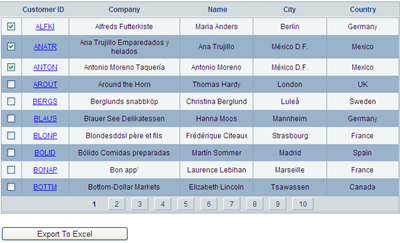
and customers table to populate gridview.
you can follow link to know how to install it on sql server 2008.
, i described how to export gridview containing controls like linkbutton, checkbox,dropdown etc to excel. I'll be using this code further to export selected rows.
Set DataKeyNames property of gridview to CustomerID.
HTML MARKUP
<asp:GridView ID="GridView1" runat="server" AllowPaging="True"
DataSourceID="sqlDataSourceGridView"
DataKeyNames="CustomerID"
AutoGenerateColumns="False"
onpageindexchanging="GridView1_PageIndexChanging"
onrowdatabound="GridView1_RowDataBound" >
<Columns>
<asp:TemplateField>
<ItemTemplate>
<asp:CheckBox ID="chkSelect" runat="server" />
</ItemTemplate>
</asp:TemplateField>
<asp:TemplateField HeaderText="Customer ID">
<ItemTemplate>
<asp:LinkButton ID="lButton" runat="server"
Text='<%#Eval("CustomerID") %>'
PostBackUrl="~/Default.aspx" >
</asp:LinkButton>
</ItemTemplate>
</asp:TemplateField>
<asp:BoundField DataField="CompanyName" HeaderText="Company">
</asp:BoundField>
<asp:BoundField DataField="ContactName" HeaderText="Name">
</asp:BoundField>
<asp:BoundField DataField="City" HeaderText="city">
</asp:BoundField>
<asp:BoundField DataField="Country" HeaderText="Country"
</asp:BoundField>
</Columns>
</asp:GridView>
<asp:SqlDataSource ID="sqlDataSourceGridView" runat="server"
ConnectionString="<%$ ConnectionStrings:northWindConnectionString %>"
SelectCommand="SELECT [CustomerID], [CompanyName], [ContactName],
[City], [Country] FROM [Customers]">
</asp:SqlDataSource>
<asp:Button ID="btnExportToExcel" runat="server"
Text="Export To Excel"
onclick="btnExportToExcel_Click"/>
We need to write a method to find checked rows and maintane their state across postbacks or across gridview paging.
This method stores to customerID of selected row in viewstate using arraylist.
C#
private void FindCheckedRows()
    {
        ArrayList checkedRowsList;
        if (ViewState["checkedRowsList"] != null)
        {
            checkedRowsList = (ArrayList)ViewState["checkedRowsList"];
        }
        else
        {
            checkedRowsList = new ArrayList();
        }

        foreach (GridViewRow gvRow in GridView1.Rows)
        {
            if (gvRow.RowType == DataControlRowType.DataRow)
            {
                string rowIndex =

Convert.ToString(GridView1.DataKeys[gvRow.RowIndex]["CustomerID"]);
                //int rowIndex = Convert.ToInt32(gvRow.RowIndex) +

Convert.ToInt32(GridView1.PageIndex);
                CheckBox chkSelect =

(CheckBox)gvRow.FindControl("chkSelect");
                if ((chkSelect.Checked) &&

(!checkedRowsList.Contains(rowIndex)))
                {
                    checkedRowsList.Add(rowIndex);
                }
                else if ((!chkSelect.Checked) &&

(checkedRowsList.Contains(rowIndex)))
                {
                    checkedRowsList.Remove(rowIndex);
                }
            }

        }
        ViewState["checkedRowsList"] = checkedRowsList;
    }
VB.NET
Private Sub FindCheckedRows()
 Dim checkedRowsList As ArrayList
 If ViewState("checkedRowsList") IsNot Nothing Then
  checkedRowsList =

DirectCast(ViewState("checkedRowsList"), ArrayList)
 Else
  checkedRowsList = New ArrayList()
 End If

 For Each gvRow As GridViewRow In GridView1.Rows
  If gvRow.RowType = DataControlRowType.DataRow Then
   Dim rowIndex As String =

Convert.ToString(GridView1.DataKeys(gvRow.RowIndex)("CustomerID"))
   'int rowIndex = Convert.ToInt32(gvRow.RowIndex)

+ Convert.ToInt32(GridView1.PageIndex);
   Dim chkSelect As CheckBox =

DirectCast(gvRow.FindControl("chkSelect"), CheckBox)
   If (chkSelect.Checked) AndAlso (Not

checkedRowsList.Contains(rowIndex)) Then
    checkedRowsList.Add(rowIndex)
   ElseIf (Not chkSelect.Checked) AndAlso

(checkedRowsList.Contains(rowIndex)) Then
    checkedRowsList.Remove(rowIndex)
   End If

  End If
 Next
 ViewState("checkedRowsList") = checkedRowsList
End Sub
Call this method whenever gridview pageindex changes.
protected void GridView1_PageIndexChanging(object sender,

GridViewPageEventArgs e)
    {
        FindCheckedRows();
    }
Find the checkbox state and implement it whenever gridview is refreshed while paging.
To implement this write code in RowDataBound event of gridview.
C#
protected void GridView1_RowDataBound(object sender,

GridViewRowEventArgs e)
    {
        if (ViewState["checkedRowsList"] != null)
        {
            ArrayList checkedRowsList =

(ArrayList)ViewState["checkedRowsList"];
            GridViewRow gvRow = e.Row;
            if (gvRow.RowType == DataControlRowType.DataRow)
            {
                CheckBox chkSelect =

(CheckBox)gvRow.FindControl("chkSelect");
                string rowIndex =

Convert.ToString(GridView1.DataKeys[gvRow.RowIndex]["CustomerID"]);
                //int rowIndex = Convert.ToInt32(gvRow.RowIndex) +

Convert.ToInt32(GridView1.PageIndex);
                if(checkedRowsList.Contains(rowIndex))
                {
                    chkSelect.Checked = true;
                }


            }
        }


    }
VB.NET
Protected Sub GridView1_RowDataBound(sender As Object, e As

GridViewRowEventArgs)
 If ViewState("checkedRowsList") IsNot Nothing Then
  Dim checkedRowsList As ArrayList =

DirectCast(ViewState("checkedRowsList"), ArrayList)
  Dim gvRow As GridViewRow = e.Row
  If gvRow.RowType = DataControlRowType.DataRow Then
   Dim chkSelect As CheckBox =

DirectCast(gvRow.FindControl("chkSelect"), CheckBox)
   Dim rowIndex As String =

Convert.ToString(GridView1.DataKeys(gvRow.RowIndex)("CustomerID"))
   'int rowIndex = Convert.ToInt32(gvRow.RowIndex)

+ Convert.ToInt32(GridView1.PageIndex);
   If checkedRowsList.Contains(rowIndex) Then
    chkSelect.Checked = True


   End If
  End If
 End If


End Sub
To export these selected rows to excel write following code in Click event of export button.
C#
protected void btnExportToExcel_Click(object sender, EventArgs e)
    {
        FindCheckedRows();
        GridView1.ShowHeader = true;
        GridView1.GridLines = GridLines.Both;
        GridView1.AllowPaging = false;
        GridView1.DataBind();
        GridView1.HeaderRow.Cells.RemoveAt(0);
        if (ViewState["checkedRowsList"] != null)
        {
            ArrayList checkedRowsList =

(ArrayList)ViewState["checkedRowsList"];
            foreach (GridViewRow gvRow in GridView1.Rows)
            {
                gvRow.Visible = false;
                if (gvRow.RowType == DataControlRowType.DataRow)
                {
                    string rowIndex =

Convert.ToString(GridView1.DataKeys[gvRow.RowIndex]["CustomerID"]);
                    if(checkedRowsList.Contains(rowIndex))
                    {
                        gvRow.Visible = true;
                        gvRow.Cells[0].Visible = false;

                    }
                }
            }
        }

        ChangeControlsToValue(GridView1);
        Response.ClearContent();

        Response.AddHeader("content-disposition", "attachment;

filename=GridViewToExcel.xls");

        Response.ContentType = "application/excel";

        StringWriter sWriter = new StringWriter();

        HtmlTextWriter hTextWriter = new HtmlTextWriter(sWriter);

        HtmlForm hForm = new HtmlForm();

        GridView1.Parent.Controls.Add(hForm);

        hForm.Attributes["runat"] = "server";

        hForm.Controls.Add(GridView1);

        hForm.RenderControl(hTextWriter);

        Response.Write(sWriter.ToString());

        Response.End();
    }
VB.NET
Protected Sub btnExportToExcel_Click(sender As Object, e As EventArgs)
 FindCheckedRows()
 GridView1.ShowHeader = True
 GridView1.GridLines = GridLines.Both
 GridView1.AllowPaging = False
 GridView1.DataBind()
 GridView1.HeaderRow.Cells.RemoveAt(0)
 If ViewState("checkedRowsList") IsNot Nothing Then
  Dim checkedRowsList As ArrayList =

DirectCast(ViewState("checkedRowsList"), ArrayList)
  For Each gvRow As GridViewRow In GridView1.Rows
   gvRow.Visible = False
   If gvRow.RowType = DataControlRowType.DataRow

Then
    Dim rowIndex As String =

Convert.ToString(GridView1.DataKeys(gvRow.RowIndex)("CustomerID"))
    If checkedRowsList.Contains(rowIndex)

Then
     gvRow.Visible = True

     gvRow.Cells(0).Visible = False
    End If
   End If
  Next
 End If

 ChangeControlsToValue(GridView1)
 Response.ClearContent()

 Response.AddHeader("content-disposition", "attachment;

filename=GridViewToExcel.xls")

 Response.ContentType = "application/excel"

 Dim sWriter As New StringWriter()

 Dim hTextWriter As New HtmlTextWriter(sWriter)

 Dim hForm As New HtmlForm()

 GridView1.Parent.Controls.Add(hForm)

 hForm.Attributes("runat") = "server"

 hForm.Controls.Add(GridView1)

 hForm.RenderControl(hTextWriter)

 Response.Write(sWriter.ToString())

 Response.[End]()
End Sub

This is how exported rows will look like in excel.
Download Sample Code
Other Posts on asp.net,C#,VB.NET: