4

AutoCompleteExtender Example Ajax

In this post i m showing Ajax AutoComplete Extender Examples using ASP.NET C# and VB.NET with Database and WebService.

Autocomplete TextBox In GridView
In this example i am implementing the AutoComplete functionality to textbox in the EditItemTemaplate of GridView using AJAX autocomplete extender, for this we need to create a web service which calls the method to fetch data from database and display results as suggestions for textbox


AutoCompleteExtender TextBox CompletionList Width
Set Width of Completion List in Ajax AutoComplete Extender TextBox. The default behavior of completion list takes width equal to the width of textbox. we can change this behavior by applying some CSS style to set the width we want. default width is as shown below in the Image.


Autocomplete Textbox Progress Image
add animated Progress Image inside Ajax Auto complete extender textbox to represent loading of data.


Winforms AutoComplete TextBox In Windows Forms application
In this example i am explaining how to create a AutoComplete TextBox In windows forms application using C#.lp


hope this helps


.

3

GridView EditItemTemplate Example

In this post i am listing some GridView EditItemTemplate examples in Asp.Net 2.0,3.5,4.0 with C# Csharp and VB.NET.


autocomplete textbox in GridView

Example of Ajax Autocomplete Extender TextBox in EditItemTemplate of GridView.


Insert Edit Delete In GridView

Insert Update Edit and Delete Records In GridView using ItemTemplate and EditItemTemplate.


Search in GridView

Search records in GridView footer using footer template and ItemTemplate and highlight results using Ajax


Checkbox In GridView To Edit Or Update

Implementing Check All CheckBox in ItemTemplate of GridView to perform Bulk Editing or Deleting


Hope This Helps


.

2

ObjectDataSource Examples With GridView In ASP.NET

GridView With ObjectDataSource Examples In Asp.Net 2.0 and 3.5 with UpdateMethod, InsertMethod and Select Method  using C# csharp and VB.NET.

Here i have compiled list of few examples of ObjectDataSource to populate or bind gridview i posted earlier in this blog.


GridView With ObjectDataSource Examples In Asp.Net
Hide GridView Columns In ASP.NET


Images in Gridview/DataList using Objectdatasource


Insert Edit Update GridView with ObjectDataSource


Hope this helps

11

GridView Examples In ASP.NET 2.0 3.5 4.0 4.5

11

GridView Filter Expression With DropDownList ASP.NET

This example explains how to Filter GridView With DropDownList In ASP.NET Using FilterExpression And Filter Paramaters Or GridView Filtering with Sql Server And SqlDataSource.

Filter GridView With DropDownList In ASP.NET
I m using northwind database and customers table to show data and filter gridview with dropdownlist.

First of all open aspx page in design view and place 2 dropdownlist, 1 gridview and 3 SqlDatasource on the page.

Configure all 3 sqldatasources as according to code mentioned below. and use them for datasource to populate city dropdown, country dropdown and gridview.

You can also read ModalPopUp extender in Gridview to know how to configure SqlDataSource.


HTML Markup to Populate Dropdowns
<asp:DropDownList ID="ddlCity" runat="server" 
                  AppendDataBoundItems="True" 
                  AutoPostBack="True" 
                  DataSourceID="sqlDataSourceCity" 
                  DataTextField="City" 
                  DataValueField="City" Width="100px">
 <asp:ListItem Value="%">All</asp:ListItem>
 </asp:DropDownList>

<asp:SqlDataSource ID="sqlDataSourceCity" runat="server" 
ConnectionString="<%$ ConnectionStrings:northWindConnectionString %>" 
SelectCommand="SELECT DISTINCT City FROM Customers">
</asp:SqlDataSource>


<asp:DropDownList ID="ddlCountry" runat="server" 
                  AppendDataBoundItems="True" 
                  AutoPostBack="True" 
                  DataSourceID="sqlDataSourceCountry" 
                  DataTextField="Country" 
                  DataValueField="Country" Width="100px">
<asp:ListItem Value="%">All</asp:ListItem>
</asp:DropDownList>


<asp:SqlDataSource ID="sqlDataSourceCountry" runat="server" 
ConnectionString="<%$ ConnectionStrings:northWindConnectionString %>" 
SelectCommand="SELECT DISTINCT [Country] FROM [Customers]">
</asp:SqlDataSource>

Now Configure third sqldatasource to populate gridview based on filter expression as mentioned below

HTML markup of gridview and sqldatasource with filter expression
<asp:GridView ID="GridView1" runat="server" 
              AllowPaging="True" 
              DataSourceID="sqlDataSourceGridView" 
              AutoGenerateColumns="False"
              CssClass="GridViewStyle" 
              GridLines="None" Width="650px" 
              ShowHeader="false">
<Columns>
<asp:BoundField DataField="CustomerID" HeaderText="Customer ID"/>
<asp:BoundField DataField="CompanyName" HeaderText="Company"/>
<asp:BoundField DataField="ContactName" HeaderText="Name"/>
<asp:BoundField DataField="City" HeaderText="city"/>
<asp:BoundField DataField="Country" HeaderText="Country"/>
</Columns>
</asp:GridView>


<asp:SqlDataSource ID="sqlDataSourceGridView" 
                   runat="server" 
ConnectionString="<%$ ConnectionStrings:northWindConnectionString %>" 
SelectCommand="SELECT [CustomerID], [CompanyName], [ContactName], 
[City], [Country] FROM [Customers]" 
FilterExpression="[City] like '{0}%' and [Country] like '{1}%'">
<FilterParameters>
<asp:ControlParameter ControlID="ddlCity" Name="City" 
                      PropertyName="SelectedValue" 
                      Type="String" />
<asp:ControlParameter ControlID="ddlCountry" Name="Country" 
                      PropertyName="SelectedValue" 
                      Type="String" />
</FilterParameters>
</asp:SqlDataSource>

Build and run the application.

Download Sample Code


18

ModalPopUpExtender In GridView

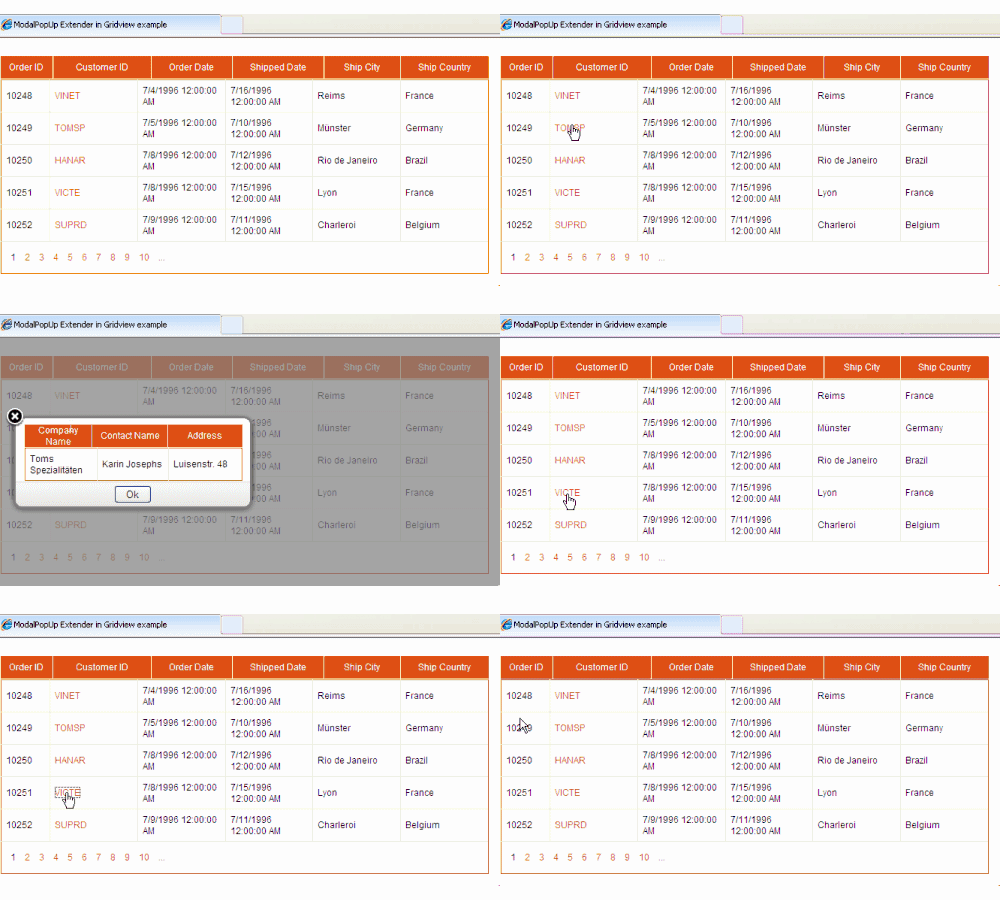
Ajax ModalPopUpExtender In GridView Example To Show Master Detail Or Parent Child Data As PopUp. In this sample code i am showing how to implement or use ModalPopUp Extender in Gridview using sqlDataSource, AjaxControlToolkit,Sql Server 2008 and visual studio 2008.

Ajax ModalPopUpExtender In GridView Example
I have used "Orders" and "Customers" table of Northwind database for this example.

You can install Northwind database on sql server 2008 If you don't have.

Create new website in VS2008 and Create BIN folder by right clicking and selecting Add ASP.NET folder option in solution explorer.

Put AjaxControlToolkit.dll in this BIN folder and add reference to it.


Open Default.aspx page source and register AjaxControlToolkit in page directive.
<%@ Register Assembly="AjaxControlToolkit" 
             Namespace="AjaxControlToolkit" 
             TagPrefix="AjaxToolkit" %>

Add following CSS style in head section of page to show modal background.
<style>
.modalBackground 
{
 background-color:Gray;filter:alpha(opacity=70);opacity:0.7;
} 
</style>

Switch to design view and drag toolkitScriptManager on the page Or add it in html source.
<AjaxToolkit:ToolkitScriptManager ID="scriptManager" 
                                      runat="server">
    </AjaxToolkit:ToolkitScriptManager>

Drag and place an Update Panel on the page. we will put gridview and modal popup inside it in later part of this post
<asp:UpdatePanel ID="UpdatePanel1" runat="server">
            <ContentTemplate>
            </ContentTemplate>
</asp:UpdatePanel>

Now let's create SQLDataSource to populate the gridview and display orders table data.

switch to design view and drag sqldatasource control on the page and configure it according to pictures below.


<asp:SqlDataSource ID="SqlDataSource1" runat="server" 
ConnectionString="<%$ ConnectionStrings:ModalPopUpConnectionString %>" 
SelectCommand="SELECT [OrderID], [CustomerID], [OrderDate], 
[ShippedDate], [ShipCity], [ShipCountry] FROM [Orders]">
</asp:SqlDataSource>


Now drag and place a GridView inside content template of Update panel and specify sqldatasource as datasource.

<asp:GridView ID="GridView1" runat="server" 
              AllowPaging="True" AutoGenerateColumns="False" 
              DataKeyNames="OrderID" 
              DataSourceID="SqlDataSource1" 
              CssClass="Gridview" 
              Width="650px" ShowHeader="false" PageSize="5">
<Columns>
<asp:BoundField DataField="OrderID" HeaderText="OrderID"/>
<asp:TemplateField HeaderText="CustomerID">
<ItemTemplate>
<asp:LinkButton runat="server" ID="lnkCustomer" 
                Text='<%#Eval("CustomerID") %>' 
                OnClick="lnkCustomer_Click">
</asp:LinkButton>
</ItemTemplate>
</asp:TemplateField>
<asp:BoundField DataField="OrderDate" HeaderText="OrderDate"/>
<asp:BoundField DataField="ShippedDate" HeaderText="ShippedDate"/>
<asp:BoundField DataField="ShipCity" HeaderText="ShipCity"/>
<asp:BoundField DataField="ShipCountry" HeaderText="ShipCountry"/>
</Columns>
</asp:GridView>

Now add ModalPopUp extender and specify it's properties as mentioned below
<AjaxToolkit:ModalPopupExtender ID="modalPopUpExtender1" 
                           runat="server"
                           TargetControlID="btnModalPopUp"
                           PopupControlID="pnlPopUp"
                           BackgroundCssClass="modalBackground"
                           OkControlID="btnOk"
                           X="20"
                           Y="100">
</AjaxToolkit:ModalPopupExtender>

Now add one panel and one gridview inside this panel to display details
<asp:Panel runat="Server" ID="pnlPopUp" CssClass="confirm-dialog">
<asp:GridView ID="GridView2" runat="server" 
              CssClass="Gridview" Width="290px" 
              AutoGenerateColumns="false">
</asp:GridView>
</asp:UpdatePanel>


Complete HTML source of page
<form id="form1" runat="server">
    <div>
    
<AjaxToolkit:ToolkitScriptManager ID="scriptManager" 
                                  runat="server">

</AjaxToolkit:ToolkitScriptManager>
     
<asp:UpdatePanel ID="UpdatePanel1" runat="server">
<ContentTemplate>
<asp:GridView ID="GridView1" runat="server" AllowPaging="True" 
              AutoGenerateColumns="False" DataKeyNames="OrderID" 
              DataSourceID="SqlDataSource1" CssClass="Gridview" 
              Width="650px" ShowHeader="false" PageSize="5">
<Columns>
<asp:BoundField DataField="OrderID" HeaderText="OrderID"/>
<asp:TemplateField HeaderText="CustomerID">
<ItemTemplate>
<asp:LinkButton runat="server" ID="lnkCustomer" 
                Text='<%#Eval("CustomerID") %>' 
                OnClick="lnkCustomer_Click">
</asp:LinkButton>
</ItemTemplate>
</asp:TemplateField>
<asp:BoundField DataField="OrderDate" HeaderText="OrderDate"/>
<asp:BoundField DataField="ShippedDate" HeaderText="ShippedDate"/>
<asp:BoundField DataField="ShipCity" HeaderText="ShipCity"/>
<asp:BoundField DataField="ShipCountry" HeaderText="ShipCountry"/>
</Columns>
</asp:GridView>

<asp:Button runat="server" ID="btnModalPopUp" 
            style="display:none"/>
            
<AjaxToolkit:ModalPopupExtender ID="modalPopUpExtender1" 
             runat="server"
             TargetControlID="btnModalPopUp"
             PopupControlID="pnlPopUp"
             BackgroundCssClass="modalBackground"
             OkControlID="btnOk"
             X="20"
             Y="100">
</AjaxToolkit:ModalPopupExtender>
                
<asp:Panel runat="Server" ID="pnlPopUp" CssClass="confirm-dialog">
<asp:GridView ID="GridView2" runat="server">
</asp:GridView>
</asp:Panel>
</ContentTemplate>
</asp:UpdatePanel>
<br />
<asp:SqlDataSource ID="SqlDataSource1" runat="server" 
ConnectionString="<%$ ConnectionStrings:ModalPopUpConnectionString %>" 
SelectCommand="SELECT [OrderID], [CustomerID], [OrderDate], 
[ShippedDate], [ShipCity], [ShipCountry] FROM [Orders]">
</asp:SqlDataSource>
    
    </div>
    </form>

Write following code in Click Event of link Button in gridview to populate details or child gridview

C#
protected void lnkCustomer_Click(object sender, EventArgs e)
    {
        //Retrieve Customer ID 
        LinkButton lnkCustomerID = sender as LinkButton;
        string strCustomerID = lnkCustomerID.Text;
        
        //Create sql connection and fetch data from database based on CustomerID
        string strConnectionString = ConfigurationManager.ConnectionStrings["ModalPopUpConnectionString"].ConnectionString;
        string strSelect = "SELECT CompanyName, ContactName, Address FROM Customers WHERE CustomerID = @customerID";
        SqlConnection sqlCon = new SqlConnection();
        sqlCon.ConnectionString = strConnectionString;
        SqlCommand cmdCustomerDetails = new SqlCommand();
        cmdCustomerDetails.Connection = sqlCon;
        cmdCustomerDetails.CommandType = System.Data.CommandType.Text;
        cmdCustomerDetails.CommandText = strSelect;
        cmdCustomerDetails.Parameters.AddWithValue("@customerID", strCustomerID);
        sqlCon.Open();

        //Create DataReader to read the record
        SqlDataReader dReader = cmdCustomerDetails.ExecuteReader();
        GridView2.DataSource = dReader;
        GridView2.DataBind();
        sqlCon.Close();
        modalPopUpExtender1.Show();
}

VB.NET
Protected Sub lnkCustomer_Click(sender As Object, e As EventArgs)
 'Retrieve Customer ID 
 Dim lnkCustomerID As LinkButton = TryCast(sender, LinkButton)
 Dim strCustomerID As String = lnkCustomerID.Text

 'Create sql connection and fetch data from database based on CustomerID
 Dim strConnectionString As String = ConfigurationManager.ConnectionStrings("ModalPopUpConnectionString").ConnectionString
 Dim strSelect As String = "SELECT CompanyName, ContactName, Address FROM Customers WHERE CustomerID = @customerID"
 Dim sqlCon As New SqlConnection()
 sqlCon.ConnectionString = strConnectionString
 Dim cmdCustomerDetails As New SqlCommand()
 cmdCustomerDetails.Connection = sqlCon
 cmdCustomerDetails.CommandType = System.Data.CommandType.Text
 cmdCustomerDetails.CommandText = strSelect
 cmdCustomerDetails.Parameters.AddWithValue("@customerID", strCustomerID)
 sqlCon.Open()

 'Create DataReader to read the record
 Dim dReader As SqlDataReader = cmdCustomerDetails.ExecuteReader()
 GridView2.DataSource = dReader
 GridView2.DataBind()
 sqlCon.Close()
 modalPopUpExtender1.Show()
End Sub

Download Sample Code


5

Install NorthWind Pubs Database On Sql Server 2008

To Install Northwind Or Pubs Sample Database On Sql Server 2008 follow steps mentioned below

1. Download and install SQL2000SampleDb.msi from Microsoft Download center

It will be installed in "C:\SQL Server 2000 Sample Databases" folder.

Move Northwind and Pubs database files (MDF and LDF files) to your default database file location (C:\Program Files\Microsoft SQL Server\MSSQL.1\MSSQL\Data) from "C:\SQL Server 2000 Sample Databases" folder.

Open sql server management studio and log in,

Right click on database > Select Attach > and locate the northwind.mdf file you just copied.

Install Northwind Or Pubs Sample Database On Sql Server 2008


Click on OK.

Install using scripts 

Open SQL Server Management Studio. Go to File >> Open >> Navigate to “C:\SQL Server 2000 Sample Databases\instpubs.sql”.


Select execute and this will install pubs database.

20

Ajax ModalPopUpExtender Example

In this post i'm showing Ajax ModalPopUpExtender Example In Asp.Net 2.0,3.5,4.0 Using C# VB.NET to open popup on mouseover. For this to work u need to download and install ajaxcontroltoolkit

Ajax ModalPopUpExtender Example In Asp.Net
I have also implement ModalPopUpExtender In Gridview to show master detail data.

Create a new website in visual studio

Add one hyperlink on the page and write html markup of ModalPopExtender to open popup on mouse over on hyperlink on aspx page as shown below.

Put AjaxControlToolkit.dll in BIN folder and register assembly in page directive of ur aspx page.

<%@ Register Assembly="AjaxControlToolkit" 
Namespace="AjaxControlToolkit" TagPrefix="ajaxToolkit" %>

Add this javascript method between <head></head> section of page

<script type="text/javascript">
function MouseHover() 
{
$find("modelPopupExtender1").show();
}
</script>

Add new StyleSheet to solution and write below mentioned css style in it.

body { 
    BACKGROUND: #fff;FONT: 12px/1.25 "Helvetica Neue", Arial, sans-serif; 
    COLOR: #222;
}
.confirm-dialog { 
    BACKGROUND: url(img/box.png) no-repeat left top; 
    MARGIN: 0px auto;WIDTH: 330px;PADDING-TOP: 14px; 
    POSITION: relative;
}
.confirm-dialog .inner { 
    PADDING-RIGHT: 20px;PADDING-LEFT: 20px; 
    PADDING-BOTTOM: 11px;BACKGROUND: url(img/box.png) no-repeat left bottom; 
    FLOAT: left;MARGIN: 0px 0px -20px 0px;WIDTH: 290px;PADDING-TOP: 0px;
} 
.confirm-dialog .base { 
    BORDER-TOP: #ddd 1px solid;BACKGROUND: url(img/base.png) no-repeat left bottom; 
    PADDING-BOTTOM: 4px;MARGIN-LEFT: -11px;MARGIN-RIGHT: -11px; 
    PADDING-TOP: 4px;TEXT-ALIGN: center;
}
.confirm-dialog H2 { 
    FONT-WEIGHT: bold;FONT-SIZE: 1.25em;COLOR: #f60;TEXT-ALIGN: center;
} 
.confirm-dialog input { 
    WIDTH:50px;
}     
.close { 
    DISPLAY: block;BACKGROUND: url(img/close.png) no-repeat 0px 0px; 
    LEFT: -5px;WIDTH: 26px;TEXT-INDENT: -1000em;POSITION: absolute; 
    TOP: -7px;HEIGHT: 26px; 
}   
.modalBackground {
    background-color:Gray;filter:alpha(opacity=70);opacity:0.7;
} 


HTML SOURCE
<Ajax:ToolkitScriptManager ID="ToolkitScriptManager1" runat="server"/>
<p style="background-color: #9999FF; width: 95%;">
Example of using a ModalPopupExtender with with Mouse Over
<br/></p><br/>
Hover over the hyperlink 
 
<asp:HyperLink ID="HyperLink1" runat="server" 
               onmouseover="MouseHover();" 
               Font-Underline="True" ForeColor="Blue">
               <b>Mouse Over Here to Open PopUp</b>
</asp:HyperLink> to open pop up
            
<Ajax:ModalPopupExtender runat="server" 
                   BehaviorID="modalPopupExtender1" 
                   TargetControlID="HyperLink1"
                   PopupControlID="popUpPanel" 
                   OkControlID="btnOk" 
                   BackgroundCssClass="modalBackground" >
</Ajax:ModalPopupExtender>
 
<asp:Panel ID="popUpPanel" runat="server" CssClass="confirm-dialog">
<div class="inner">
<h2>Thanks For Visiting This Site</h2>
<div class="base">
<asp:Button ID="btnOk" runat="server" Text="Ok"/>
<asp:LinkButton ID="LinkButton1" runat="server" CssClass="close" 
OnClientClick="$find('modelPopupExtender1').hide(); return false;"/>
</div></div>
</asp:Panel>


Download Sample Code


Find More Articles