1

Install Configure Windows Server AppFabric

Install Configure Windows Server AppFabric Cache Services In Asp.Net 3.5 and 4.0.

Install Windows Server Appfabric
Here i am explaining steps to install and configure windows server appfabric cache services in asp.net 3.5 and 4.0.

1. Download and run windows server appfabric from this link

Select the features you want to install, Confirm the next screen and finish the installation.


Install AppFabric

After installation is finished, Go start > all programs> windows server AppFabric and launch configure AppFabric

ConfigureAppFabric

Click on caching service tab and configure it as shown in picture.

Configure windows server appfabric

Windows server AppFabric


Once configuration is done, you need to start the cache services.

For this open Caching Administration Windows PowerShell from the Appfabric menu and type and run below mentiond command.

C:\> Start-CacheCluster

HostName : CachePort Service Name Service Status Version Info
-------------------- ------------ -------------- ------------
AMIT:22233 AppFabricCachingService UP 1 [1,1][1,1]


Now cache services are up and running.

You can change the startup type of cache services to automatic from MMC snap add in.


Hope this helps


17

Export GridView To Excel ASP.NET

In this example i'm explaining how to Create Or Export GridView to Excel In Asp.Net 2.0,3.5 using C# and VB.NET. Place one button on the page for exporting data to ms excel file.

Export Gridview To Excel Asp.Net
I have used Northwind database to populate GridView.

I have also explained how we can Create PDF From Gridview in one of my previous articles.


Write following code in Click Event of button
Response.ClearContent();

        Response.AddHeader("content-disposition", "attachment; filename=GridViewToExcel.xls");

        Response.ContentType = "application/excel";

        StringWriter sWriter = new StringWriter();

        HtmlTextWriter hTextWriter = new HtmlTextWriter(sWriter);

        GridView1.RenderControl(hTextWriter);

        Response.Write(sWriter.ToString());

        Response.End();


httpexception error
But when we try to execute this code on we get this httpexception error.

to get past this error we can write this method in code behind.


public override void VerifyRenderingInServerForm(Control control)
{
}

or we can add a html form and render it after adding gridview in it, i'll be using this.

RegisterForEventValidation error
If paging is enabled or Gridview contains controls like linkbutton, DropDownLists or checkboxes etc then we get this error.

we can fix this error by setting event validation property to false in page directive.


<%@ Page Language="C#" AutoEventWireup="true"  EnableEventValidation="false" CodeFile="Default.aspx.cs" Inherits="_Default" %>


Hyperlinks or other controls in gridview are not desireable in excel sheet, we should display their display text instead, for this write a method to remove controls and display their respective text property as mentioned below.

private void ChangeControlsToValue(Control gridView)
    {
        Literal literal = new Literal();
        
        for (int i = 0; i < gridView.Controls.Count; i++)
        {
            if (gridView.Controls[i].GetType() == typeof(LinkButton))
            {

                literal.Text = (gridView.Controls[i] as LinkButton).Text;
                gridView.Controls.Remove(gridView.Controls[i]);
                gridView.Controls.AddAt(i,literal);
            }
            else if (gridView.Controls[i].GetType() == typeof(DropDownList))
            {
                literal.Text = (gridView.Controls[i] as DropDownList).SelectedItem.Text;

                gridView.Controls.Remove(gridView.Controls[i]);

                gridView.Controls.AddAt(i,literal);

            }
            else if (gridView.Controls[i].GetType() == typeof(CheckBox))
            {
                literal.Text = (gridView.Controls[i] as CheckBox).Checked ? "True" : "False";
                gridView.Controls.Remove(gridView.Controls[i]);
                gridView.Controls.AddAt(i,literal);
            }
            if (gridView.Controls[i].HasControls())
            {

                ChangeControlsToValue(gridView.Controls[i]);

            }

        }

    }


HTML SOURCE
<asp:GridView ID="GridView1" runat="server" AllowPaging="True" 
              DataSourceID="sqlDataSourceGridView" 
              AutoGenerateColumns="False"
              CssClass="GridViewStyle" 
              GridLines="None" Width="650px" 
              ShowHeader="False">
<Columns>
<asp:TemplateField HeaderText="Customer ID" ItemStyle-Width="75px">
<ItemTemplate>
<asp:LinkButton ID="lButton" runat="server" Text='<%#Eval("CustomerID") %>' 
                PostBackUrl="~/Default.aspx">
</asp:LinkButton>
</ItemTemplate>
<ItemStyle Width="75px"></ItemStyle>
</asp:TemplateField>
<asp:BoundField DataField="CompanyName" HeaderText="Company" 
                ItemStyle-Width="200px" >
<ItemStyle Width="200px"></ItemStyle>
</asp:BoundField>
<asp:BoundField DataField="ContactName" HeaderText="Name" 
                ItemStyle-Width="125px">
<ItemStyle Width="125px"></ItemStyle>
</asp:BoundField>
<asp:BoundField DataField="City" HeaderText="city" ItemStyle-Width="125px" >
<ItemStyle Width="125px"></ItemStyle>
</asp:BoundField>
<asp:BoundField DataField="Country" HeaderText="Country" 
                ItemStyle-Width="125px" >
<ItemStyle Width="125px"></ItemStyle>
</asp:BoundField>
</Columns>
<RowStyle CssClass="RowStyle" />
<PagerStyle CssClass="PagerStyle" />
<SelectedRowStyle CssClass="SelectedRowStyle" />
<HeaderStyle CssClass="HeaderStyle" />
<AlternatingRowStyle CssClass="AltRowStyle" />
</asp:GridView>

<asp:SqlDataSource ID="sqlDataSourceGridView" runat="server" 
ConnectionString="<%$ ConnectionStrings:northWindConnectionString %>" 
SelectCommand="SELECT [CustomerID], [CompanyName], [ContactName], 
               [City], [Country] FROM [Customers]">
</asp:SqlDataSource>

<table align="left" class="style1">
<tr>
<td class="style2">
<asp:RadioButtonList ID="RadioButtonList1" runat="server" AutoPostBack="True" 
                     RepeatDirection="Horizontal" RepeatLayout="Flow">
<asp:ListItem Value="0">All Pages</asp:ListItem>
</asp:RadioButtonList>
</td>
<td>
<asp:Button ID="btnExportToExcel" runat="server" Text="Export To Excel" 
            Width="215px" onclick="btnExportToExcel_Click"/>
</td>
</tr>
</table>

C# CODE
protected void btnExportToExcel_Click(object sender, EventArgs e)
    {
        if (RadioButtonList1.SelectedIndex == 0)
        {
            GridView1.ShowHeader = true;
            GridView1.GridLines = GridLines.Both;
            GridView1.AllowPaging = false;
            GridView1.DataBind();
        }
        else
        {
            GridView1.ShowHeader = true;
            GridView1.GridLines = GridLines.Both;
            GridView1.PagerSettings.Visible = false;
            GridView1.DataBind();
        }

        ChangeControlsToValue(GridView1);
        Response.ClearContent();

        Response.AddHeader("content-disposition", "attachment; filename=GridViewToExcel.xls");

        Response.ContentType = "application/excel";

        StringWriter sWriter = new StringWriter();

        HtmlTextWriter hTextWriter = new HtmlTextWriter(sWriter);

        HtmlForm hForm = new HtmlForm();

        GridView1.Parent.Controls.Add(hForm);

        hForm.Attributes["runat"] = "server";

        hForm.Controls.Add(GridView1);

        hForm.RenderControl(hTextWriter);

        // Write below code to add cell border to empty cells in Excel file
        // If we don't add this line then empty cells will be shown as blank white space

         StringBuilder sBuilder = new StringBuilder();
        sBuilder.Append("<html xmlns:v="urn:schemas-microsoft-com:vml" xmlns:o="urn:schemas-microsoft-com:office:office" xmlns:x="urn:schemas-microsoft-com:office:excel" xmlns="http://www.w3.org/TR/REC-html40"> <head><meta http-equiv="Content-Type" content="text/html;charset=windows-1252"><!--[if gte mso 9]><xml><x:ExcelWorkbook><x:ExcelWorksheets><x:ExcelWorksheet><x:Name>ExportToExcel</x:Name><x:WorksheetOptions><x:Panes></x:Panes></x:WorksheetOptions></x:ExcelWorksheet></x:ExcelWorksheets></x:ExcelWorkbook></xml><![endif]--></head> <body>");
        sBuilder.Append(sWriter + "</body></html>");
        Response.Write(sBuilder.ToString());
        Response.End();
    }

    private void ChangeControlsToValue(Control gridView)
    {
        Literal literal = new Literal();
        
        for (int i = 0; i < gridView.Controls.Count; i++)
        {
            if (gridView.Controls[i].GetType() == typeof(LinkButton))
            {

                literal.Text = (gridView.Controls[i] as LinkButton).Text;
                gridView.Controls.Remove(gridView.Controls[i]);
                gridView.Controls.AddAt(i,literal);
            }
            else if (gridView.Controls[i].GetType() == typeof(DropDownList))
            {
                literal.Text = (gridView.Controls[i] as DropDownList).SelectedItem.Text;

                gridView.Controls.Remove(gridView.Controls[i]);

                gridView.Controls.AddAt(i,literal);

            }
            else if (gridView.Controls[i].GetType() == typeof(CheckBox))
            {
                literal.Text = (gridView.Controls[i] as CheckBox).Checked ? "True" : "False";
                gridView.Controls.Remove(gridView.Controls[i]);
                gridView.Controls.AddAt(i,literal);
            }
            if (gridView.Controls[i].HasControls())
            {

                ChangeControlsToValue(gridView.Controls[i]);

            }

        }

    }

VB.NET
Protected Sub btnExportToExcel_Click(sender As Object, e As EventArgs)
 If RadioButtonList1.SelectedIndex = 0 Then
  GridView1.ShowHeader = True
  GridView1.GridLines = GridLines.Both
  GridView1.AllowPaging = False
  GridView1.DataBind()
 Else
  GridView1.ShowHeader = True
  GridView1.GridLines = GridLines.Both
  GridView1.PagerSettings.Visible = False
  GridView1.DataBind()
 End If

 ChangeControlsToValue(GridView1)
 Response.ClearContent()

 Response.AddHeader("content-disposition", "attachment; filename=GridViewToExcel.xls")

 Response.ContentType = "application/excel"

 Dim sWriter As New StringWriter()

 Dim hTextWriter As New HtmlTextWriter(sWriter)

 Dim hForm As New HtmlForm()

 GridView1.Parent.Controls.Add(hForm)

 hForm.Attributes("runat") = "server"

 hForm.Controls.Add(GridView1)

 hForm.RenderControl(hTextWriter)

 Dim sBuilder As New StringBuilder()
sBuilder.Append("<html xmlns:v="urn:schemas-microsoft-com:vml" xmlns:o="urn:schemas-microsoft-com:office:office" xmlns:x="urn:schemas-microsoft-com:office:excel" xmlns="http://www.w3.org/TR/REC-html40"> <head><meta http-equiv="Content-Type" content="text/html;charset=windows-1252"><!--[if gte mso 9]><xml><x:ExcelWorkbook><x:ExcelWorksheets><x:ExcelWorksheet><x:Name>ExportToExcel</x:Name><x:WorksheetOptions><x:Panes></x:Panes></x:WorksheetOptions></x:ExcelWorksheet></x:ExcelWorksheets></x:ExcelWorkbook></xml><![endif]--></head> <body>")
sBuilder.Append(sWriter & "</body></html>")
Response.Write(sBuilder.ToString())

 Response.[End]()
End Sub

Private Sub ChangeControlsToValue(gridView As Control)
 Dim literal As New Literal()

 For i As Integer = 0 To gridView.Controls.Count - 1
  If gridView.Controls(i).[GetType]() = GetType(LinkButton) Then

   literal.Text = TryCast(gridView.Controls(i), LinkButton).Text
   gridView.Controls.Remove(gridView.Controls(i))
   gridView.Controls.AddAt(i, literal)
  ElseIf gridView.Controls(i).[GetType]() = GetType(DropDownList) Then
   literal.Text = TryCast(gridView.Controls(i), DropDownList).SelectedItem.Text

   gridView.Controls.Remove(gridView.Controls(i))


   gridView.Controls.AddAt(i, literal)
  ElseIf gridView.Controls(i).[GetType]() = GetType(CheckBox) Then
   literal.Text = If(TryCast(gridView.Controls(i), CheckBox).Checked, "True", "False")
   gridView.Controls.Remove(gridView.Controls(i))
   gridView.Controls.AddAt(i, literal)
  End If
  If gridView.Controls(i).HasControls() Then


   ChangeControlsToValue(gridView.Controls(i))

  End If
 Next

End Sub

This is how exported excel sheet will look like. Hope this helps.

Download Sample Code


3

Hide Show Div Using JQuery Asp.Net

Show Hide Div Using JQuery Example In Asp.Net. So many times while developing Asp.Net web application we need to show or hide div or other html elements based on user interaction as shown in picture.
we can do this with ease using JQuery
Show or Hide Div using jquery
First of all we need to add reference to jquery in head section of page.

Add Reference in HTML Source


Write some CSS for div and button
.button, .button:visited {
 background: #222;
 display: inline-block;
 padding: 5px 10px 6px;
 color: #fff;
 text-decoration: none;
 -moz-border-radius: 6px;
 -webkit-border-radius: 6px;
 -moz-box-shadow: 0 1px 3px rgba(0,0,0,0.6);
 -webkit-box-shadow: 0 1px 3px rgba(0,0,0,0.6);
 text-shadow: 0 -1px 1px rgba(0,0,0,0.25);
 border-bottom: 1px solid rgba(0,0,0,0.25);
 font-size: 11px;font-weight: bold;line-height: 1;text-shadow: 0 -1px 1px rgba(0,0,0,0.25);
        background-color: #2981e4;
        top:250px;
        float:left;
        left:150px;
        position:fixed;
        
}
.button:hover {background-color: #2575cf;}

.detailDiv {
 height:80px;
        width: 400px;
 background: #222;
 display: inline-block;
 padding: 50px 10px 6px;
 color: #fff;
 text-decoration: none;
 -moz-border-radius: 6px;
 -webkit-border-radius: 6px;
 -moz-box-shadow: 0 1px 3px rgba(0,0,0,0.6);
 -webkit-box-shadow: 0 1px 3px rgba(0,0,0,0.6);
 text-shadow: 0 -1px 1px rgba(0,0,0,0.25);
 border-bottom: 1px solid rgba(0,0,0,0.25);
 position: relative;
 cursor: pointer
        font-size: 11px;font-weight: bold;line-height: 1;text-shadow: 0 -1px 1px rgba(0,0,0,0.25);
        background-color: #91bd09;
 text-align:center;
}
.detailDiv:hover {background-color: #749a02;}


Write following html code to hide or show div
<div class="detailDiv">
This is example of Hide show div element using jquery 
</div>

<button class="button">Show or Hide div </button>

Now we will be showing or hiding the div on click of button so we need to add click event listener in jquery function as follows.


And result will be like one in demo below, Click on button to see it live.


This is example of Hide show div element using jquery


Have fun with JQuery

3

Dynamic Buttons Controls Event Handling WinForms Windows Forms

Dynamic Buttons Controls Event Handling In Windows Forms Or Winforms Applications In .Net 2.0,3,5. C# And VB.NET.

Dynamic Buttons in winforms
many times we need to create controls at runtime or through code behind depending on the real time scenario.

In this post i am going to explain how to add dynamic buttons at runtime and handle the Button Click event in winforms or windows forms applications.

I am creating 3 buttons on Form_Load event and placing them on the form.


Write this code in Load event of windows form.


C# Code

private void Form1_Load(object sender, EventArgs e)
        {
            int x = 50, y = 50;
            for (int i = 1; i <= 3; i++)
            {
                Button btnDynamic = new Button();
                btnDynamic.Location = new System.Drawing.Point(x, y);
                btnDynamic.Name = " Dynamic Button " + i;
                btnDynamic.Size = new System.Drawing.Size(100, 50);
                btnDynamic.Text = btnDynamic.Name;
                Controls.Add(btnDynamic);
                x += 100;
                btnDynamic.Click += new EventHandler(this.DynamicButtonClick);
            }
            
        }

Here x and y are horizontal and vertical cordinates where dynamically created buttons will be placed.

x is incremented by 100 each time so that buttons don't get placed overlapped.

when button is created, eventhandler for Click Event of button is associated with it in last line of above mentioned method.

Now write below mentioned method signature in the code behind

private void DynamicButtonClick(object sender, EventArgs e)
   {

   }

Method name must be exactly the same u mentioned in eventhandling code, as It's case sensitive. Write this code inside this method

private void DynamicButtonClick(object sender, EventArgs e)
        {
            Button btnDynamic = (Button)sender;
            btnDynamic.Text = "You Clicked" + btnDynamic.Name;
                      
        }

VB.NET Code

Private Sub Form1_Load(sender As Object, e As EventArgs)
 Dim x As Integer = 50, y As Integer = 50
 For i As Integer = 1 To 3
  Dim btnDynamic As New Button()
  btnDynamic.Location = New System.Drawing.Point(x, y)
  btnDynamic.Name = " Dynamic Button " & i
  btnDynamic.Size = New System.Drawing.Size(100, 50)
  btnDynamic.Text = btnDynamic.Name
  Controls.Add(btnDynamic)
  x += 100
  btnDynamic.Click += New EventHandler(AddressOf Me.DynamicButtonClick)
 Next

End Sub

Private Sub DynamicButtonClick(sender As Object, e As EventArgs)
 Dim btnDynamic As Button = DirectCast(sender, Button)
 btnDynamic.Text = "You Clicked" + btnDynamic.Name

End Sub


Build the application and run.

0

Context.User.Identity.Name Is Empty Null Blank

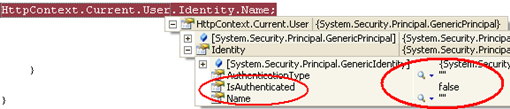
Context.User.Identity.Name Is Empty Null Or Blank In Asp.Net. If you have set the forms authentication and trying to display logged in user name in your asp.net web application by getting the user name using user.identity.name and this is blank or empty as displayed in image below.

Context.User.Identity.Name is Empty

Then u might have missed few configuration settings.

If yor are getting user identity name null or emplty when u try to get it to display user name in welcome message (for example) then probably you have allowed anonymous access to your site hence user.identity.name is null.

To avoid this try to write the code as mentioned below

First of all set authentication mode to forms authentication in web.config file


Now deny anonymous access to your site by adding below mentioned code in authorization section of web.config.


the ? represents anonymous user

Now write this code in Page_load to check the value of Identity name.

protected void Page_Load(object sender, EventArgs e)
    {
        if (HttpContext.Current.User != null)
        {
            if (HttpContext.Current.User.Identity.IsAuthenticated)
            {
                lblName.Text = HttpContext.Current.User.Identity.Name.ToUpper().ToString();

            }
                      
        
        }
        
    }

Context.User.Identity.Name is Blank

Now identity name is not blank as shown in picture.

You may also read more about Forms Authentication And FormsAuthenticationTicket.

5

Pass Crystal Report Parameters Programmatically Asp.Net

Pass Crystal Report Parameters Programmatically In Asp.Net 2.0,3.5,4.0 Using C# And VB.NET. In this post i am explaining how to pass parameters to crystal reports programmatically in code behind of asp.net web page.

Pass Crystal Report Parameters Programmatically In Asp.Net

For this example i am using northwind database and products table.

I have put one text box on the page and report will display details of product based on product id entered by user.

Read how to create Crystal Reports In Asp.Net , Or Windows Forms.


Open crystal report in design view, right click on it and select Field Explorer

Now select Parameter Fields and select new to add new parameter to report.

Name it as ProductID and remember it.

Now click on Special Fields in Field Explorer and select Record Selection Formula.

Select is equal to and {?ProductID} from the dropdowns and click on OK.

Click on smart tag of reportviewer control and uncheck Database logon prompting and parameter prompting as we will provide these info in code behind.


HTML markup of aspx page

<form id="form1" runat="server">
    <table class="style1">
        <tr>
            <td>
                Enter Product ID :
            </td>
            <td>
                <asp:TextBox ID="txtProductID" runat="server">
                </asp:TextBox>
                </td>
            <td>
                <asp:Button ID="btnReport" runat="server" 
                            Text="Show Report" 
                            onclick="btnReport_Click" 
                            Width="108px" />
                </td>
        </tr>
    </table>
    <br />
    <CR:CrystalReportViewer ID="CrystalReportViewer1" runat="server" 
        AutoDataBind="True" EnableDatabaseLogonPrompt="False" 
        EnableParameterPrompt="False" Height="1039px" 
        ReportSourceID="CrystalReportSource1" 
        ReuseParameterValuesOnRefresh="True" 
        Width="901px" DisplayGroupTree="False" />
    <CR:CrystalReportSource ID="CrystalReportSource1" runat="server">
        <Report FileName="CrystalReport.rpt">
        </Report>
    </CR:CrystalReportSource>
    </form>


Now go to code behind of the page and add below mentioned namespace for crystal reports.

using CrystalDecisions.Shared;
using CrystalDecisions.CrystalReports.Engine;

Write this code in Page_Load event of the page

protected void Page_Load(object sender, EventArgs e)
    {
        if (Page.IsPostBack) CrystalReportViewer1.Visible = true;
        else
            CrystalReportViewer1.Visible = false;
    }

Generate click event for button to shaow report and write this code.

protected void btnReport_Click(object sender, EventArgs e)
    {   //Create report document
        ReportDocument crystalReport = new ReportDocument();
        
        //Load crystal report made in design view
        crystalReport.Load(Server.MapPath("CrystalReport.rpt"));

        //Set DataBase Login Info
        crystalReport.SetDatabaseLogon
            ("amitjain", "password", @"AMITJAIN\SQL", "Northwind");

        //Provide parameter values
        crystalReport.SetParameterValue("ProductID", txtProductID.Text);
        CrystalReportViewer1.ReportSource = crystalReport;
    }

Build the solution and run.


have fun.

3

Asp.Net QueryString Example

QueryString Example In Asp.Net 2.0,3.5,4.0 With Multiple Variable Values Using C# And VB.NET. Several time in ASP.NET applications we need to transfer data or information provided by user from one aspx page to another.

We can achieve this using several methods like Cookies,Session or Crosspage posting

In this post i am explaining how to use querystrings.

Example url with querystring can be something similar like this

http://yourdomainname.com/defauld.aspx?variable1=value1&variable2=value2

Suppose we have a textbox txtData and we want it's value on other page
than in code behind we would write in click event of btnGo

private void btnGO_Click(object sender, System.EventArgs e)
{
Response.Redirect("Default2.aspx?Value=" +
txtData.Text);
}

Or

private void btnGO_Click(object sender, System.EventArgs e)
{
Response.Redirect("Default2.aspx?city=" +
txtData.Text + "&country=" + txtcountry.Text);
}


Now to retrieve these values on other page we need to use request.querystring, we can either retrieve them by variable name or by index

private void Page_Load(object sender,System.EventArgs e)
{
txtCity.Text = Request.QueryString["city"];
txtCountry.Text = Request.QueryString["country"];
}

Or we can also use

private void Page_Load(object sender,System.EventArgs e)
{
txtCity.Text = Request.QueryString[0];
txtCountry.Text = Request.QueryString[1];
}


QueryString can't be used for sending long data because it has a max lenght limit

Data being transferred is visible in url of browser

To use spaces and & in query string we need to replace space by %20 and & by %26


private void btnGO_Click(object sender, System.EventArgs e)
{
Response.Redirect("Default2.aspx?Value=" +
txtData.Text.Replace(" ","%20");
}

Or we can use Server.UrlEncode method

private void btno_Click(object sender, System.EventArgs e)
{
Response.Redirect("Default2.Aspx?" +
"Name=" + Server.UrlEncode(txtData.Text));
}


2

Select Find Nth Highest Salary Record In Sql Server

Select Find Get Second Third Nth Highest Salary Record Row In Ms Sql Server. This is most frequentky asked question how to select or get nth highest record or second third row/record from any column of sql table.

Select Find Nth Highest Record In Ms Sql Server
for example select get or fetch 2nd (second highest) or nth highest salary of employee or 10th highest record from the table.

There are various ways to achieve this result, i've mentioned few here.

I have created Employee table with following schema.


1st method

To select 2nd highest salary or record we can use following query.

SELECT TOP 1 [Salary]
FROM 
(
SELECT  DISTINCT TOP 2 [Salary]
FROM [dbo].[Employee]
ORDER BY [Salary] DESC
) temp
ORDER BY [Salary] 


2nd method

To select 3rd highest salary or record we can use following query.
SELECT TOP 1 [Salary]
FROM ( SELECT  TOP 3 [Salary]
  FROM [dbo].[Employee] e1 GROUP BY e1.Salary
  ORDER BY [e1].[Salary] DESC) e2
  ORDER BY [Salary]


These queries holds good untill we are selecting only salary column and fails when we want to select all the columns or few more columns with salary as salary can be same for more then one employees or records.

For example if we change the first query to select 2nd highest salary with all the columns of table, output would be undesirable as shown below.
SELECT TOP 1 [Salary],[EmployeeName]
FROM 
(
SELECT  DISTINCT TOP 2 [Salary], [EmployeeName]
FROM [dbo].[Employee]
ORDER BY [Salary] DESC
) temp
ORDER BY [Salary]


To select all columns we can use queries mentioned below.

This query will give 4th highest salary record but will show only 1 highest record if even if there are multiple duplicate salary records.

SELECT TOP 1 * FROM [dbo].[Employee]
WHERE [Salary] NOT IN  
( 
  SELECT DISTINCT TOP 3 [Salary] FROM [dbo].[Employee]
  ORDER BY [Salary] DESC
)
ORDER BY [Salary] DESC


These 2 queries will select 4th highest salary with duplicate records.
SELECT * FROM [dbo].[Employee]
WHERE [Salary] = 
( 
  SELECT MAX([Salary]) FROM [dbo].[Employee] 
  WHERE [Salary] NOT IN
    ( 
      SELECT DISTINCT TOP (4-1) [Salary] FROM [dbo].[Employee] e1
      ORDER BY [Salary] DESC 
    )
)

SELECT *
FROM Employee E1
WHERE (4-1) = (
SELECT COUNT(DISTINCT(E2.Salary))
FROM Employee E2
WHERE E2.Salary > E1.Salary)


We can also use sql ranking function to get desired result as follows.

SELECT * FROM 
(
  SELECT DENSE_RANK() OVER(ORDER BY [Salary] DESC)AS RowId, * 
  FROM [dbo].[Employee] 
) AS e1
  WHERE e1.RowId = 4  


Find More Articles