1

Visual Studio Remove Unused References With Organize Usings

Remove Unused References In Visual Studio By Organize Usings Command For C# VB.NET COde Behind

When we create a new website or project in visual studio, several namespace references are added in code behind by default.

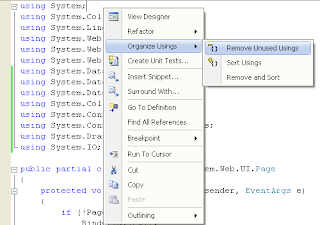
Visual studio Remove unused references using organize using

It's always advisable to remove all unused usings and references from code behind for better performance.

We can follow steps mentioned below to remove all unused usings and references.

FOR C# APPLICATIONS OR PROJECTS

Open code behind of the page u want to remove unused references,
Right click > Organize Usings > Remove Unused Usings


All unused usings will be removed as shown below.


FOR VB.NET APPLICATIONS

Right click on My Project in solution explorer > Select Open.


Select References tab and click on unused references button.


Check the check box for references you want to remove and click on remove.


Hope this helps.


4

Get RowIndex In GridView RowCommand Event Using DataKey

Get RowIndex Of GridView Row In RowCommand Event Using DataKey or CommandArgument in asp.net

In this post i am showing how to get RowIndex of gridview row in RowCommand Event through DataKey property or commandArgument.

RowCommand event is raised when a button inside gridview is clicked.

Method 1.

To get gridview rowindex through DataKey property we can use code as mentioned below.

For this we need to define DataKeyNames property in gridview.

HTML SOURCE
<asp:GridView ID="GridView1" runat="server" 
              AutoGenerateColumns="False" 
              DataSourceID="SqlDataSource1" 
              onrowcommand="GridView1_RowCommand" 
              DataKeyNames="DocID">
<Columns>
<asp:BoundField DataField="DocID" HeaderText="DocID" 
                InsertVisible="False" 
                ReadOnly="True" 
                SortExpression="DocID" />

<asp:ButtonField ButtonType="Button"  
                CommandName="Show" 
                Text="Show"/>
                
</Columns>
</asp:GridView>

Write following code in RowCommand Event of gridview to get rowindex or row number in which button was clicked.

C# CODE
protected void GridView1_RowCommand(object sender, GridViewCommandEventArgs e)
    {
        if (e.CommandName == "Show")
        {
            int index = Convert.ToInt32(e.CommandArgument);
            int documentID = Convert.ToInt32(GridView1.DataKeys[index].Value);
           
             // Write your further code
            
        }
    }

VB.NET
Protected Sub GridView1_RowCommand(sender As Object, e As GridViewCommandEventArgs)
 If e.CommandName = "Show" Then
  Dim index As Integer = Convert.ToInt32(e.CommandArgument)
  Dim documentID As Integer = Convert.ToInt32(GridView1.DataKeys(index).Value)
                 
                ' Write your further code
 End If
End Sub


Method 2.

To get rowindex without using DataKey we can write code as mentioned below.

C#
protected void GridView1_RowCommand(object sender, GridViewCommandEventArgs e)
    {
        if (e.CommandName == "Show")
        {
            int index = Convert.ToInt32(e.CommandArgument);
            GridViewRow row = GridView1.Rows[index];
            int docID = Convert.ToInt32(row.Cells[0].Text);
           
            // Write your further code here 
        }
     }

VB.NET
Protected Sub GridView1_RowCommand(sender As Object, e As GridViewCommandEventArgs)
 If e.CommandName = "Show" Then
  Dim index As Integer = Convert.ToInt32(e.CommandArgument)
  Dim row As GridViewRow = GridView1.Rows(index)
  Dim docID As Integer = Convert.ToInt32(row.Cells(0).Text)

               ' Write your further code here 
 End If
End Sub

If we have placed controls like label,textbox or dropdowns in the gridview row then we can access these controls in following manner.

HTML SOURCE
<asp:GridView ID="GridView1" runat="server" 
              AutoGenerateColumns="False" 
              DataSourceID="SqlDataSource1" 
              onrowcommand="GridView1_RowCommand">
<Columns>
<asp:BoundField DataField="DocID" HeaderText="DocID" 
                InsertVisible="False" 
                ReadOnly="True" 
                SortExpression="DocID" />

<asp:ButtonField ButtonType="Button"  
                CommandName="Show" 
                Text="Show"/>
                
<asp:TemplateField HeaderText="Message">
<ItemTemplate>
<asp:Label ID="lblMessage" runat="server" 
           Text='<%#Eval("DocName") %>'>
</asp:Label>
</ItemTemplate>
</asp:TemplateField>
</Columns>
</asp:GridView>

C#
protected void GridView1_RowCommand(object sender, GridViewCommandEventArgs e)
    {
        if (e.CommandName == "Show")
        {
            int index = Convert.ToInt32(e.CommandArgument);
            GridViewRow row = GridView1.Rows[index];
            int docID = Convert.ToInt32(row.Cells[0].Text);
            string labelText = ((Label)row.FindControl("lblMessage")).Text.ToString();
        }
    }

If we want to place a button inside TemplateField then we need to define CommandArgument property manually in html source as follows.

<asp:TemplateField>
 <ItemTemplate>                
 <asp:Button runat="server" ID="btnDn"
             Text="Down" CommandName="Show" 
CommandArgument="<%#((GridViewRow)Container).RowIndex%>"/>
</ItemTemplate>
</asp:TemplateField>

Hope this helps


20

Save Store Files In Sql Database Download From GridView Asp.Net

Upload Save Or Store Files In Ms Sql Server Database And Download In Asp.Net.

In this post i'm explaining how to save pdf,word,excel,jpeg,gif,png files in MS sqlserver database .

Save or Store files in sqlserver database asp.net

I'll also explain how to download files from sql database.

For this example i have created a sample database with table name SaveDoc to save documents in it. table schema is shown below in image.

Read Display Images In GridView From SqlServer DataBase Asp.Net to know how to save and retrieve images in sql database and display them in gridview using handler.


For uploading and saving files to database we need to use Fileupload control, so drag and place one fileupload control and one button on the aspx page in design mode.

Place one label on the page to display success or failure message, and one gridview to display uploaded documents and provide link to download document files.

I have added one button field in gridview to provide download link to file shown in respective row of gridview and this gridview is populated by sqlDataSource.

HTML SOURCE OF THE PAGE
<form id="form1" runat="server">
<div>
<asp:FileUpload ID="FileUpload1" runat="server"/>
<asp:Button ID="btnUpload" runat="server"  
            onclick="btnUpload_Click" 
            Text="Upload"/>
</div>
<br/>
<asp:Label ID="lblMessage" runat="server">
</asp:Label><br /><br /><br />
      
<asp:GridView ID="GridView1" runat="server" 
              AutoGenerateColumns="False" 
              DataSourceID="SqlDataSource1" 
              onrowcommand="GridView1_RowCommand" 
              DataKeyNames="DocID">
<Columns>
<asp:BoundField DataField="DocID" HeaderText="DocID" 
                InsertVisible="False" 
                ReadOnly="True" 
                SortExpression="DocID" />

<asp:BoundField DataField="DocName" 
                HeaderText="DocName" 
                SortExpression="DocName" />

<asp:BoundField DataField="Type" HeaderText="Type" 
                SortExpression="Type" />
            
<asp:ButtonField ButtonType="Image"  
                ImageUrl="~/download.png" 
                CommandName="Download" 
                HeaderText="Download" />
</Columns>
</asp:GridView>
<asp:SqlDataSource ID="SqlDataSource1" runat="server" 
ConnectionString="<%$ ConnectionStrings:ConnectionString %>" 
SelectCommand="SELECT [DocID], [DocName], [Type] 
               FROM [SaveDoc]">
</asp:SqlDataSource>
</form>

To upload and save files in database write code mentioned below in Click event of upload button we placed on aspx page.

C# CODE
using System.IO;
using System.Data;
using System.Data.SqlClient;
using System.Configuration;

protected void btnUpload_Click(object sender, EventArgs e)
    {
        //Check whether FileUpload control has file 
        if (FileUpload1.HasFile)
        {
            string fileName = Path.GetFileName(FileUpload1.PostedFile.FileName);
            string fileExtension = Path.GetExtension(FileUpload1.PostedFile.FileName);
            string documentType = string.Empty;

            //provide document type based on it's extension
            switch (fileExtension)
            {
                case ".pdf":
                    documentType = "application/pdf";
                    break;
                case ".xls":
                    documentType = "application/vnd.ms-excel";
                    break;
                case ".xlsx":
                    documentType = "application/vnd.ms-excel";
                    break;
                case ".doc":
                    documentType = "application/vnd.ms-word";
                    break;
                case ".docx":
                    documentType = "application/vnd.ms-word";
                    break;
                case ".gif":
                    documentType = "image/gif";
                    break;
                case ".png":
                    documentType = "image/png";
                    break;
                case ".jpg":
                    documentType = "image/jpg";
                    break;
            }

            //Calculate size of file to be uploaded
            int fileSize = FileUpload1.PostedFile.ContentLength;

            //Create array and read the file into it
            byte[] documentBinary = new byte[fileSize];
            FileUpload1.PostedFile.InputStream.Read(documentBinary, 0, fileSize);

            // Create SQL Connection 
            SqlConnection con = new SqlConnection();
            con.ConnectionString = ConfigurationManager.ConnectionStrings["ConnectionString"].ConnectionString;

            // Create SQL Command and Sql Parameters 
            SqlCommand cmd = new SqlCommand();
            cmd.CommandText = "INSERT INTO SaveDoc(DocName,Type,DocData)" +
                              " VALUES (@DocName,@Type,@DocData)";
            cmd.CommandType = CommandType.Text;
            cmd.Connection = con;

            SqlParameter DocName = new SqlParameter("@DocName", SqlDbType.VarChar, 50);
            DocName.Value = fileName.ToString();
            cmd.Parameters.Add(DocName);

            SqlParameter Type = new SqlParameter("@Type", SqlDbType.VarChar, 50);
            Type.Value = documentType.ToString();
            cmd.Parameters.Add(Type);

            SqlParameter uploadedDocument = new SqlParameter("@DocData", SqlDbType.Binary,fileSize);
            uploadedDocument.Value = documentBinary;
            cmd.Parameters.Add(uploadedDocument);

            con.Open();
            int result = cmd.ExecuteNonQuery();
            con.Close();
            if (result > 0)
                lblMessage.Text = "File saved to database";
            GridView1.DataBind();
        }
    }

VB.NET CODE
Protected Sub btnUpload_Click(sender As Object, e As EventArgs)
 'Check whether FileUpload control has file 
 If FileUpload1.HasFile Then
  Dim fileName As String = Path.GetFileName(FileUpload1.PostedFile.FileName)
  Dim fileExtension As String = Path.GetExtension(FileUpload1.PostedFile.FileName)
  Dim documentType As String = String.Empty

  'provide document type based on it's extension
  Select Case fileExtension
   Case ".pdf"
    documentType = "application/pdf"
    Exit Select
   Case ".xls"
    documentType = "application/vnd.ms-excel"
    Exit Select
   Case ".xlsx"
    documentType = "application/vnd.ms-excel"
    Exit Select
   Case ".doc"
    documentType = "application/vnd.ms-word"
    Exit Select
   Case ".docx"
    documentType = "application/vnd.ms-word"
    Exit Select
   Case ".gif"
    documentType = "image/gif"
    Exit Select
   Case ".png"
    documentType = "image/png"
    Exit Select
   Case ".jpg"
    documentType = "image/jpg"
    Exit Select
  End Select

  'Calculate size of file to be uploaded
  Dim fileSize As Integer = FileUpload1.PostedFile.ContentLength

  'Create array and read the file into it
  Dim documentBinary As Byte() = New Byte(fileSize - 1) {}
  FileUpload1.PostedFile.InputStream.Read(documentBinary, 0, fileSize)

  ' Create SQL Connection 
  Dim con As New SqlConnection()
  con.ConnectionString = ConfigurationManager.ConnectionStrings("ConnectionString").ConnectionString

  ' Create SQL Command and Sql Parameters 
  Dim cmd As New SqlCommand()
  cmd.CommandText = "INSERT INTO SaveDoc(DocName,Type,DocData)" & " VALUES (@DocName,@Type,@DocData)"
  cmd.CommandType = CommandType.Text
  cmd.Connection = con

  Dim DocName As New SqlParameter("@DocName", SqlDbType.VarChar, 50)
  DocName.Value = fileName.ToString()
  cmd.Parameters.Add(DocName)

  Dim Type As New SqlParameter("@Type", SqlDbType.VarChar, 50)
  Type.Value = documentType.ToString()
  cmd.Parameters.Add(Type)

  Dim uploadedDocument As New SqlParameter("@DocData", SqlDbType.Binary, fileSize)
  uploadedDocument.Value = documentBinary
  cmd.Parameters.Add(uploadedDocument)

  con.Open()
  Dim result As Integer = cmd.ExecuteNonQuery()
  con.Close()
  If result > 0 Then
   lblMessage.Text = "File saved to database"
  End If
  GridView1.DataBind()
 End If
End Sub


To retrieve files from database for download in click of download button we put in gridview, we need to write code mentioned below in RowCommand Event of gridview

c# CODE
protected void GridView1_RowCommand(object sender, GridViewCommandEventArgs e)
    {
        if (e.CommandName == "Download")
        {
            string fileName = string.Empty;
            int index = Convert.ToInt32(e.CommandArgument);
            GridViewRow row = GridView1.Rows[index];
            int documentID = Convert.ToInt32(GridView1.DataKeys[index].Value);
            SqlConnection con = new SqlConnection(ConfigurationManager.ConnectionStrings["ConnectionString"].ConnectionString);
            SqlCommand cmd = new SqlCommand("SELECT DocName,DocData FROM SaveDoc WHERE DocID = " + documentID, con);
            con.Open();
            SqlDataReader dReader = cmd.ExecuteReader();
            while (dReader.Read())
            {
                fileName = dReader["DocName"].ToString();
                byte[] documentBinary = (byte[])dReader["DocData"];
                FileStream fStream = new FileStream(Server.MapPath("Docs") + @"\" + fileName, FileMode.Create);
                fStream.Write(documentBinary, 0, documentBinary.Length);
                fStream.Close();
                fStream.Dispose();
            }
            con.Close();
            Response.Redirect(@"Docs\" + fileName);
        }
    }

VB.NET CODE
Protected Sub GridView1_RowCommand(sender As Object, e As GridViewCommandEventArgs)
 If e.CommandName = "Download" Then
  Dim fileName As String = String.Empty
  Dim index As Integer = Convert.ToInt32(e.CommandArgument)
  Dim row As GridViewRow = GridView1.Rows(index)
  Dim documentID As Integer = Convert.ToInt32(GridView1.DataKeys(index).Value)
  Dim con As New SqlConnection(ConfigurationManager.ConnectionStrings("ConnectionString").ConnectionString)
  Dim cmd As New SqlCommand("SELECT DocName,DocData FROM SaveDoc WHERE DocID = " & documentID, con)
  con.Open()
  Dim dReader As SqlDataReader = cmd.ExecuteReader()
  While dReader.Read()
   fileName = dReader("DocName").ToString()
   Dim documentBinary As Byte() = DirectCast(dReader("DocData"), Byte())
   Dim fStream As New FileStream(Server.MapPath("Docs") & "\" & fileName, FileMode.Create)
   fStream.Write(documentBinary, 0, documentBinary.Length)
   fStream.Close()
   fStream.Dispose()
  End While
  con.Close()
  Response.Redirect("Docs\" & fileName)
 End If
End Sub

Build and run the application.


Download Sample Code


8

GridView Inside GridView In Asp.Net Master Detail Example

In this example i am explaining how to create Nested GridView Inside Gridview To Show Master Detail Or Parent Child Data In Asp.Net Using C# VB.NET.

Gridview inside gridview in asp.net
For this i have used northwind database and customers and Orders table to display data.

Drag SqlDataSource1 on page and configure it to fetch data Customers table and select CustomerID and CustomerName fields in select statement.

Drag and drop sqlDataSource2 on the page and configure it to fetch data from Orders table based on customer id in where clause.


Place one gridview on the page and set SqlDataSource1 as it's datasource.

Create one TemplateField field in this gridview and put another gridview inside ItemTemplate and provide SqlDataSOurce2 as it's datasource, set it's visible property to False.

Complete HTML source of page will look like shown below.

HTML SOURCE OF THE PAGE
<form id="form1" runat="server">
<div>
<asp:GridView ID="GridView1" runat="server" 
              AllowPaging="True" 
              AutoGenerateColumns="False" 
              DataKeyNames="CustomerID" 
              DataSourceID="SqlDataSource1" 
onselectedindexchanged="GridView1_SelectedIndexChanged">
<RowStyle VerticalAlign="Top" />
<Columns>
<asp:BoundField DataField="CustomerID" 
                HeaderText="CustomerID" 
                ReadOnly="True" 
                SortExpression="CustomerID" />

<asp:BoundField DataField="CompanyName" 
                HeaderText="CompanyName" 
                SortExpression="CompanyName" />
                
<asp:CommandField ShowSelectButton="True" 
                  SelectText="Show Details"/>
               
<asp:TemplateField>
<ItemTemplate>
<asp:GridView ID="GridView2" runat="server" 
              AutoGenerateColumns="False" 
              DataKeyNames="OrderID" 
              DataSourceID="SqlDataSource2" 
              Visible="false">
<Columns>
<asp:BoundField DataField="OrderID" 
                HeaderText="OrderID" 
                InsertVisible="False" 
                ReadOnly="True" 
                SortExpression="OrderID" />
<asp:BoundField DataField="OrderDate" 
                HeaderText="OrderDate" 
                SortExpression="OrderDate" />
</Columns>
</asp:GridView>
</ItemTemplate>
</asp:TemplateField>
</Columns>
</asp:GridView>

<asp:SqlDataSource ID="SqlDataSource1" 
                   runat="server" 
ConnectionString="<%$ ConnectionStrings:NorthwindConnectionString %>" 
SelectCommand="SELECT [CustomerID], [CompanyName] 
               FROM [Customers]">
</asp:SqlDataSource>

<asp:SqlDataSource ID="SqlDataSource2" 
                   runat="server" 
ConnectionString="<%$ ConnectionStrings:NorthwindConnectionString %>" 
SelectCommand="SELECT [OrderID], [OrderDate] 
               FROM [Orders] 
               WHERE ([CustomerID] = @CustomerID)">
<SelectParameters>
<asp:Parameter Name="CustomerID" Type="String"/>
</SelectParameters>
</asp:SqlDataSource>
</div>
</form>

Now generate SelectedIndexChanged event for parent gridview (GridView1) and write code mentioned below.

C# CODE BEHIND

protected void GridView1_SelectedIndexChanged(object sender, EventArgs e)
    {
        foreach (GridViewRow gvRow in GridView1.Rows)
        {
            gvRow.FindControl("GridView2").Visible = false;
        }
        SqlDataSource2.SelectParameters[0].DefaultValue = GridView1.SelectedDataKey[0].ToString();
        GridView1.SelectedRow.FindControl("GridView2").Visible = true;
    }


VB.NET CODE BEHIND

Protected Sub GridView1_SelectedIndexChanged(sender As Object, e As EventArgs)
 For Each gvRow As GridViewRow In GridView1.Rows
  gvRow.FindControl("GridView2").Visible = False
 Next
 SqlDataSource2.SelectParameters(0).DefaultValue = GridView1.SelectedDataKey(0).ToString()
 GridView1.SelectedRow.FindControl("GridView2").Visible = True
End Sub

Build and run the application.


1

Add License Agreement In Visual Studio Setup Project

Add License Agreement In Setup Project Using Visual Studio For Winforms Windows Forms Or Asp.Net Web Applications

Add License agreement in setup project

In this post i am explaining steps to add license agreement dialog in visual studio setup project.

After Creating Setup And Deployment Project in Visual Studio 2008/2010 follow instructions given below

step 1.

First of all we need to create a licence agreement file, for this open wordpad and type your licence agreement text and save it as licence.rtf.

Add this file in your project in solution explorer by select add existing item menu.


Step 2.

Right click on your setup project and select View > File System.

license agreement in visual studio setupproject

Step 3.

Right click on Application folder and select Add > File.

Browse to licence.rtf we added to solution in step 1.

Add license.rtf file

Step 4.

Right click on setup project in solution explorer and select View > User Interface.

UserInterface in setupproject

Step 5.

Right click on Start and select Add Dialog.

Add dialog in setup project

Select Licence agreement and click on OK.

License agreement dialog in setup project

Move it Up by right clicking and selecting Move Up to put it on the top to show up when setup starts.

Step 6.

Select Licence Agreement dialog in start group and open it's property window by pressing F4 key.


Click on Browse in LicenceFile property and select licence.rtf file from Application Folder and click on OK.

add licence.rtf to license agreement dialog

Save and build the setup project and licence agreement dialog will launch when you run setup.exe (as shown below).


2

Ajax Asp.Net PasswordStrength Example

PasswordStrength Example Using Ajax In Asp.Net.

In this example i'm explaining how to use PasswordStrength Control Of Ajax Toolkit In Asp.Net With Strength Indicator And BarIndicator.

Passwordstrength ajax asp.net

For this Add latest version of AjaxControlToolkit.dll in BIN folder of application and place one textbox and passwordstrength control on the aspx page.

Add below mentioned CSS style in stylesheet.css for strength bar to show up.


CSS StyleSheet
.BarIndicatorweak
{
    color:Red;
    background-color:Red;
}
.BarIndicatoraverage
{
    color:Blue;
    background-color:Blue;
}
.BarIndicatorgood
{
    color:Green;
    background-color:Green;
}

.BarBorder
{
    border-style:solid;
    border-width:1px;
    padding:2px 2px 2px 2px;
    width:200px;
    vertical-align:middle;
}

Now configure the passwordstrength control as shown below.

<form id="form1" runat="server">
<div>
<asp:ToolkitScriptManager ID="ToolkitScriptManager1" 
                          runat="server">
</asp:ToolkitScriptManager>

<asp:TextBox ID="TextBox1" runat="server" 
             TextMode="Password">
</asp:TextBox>
        <br />
<asp:PasswordStrength ID="PasswordStrength1" 
                      runat="server" 
         TargetControlID="TextBox1" 
         RequiresUpperAndLowerCaseCharacters="true"
         MinimumNumericCharacters="1" 
         MinimumSymbolCharacters="1" 
         MinimumUpperCaseCharacters="1" 
         PreferredPasswordLength="8"
         DisplayPosition="RightSide" 
         StrengthIndicatorType="Text">
</asp:PasswordStrength>
        <br />
        <br />
<asp:TextBox ID="TextBox2" runat="server" 
             TextMode="Password">
</asp:TextBox>
<asp:PasswordStrength ID="PasswordStrength2" 
                      runat="server" 
        TargetControlID="TextBox2" 
        RequiresUpperAndLowerCaseCharacters="true"
        MinimumNumericCharacters="1" 
        MinimumSymbolCharacters="1" 
        MinimumUpperCaseCharacters="1" 
        PreferredPasswordLength="8"
        DisplayPosition="RightSide" 
        StrengthIndicatorType="BarIndicator" 
        BarBorderCssClass="BarBorder" 
StrengthStyles="BarIndicatorweak;BarIndicatoraverage;BarIndicatorgood;">
</asp:PasswordStrength>
    </div>
    </form>

Build and run the application.


0

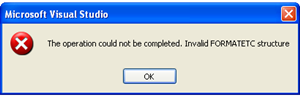
Invalid Formatetc Structure Ajax Asp.Net Error

Invalid FORMATETC Structure Ajax Asp.Net Error

If you are getting "The operation could not be completed. Invalid Formatetc Structure" error while using Asp.Net Ajax controls in Visual studio 2008 then this error occurs because of version conflict of System.web.extensions assembly installed in GAC.

Invalid FORMATETC structure Ajax Asp.Net


To fix this problem try any of the following solutions.
1st Method.

Visual studio 2008 uses .NET framework version 3.5 and System.web.extensions version 3.5.

This error occurs because of two versions of System.web.extensions installed in Global assembly cache (GAC) typically in C:\WINDOWS\assembly

Visual studio 2008 automatically installs System.web.extensions version 3.5 in GAC and if you also uses visual studio 2005 or have installed asp.net ajax extensions for Visual studio 2005 which installs System.web.extensions version 1.0.xxxxx.x in GAC and hence version conflict and this Invalid FORMATETC structure error occurs as shown below..

Asp.Net AjaxControlToolkit invalid FORMATETC structure

The simplest solution to fix this error is to put Latest version of AjaxControlToolkit.dll for .Net framework 3.5 in BIN folder of website or application.

2nd Method.

Uninstall or remove System.web.extensions version 1.0.xxxxx.x from GAC which was installed to use ajax controls with visual studio 2005.


2

Create User Programmatically Using Membership In Asp.Net

Create User Programmatically Using Membership Provider In Asp.Net

To create users or new accounts programmatically we need to use CreateUser Method of membership class.

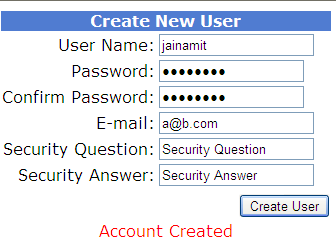
Asp.Net Membership Create user programmatically
For this i have placed textbox controls and requiredFieldValidators to validate respective textboxes.

Read CreateUserWizard Email Verification Or Confirmation In Asp.NET to know how to create user with Email Activation validation link.


HTML SOURCE OF PAGE
<table border="0" style="font-family:Verdana;font-size:100%;">
<tr>
<td align="center" colspan="2" style="color:White;
    background-color:#507CD1;
    font-weight:bold;">Create New User</td></tr>

<tr><td align="right">User Name:</td>
<td><asp:TextBox ID="txtUserName" runat="server">
</asp:TextBox>
<asp:RequiredFieldValidator 
     ID="UserName" runat="server" 
     ControlToValidate="txtUserName" 
     ErrorMessage="User Name is required." 
     ToolTip="User Name is required.">*
</asp:RequiredFieldValidator></td></tr>

<tr><td align="right">Password:</td>
<td><asp:TextBox ID="txtPassword" runat="server" 
                 TextMode="Password">
</asp:TextBox>
<asp:RequiredFieldValidator 
     ID="Password" runat="server" 
     ControlToValidate="txtPassword" 
     ErrorMessage="Password is required." 
     ToolTip="Password is required.">*
</asp:RequiredFieldValidator></td></tr>

<tr><td align="right">Confirm Password:</td>
<td><asp:TextBox ID="txtConfirmPassword" 
                 runat="server" 
                 TextMode="Password">
</asp:TextBox>
<asp:RequiredFieldValidator 
     ID="ConfirmPassword" runat="server" 
     ControlToValidate="txtConfirmPassword" 
     ErrorMessage="Confirm Password is required." 
     ToolTip="Confirm Password is required.">*
</asp:RequiredFieldValidator></td></tr>

<tr><td align="right">E-mail:</td>
<td><asp:TextBox ID="txtEmail" runat="server">
</asp:TextBox>
<asp:RequiredFieldValidator 
     ID="Email" runat="server" 
     ControlToValidate="txtEmail" 
     ErrorMessage="E-mail is required." 
     ToolTip="E-mail is required.">*
</asp:RequiredFieldValidator></td></tr>

<tr><td align="right">Security Question:</td>
<td><asp:TextBox ID="txtQuestion" runat="server">
</asp:TextBox>
<asp:RequiredFieldValidator 
     ID="Question" runat="server" 
     ControlToValidate="txtQuestion" 
     ErrorMessage="Security question is required." 
     ToolTip="Security question is required.">*
</asp:RequiredFieldValidator></td></tr>

<tr><td align="right">Security Answer:</td>
<td><asp:TextBox ID="txtAnswer" runat="server">
</asp:TextBox>
<asp:RequiredFieldValidator 
     ID="Answer" runat="server" 
     ControlToValidate="txtAnswer" 
     ErrorMessage="Security answer is required." 
     ToolTip="Security answer is required.">*
</asp:RequiredFieldValidator></td></tr>

<tr><td align="center" colspan="2">
<asp:CompareValidator 
     ID="PasswordCompare" runat="server" 
     ControlToCompare="txtPassword" 
     ControlToValidate="txtConfirmPassword" 
     ErrorMessage="The Password and Confirmation Password must match."> 
</asp:CompareValidator></td></tr>

<tr><td align="right" colspan="2" style="color:Red;">
<asp:Button ID="btnCreateUser" runat="server" 
            Text="Create User" 
            onclick="btnCreateUser_Click"/></td></tr>
<tr><td align="center" colspan="2" style="color:Red;">
<asp:Label ID="lblMessage" runat="server">
</asp:Label></td></tr>
</table>

Write below mentioned code in Click event of Create New User Button.

C# CODE
using System.Web.Security;
protected void btnCreateUser_Click(object sender, EventArgs e)
    {
        MembershipCreateStatus status;
        MembershipUser newUser = Membership.CreateUser(txtUserName.Text, txtPassword.Text, txtEmail.Text, txtQuestion.Text, txtAnswer.Text, true, out status);
        switch (status)
        {
            case MembershipCreateStatus.Success:
                lblMessage.Text = "Account Created";
                break;
            case MembershipCreateStatus.DuplicateUserName:
                lblMessage.Text = "Username Already exists";
                break;
            case MembershipCreateStatus.DuplicateEmail:
                lblMessage.Text = "Email already registered";
                    break;
            case MembershipCreateStatus.InvalidEmail:
                    lblMessage.Text = "Invalid Email";
                    break;
            case MembershipCreateStatus.InvalidPassword:
                    lblMessage.Text = "Invalid password";
                    break;
            default:
                    lblMessage.Text = "Error occured, account was not created ";
                    break;
        }
    }

VB.NET
Protected Sub btnCreateUser_Click(sender As Object, e As EventArgs)
 Dim status As MembershipCreateStatus
 Dim newUser As MembershipUser = Membership.CreateUser(txtUserName.Text, txtPassword.Text, txtEmail.Text, txtQuestion.Text, txtAnswer.Text, True, _
  status)
 Select Case status
  Case MembershipCreateStatus.Success
   lblMessage.Text = "Account Created"
   Exit Select
  Case MembershipCreateStatus.DuplicateUserName
   lblMessage.Text = "Username Already exists"
   Exit Select
  Case MembershipCreateStatus.DuplicateEmail
   lblMessage.Text = "Email already registered"
   Exit Select
  Case MembershipCreateStatus.InvalidEmail
   lblMessage.Text = "Invalid Email"
   Exit Select
  Case MembershipCreateStatus.InvalidPassword
   lblMessage.Text = "Invalid password"
   Exit Select
  Case Else
   lblMessage.Text = "Error occured, account was not created "
   Exit Select
 End Select
End Sub


Find More Articles