0

Browser Detection In Asp.Net

Browser Detection In Asp.Net

In this post i'm explaining how to detect browser type, browser name, version, cookies support and javascript version using c# or javascript in asp.net.

Detecting browser using C# is quite simple in asp.net, below mention code can detect all above mentioned features.

protected void Page_Load(object sender, EventArgs e)
    {
        System.Web.HttpBrowserCapabilities browserDetection = Request.Browser;
        lblBrowserType.Text = browserDetection.Type;
        lblBrowserName.Text = browserDetection.Browser;
        lblBrowserVersion.Text = browserDetection.Version;
        
        lblBrowserCookieSupport.Text = browserDetection.Cookies.ToString();
        lblBrowserJavaScriptVersion.Text = browserDetection.EcmaScriptVersion.ToString();

    }


To detect browser through javascript we can write code as mentioned below

   1:  var nVer = navigator.appVersion;
   2:  var nAgt = navigator.userAgent;
   3:  var browserName  = navigator.appName;
   4:  var fullVersion  = ''+parseFloat(navigator.appVersion); 
   5:  var majorVersion = parseInt(navigator.appVersion,10);
   6:  var nameOffset,verOffset,ix;
   7:   
   8:  // In Opera, the true version is after "Opera" or after "Version"
   9:  if ((verOffset=nAgt.indexOf("Opera"))!=-1) {
  10:   browserName = "Opera";
  11:   fullVersion = nAgt.substring(verOffset+6);
  12:   if ((verOffset=nAgt.indexOf("Version"))!=-1) 
  13:     fullVersion = nAgt.substring(verOffset+8);
  14:  }
  15:  // In MSIE, the true version is after "MSIE" in userAgent
  16:  else if ((verOffset=nAgt.indexOf("MSIE"))!=-1) {
  17:   browserName = "Microsoft Internet Explorer";
  18:   fullVersion = nAgt.substring(verOffset+5);
  19:  }
  20:  // In Chrome, the true version is after "Chrome" 
  21:  else if ((verOffset=nAgt.indexOf("Chrome"))!=-1) {
  22:   browserName = "Chrome";
  23:   fullVersion = nAgt.substring(verOffset+7);
  24:  }
  25:  // In Safari, the true version is after "Safari" or after "Version" 
  26:  else if ((verOffset=nAgt.indexOf("Safari"))!=-1) {
  27:   browserName = "Safari";
  28:   fullVersion = nAgt.substring(verOffset+7);
  29:   if ((verOffset=nAgt.indexOf("Version"))!=-1) 
  30:     fullVersion = nAgt.substring(verOffset+8);
  31:  }
  32:  // In Firefox, the true version is after "Firefox" 
  33:  else if ((verOffset=nAgt.indexOf("Firefox"))!=-1) {
  34:   browserName = "Firefox";
  35:   fullVersion = nAgt.substring(verOffset+8);
  36:  }
  37:  // In most other browsers, "name/version" is at the end of userAgent 
  38:  else if ( (nameOffset=nAgt.lastIndexOf(' ')+1) < 
  39:            (verOffset=nAgt.lastIndexOf('/')) ) 
  40:  {
  41:   browserName = nAgt.substring(nameOffset,verOffset);
  42:   fullVersion = nAgt.substring(verOffset+1);
  43:   if (browserName.toLowerCase()==browserName.toUpperCase()) {
  44:    browserName = navigator.appName;
  45:   }
  46:  }
  47:  // trim the fullVersion string at semicolon/space if present
  48:  if ((ix=fullVersion.indexOf(";"))!=-1)
  49:     fullVersion=fullVersion.substring(0,ix);
  50:  if ((ix=fullVersion.indexOf(" "))!=-1)
  51:     fullVersion=fullVersion.substring(0,ix);
  52:   
  53:  majorVersion = parseInt(''+fullVersion,10);
  54:  if (isNaN(majorVersion)) {
  55:   fullVersion  = ''+parseFloat(navigator.appVersion); 
  56:   majorVersion = parseInt(navigator.appVersion,10);
  57:  }
  58:   
  59:  document.write(''
  60:   +'Browser name  = '+browserName+'<br>'
  61:   +'Full version  = '+fullVersion+'<br>'
  62:   +'Major version = '+majorVersion+'<br>'
  63:   +'navigator.appName = '+navigator.appName+'<br>'
  64:   +'navigator.userAgent = '+navigator.userAgent+'<br>'
  65:  )

2

Export Crystal Reports To PDF Word Excel In Asp.Net

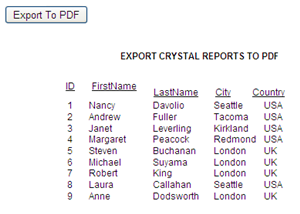
This example explains how to Export or Save Crystal Reports To Pdf,Ms Word,Excel Programmatically In Asp.Net

Export crystal reports to pdf word excel in asp.net


For this Example i have used Northwind Database and Employees table.

After you have finished Creating Crystal Reports,

place one button on the aspx page to export report to pdf or word format.

We'll write code in Page_Load Event to load report when page loads and in Click Event of button to create pdf,word or excel report.

HTML SOURCE OF PAGE
   1:  <form id="form1" runat="server">
   2:  <div>
   3:  <asp:Button ID="btnExport" runat="server" 
   4:              Text="Export To PDF" 
   5:              onclick="btnExport_Click"/>
   6:  </div>
   7:  <div>
   8:  <CR:CrystalReportSource ID="CrystalReportSource1" 
   9:                          runat="server">
  10:      <Report FileName="ExportToPdf.rpt">
  11:      </Report>
  12:  </CR:CrystalReportSource>
  13:      
  14:  <CR:CrystalReportViewer ID="CrystalReportViewer1" 
  15:                          runat="server" 
  16:                          AutoDataBind="True" 
  17:                          EnableDatabaseLogonPrompt="False" 
  18:                          EnableParameterPrompt="False" 
  19:                          ReportSourceID="CrystalReportSource1"/>
  20:  </div>
  21:  </form>


C#
using CrystalDecisions.CrystalReports.Engine;
using CrystalDecisions.Shared;
protected void Page_Load(object sender, EventArgs e)
    {
        ReportDocument pdfReport = new ReportDocument();
        pdfReport.Load(Server.MapPath("ExportToPdf.rpt"));
        pdfReport.SetDatabaseLogon("amitjain","password", @"AMITJAIN\SQL", "Northwind");
        CrystalReportViewer1.ReportSource = pdfReport;
    }
    protected void btnExport_Click(object sender, EventArgs e)
    {
        ReportDocument pdfReport = new ReportDocument();
        pdfReport.Load(Server.MapPath("ExportToPdf.rpt"));
        pdfReport.SetDatabaseLogon("amitjain", "password", @"AMITJAIN\SQL", "Northwind");
        Response.Buffer = false;
        Response.ClearContent();
        Response.ClearHeaders();
        pdfReport.ExportToHttpResponse(ExportFormatType.PortableDocFormat, Response, true, "Employees");
        Response.End();
    }


VB.NET
Protected Sub Page_Load(sender As Object, e As EventArgs)
 Dim pdfReport As New ReportDocument()
 pdfReport.Load(Server.MapPath("ExportToPdf.rpt"))
 pdfReport.SetDatabaseLogon("amitjain", "password", "AMITJAIN\SQL", "Northwind")
 CrystalReportViewer1.ReportSource = pdfReport
End Sub
Protected Sub btnExport_Click(sender As Object, e As EventArgs)
 Dim pdfReport As New ReportDocument()
 pdfReport.Load(Server.MapPath("ExportToPdf.rpt"))
 pdfReport.SetDatabaseLogon("amitjain", "password", "AMITJAIN\SQL", "Northwind")
 Response.Buffer = False
 Response.ClearContent()
 Response.ClearHeaders()
 pdfReport.ExportToHttpResponse(ExportFormatType.PortableDocFormat, Response, True, "Employees")
 Response.[End]()
End Sub

Build and run the code.

To Export crystal Reports to Word Excel or other formats we need to change below mentioned line of code to desired format.

For MS WORD
pdfReport.ExportToHttpResponse(ExportFormatType.WordForWindows, Response, true, "Employees");

Where Employees is the name of file you want to be created.

For MS Excel
pdfReport.ExportToHttpResponse(ExportFormatType.Excel, Response, true, "Employees");


9

Asp.Net AdRotator With Timer Rotate Ads Without Refresh

AdRotator Control With Timer Example In Asp.Net Ajax To Rotate Advertisements Ads Without Refreshing The Page.

Asp.Net AdRotator With timer to rotate ads without refreshing the page
AdRotator control is used to display ads on asp.net website.

Ads are changed when user reload or refresh the page, but using ajax and timer we can rotate them without refreshing.

Create a new website in visual studio and add a new folder named Ads and place some images in it.

AdRotator control display advertisements from XML file

For this right click in solution explorer > Add New Item > XML File.

Name it advertisement.xml and write following info in it.


   1:  <?xml version="1.0" encoding="utf-8" ?>
   2:  <Advertisements>
   3:    <Ad>
   4:      <ImageUrl>~/Ads/1.jpg</ImageUrl>
   5:      <NavigateUrl>http://www.google.com</NavigateUrl>
   6:      <AlternateText>AdRotator Control sample ads
   7:      </AlternateText>
   8:      <Impressions>20</Impressions>
   9:      <Keyword>Asp.Net</Keyword>
  10:    </Ad>
  11:    <Ad>
  12:      <ImageUrl>~/Ads/2.jpg</ImageUrl>
  13:      <NavigateUrl>http://csharpdotnetfreak.blogspot.com
  14:      </NavigateUrl>
  15:      <AlternateText>AdRotator Control sample ads
  16:      </AlternateText>
  17:      <Impressions>30</Impressions>
  18:      <Keyword>Asp.Net</Keyword>
  19:    </Ad>
  20:   </Advertisements>

Place AdRotator control on the aspx page and configure it as mentioned below.

   1:  <asp:AdRotator ID="AdRotator1" runat="server" 
   2:                 AdvertisementFile="~/App_Data/advertisement.xml"
   3:                 KeywordFilter="Asp.Net">
   4:  </asp:AdRotator>

Set AdvertisementFile property to the XML file we created earlier and set KeywordFilter to keywords on which we want to show ads, these can be channel keywords or banner size keywords but they must match with keywords in XML file.

To change ads on regular interval we need to put AdRotator control in Ajax Update Panel with a timer control in it as mentioned below.

   1:  <form id="form1" runat="server">
   2:  <div>
   3:  <asp:ScriptManager ID="ScriptManager1" 
   4:                     runat="server">
   5:  </asp:ScriptManager>
   6:   
   7:  <asp:Timer ID="Timer1" runat="server" 
   8:             Interval="500">
   9:  </asp:Timer>
  10:   
  11:  <asp:UpdatePanel ID="UpdatePanel1" 
  12:                   runat="server">
  13:  <Triggers>
  14:  <asp:AsyncPostBackTrigger ControlID="Timer1" 
  15:                            EventName="Tick" />
  16:  </Triggers>
  17:   
  18:  <ContentTemplate>
  19:  <asp:AdRotator ID="AdRotator1" runat="server" 
  20:                 AdvertisementFile="~/App_Data/advertisement.xml"
  21:                 KeywordFilter="Asp.Net">
  22:  </asp:AdRotator>
  23:  </ContentTemplate>
  24:  </asp:UpdatePanel>
  25:  </div>
  26:  </form>

Build and run the code.

Download Sample Code


5

Download File From Server In Asp.Net

In this example i'm explaining how to Download Files From Server In Asp.Net and display Save As dialog box when a hyperlink is clicked on the site.

Download files from server in asp.net

I have created a folder on server and stored some sample files to download.

First we need to write code to display names of all the files saved in Files folder as hyperlinks so that user can download these files.

You can read to know how to Save Files In Sql Database And Download From GridView In Asp.Net

Write below mentioned code in Page_Load event of page where you want to display all the links with file names.


C# CODE
protected void Page_Load(object sender, EventArgs e)
    {
        DirectoryInfo directory = new DirectoryInfo(Server.MapPath("~/Files"));
        int counter = 0;
        foreach (FileInfo file in directory.GetFiles())
        {
            HyperLink link = new HyperLink();
            link.ID = "Link" + counter++;
            link.Text = file.Name;
            link.NavigateUrl = "Default2.aspx?name="+file.Name;
            
            Page.Controls.Add(link);
            Page.Controls.Add(new LiteralControl("<br/>"));
        }
    }

VB.NET CODE
Protected Sub Page_Load(sender As Object, e As EventArgs)
 Dim directory As New DirectoryInfo(Server.MapPath("~/Files"))
 Dim counter As Integer = 0
 For Each file As FileInfo In directory.GetFiles()
  Dim link As New HyperLink()
  link.ID = "Link" & System.Math.Max(System.Threading.Interlocked.Increment(counter),counter - 1)
  link.Text = file.Name
  link.NavigateUrl = "Default2.aspx?name=" + file.Name

  Page.Controls.Add(link)
  Page.Controls.Add(New LiteralControl("<br/>"))
 Next
End Sub

Add a new web form Default2.aspx in the soulution and write code mentioned below in Page_Load Event.

C# CODE
protected void Page_Load(object sender, EventArgs e)
    {
        string fileName = Request.QueryString["name"].ToString();
        Response.ContentType = "application/octet-stream";
        Response.AddHeader("Content-Disposition", "attachment;filename=" + fileName);
        Response.TransmitFile(Server.MapPath("~/Files/" + fileName));
        Response.End();
    }

VB.NET CODE
Protected Sub Page_Load(sender As Object, e As EventArgs)
 Dim fileName As String = Request.QueryString("name").ToString()
 Response.ContentType = "application/octet-stream"
 Response.AddHeader("Content-Disposition", "attachment;filename=" & fileName)
 Response.TransmitFile(Server.MapPath("~/Files/" & fileName))
 Response.[End]()
End Sub

Build and run the code.

Download Sample Code


1

Asp.Net CompareValidator With Date Example

Asp.Net CompareValidator Example To Compare Or Validate Dates Or TextBox Values

To configure CompareValidator we need to assign ControlToCompare, ControlToValidate,Operator properties.

Asp.Net comparevalidator with dates example
For example We can use comparevalidator to compare values entered in password and confirm password textboxes which needs to be same,
And using it we don't need to wtite any code to check whether password in both textboxes are equal or not.

I have placed a textbox txtPwd for entering password and another textbox txtRePwd for re entering password.

HTML SOURCE TO COMPARE PASSWORDS
   1:  <tr>
   2:  <td>Password:</td>
   3:  <td><asp:TextBox ID="txtPwd" runat="server"
   4:                   TextMode="Password">
   5:      </asp:TextBox>
   6:  </td>
   7:  </tr>
   8:  <tr>
   9:  <td>Confirm Password:</td>
  10:  <td><asp:TextBox ID="txtRePwd" runat="server"
  11:                   TextMode="Password">
  12:      </asp:TextBox>
  13:  </td>
  14:  <td>
  15:  <asp:CompareValidator ID="CompareValidator1" 
  16:       runat="server" 
  17:       ControlToCompare="txtRePwd" 
  18:       ControlToValidate="txtPwd" 
  19:       Operator="Equal" 
  20:       ErrorMessage="Password and confirm 
  21:                     password do not match" 
  22:       SetFocusOnError="True">
  23:  </asp:CompareValidator>
  24:  </td>
  25:  </tr>

We can also use comparevalidator to validate dates.
For validation we need to define Type property of comparevalidator to Date.

HTML SOURCE TO COMPARE DATES
   1:  <asp:CompareValidator ID="CompareValidator2" 
   2:       runat="server"
   3:       ControlToCompare="txtLastDate"
   4:       ControlToValidate="txtRegDate" 
   5:       ErrorMessage="Please enter registration 
   6:                     date earlier then last date"
   7:       Operator="LessThanEqual" Type="Date" 
   8:       ValueToCompare="<%= txtLastDate.Text.ToShortString() %>">*
   9:  </asp:CompareValidator>

Hope this helps.

15

Create User Registration Form In Asp.Net

Creating User Registration Form Example In Asp.Net

In this post i am explaining how to create user registration or signup page in asp.net with sql server database using C# and VB.NET.

Creating user registration form in asp.net
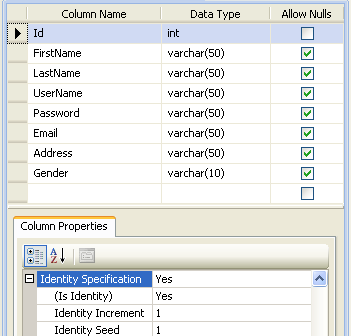
For this first of all we need to create a table in sql server database to store user registration data.

I have created a table named Users for this example with columns shown in image below.


We can also Create Users with Membership Provider programmatically Or using CreateUserWizard, You will also need a Login Page

Place textboxes on the form for entering name,username,password,address,email etc.

Set Textmode property of password textbox to password to display * character instead of text entered.

Associate RequiredFieldValidators with textboxes as shown in HTML source.

Place one Label and Button to save the data.

HTML SOURCE OF PAGE
   1:  <table>
   2:  <tr>
   3:  <td>First Name:</td>
   4:  <td><asp:TextBox ID="txtFirstName" runat="server">
   5:     </asp:TextBox>
   6:  </td>
   7:  <td><asp:RequiredFieldValidator ID="rfvFirstName" 
   8:              runat="server" 
   9:              ControlToValidate="txtFirstName"
  10:              ErrorMessage="First Name can't be left blank" 
  11:              SetFocusOnError="True">*
  12:       </asp:RequiredFieldValidator>
  13:  </td>
  14:  </tr>
  15:  <tr>
  16:  <td>Last Name:</td>
  17:  <td><asp:TextBox ID="txtLastName" runat="server">
  18:      </asp:TextBox></td>
  19:  <td><asp:RequiredFieldValidator 
  20:           ID="RequiredFieldValidator1" runat="server" 
  21:           ControlToValidate="txtLastName"
  22:           ErrorMessage="Last Name can't be left blank" 
  23:           SetFocusOnError="True">*
  24:      </asp:RequiredFieldValidator>
  25:  </td></tr>
  26:   
  27:  <tr><td>UserName:</td>
  28:  <td><asp:TextBox ID="txtUserName" runat="server">
  29:      </asp:TextBox>
  30:  </td>
  31:  <td><asp:RequiredFieldValidator 
  32:           ID="rfvUserName" 
  33:           runat="server" 
  34:           ControlToValidate="txtUserName"
  35:           ErrorMessage="UserName can't be left blank" 
  36:           SetFocusOnError="True">*
  37:      </asp:RequiredFieldValidator>
  38:  </td></tr>
  39:   
  40:  <tr><td>Password:</td>
  41:  <td><asp:TextBox ID="txtPwd" runat="server"
  42:                   TextMode="Password">
  43:      </asp:TextBox>
  44:  </td>
  45:  <td><asp:RequiredFieldValidator ID="rfvPwd" 
  46:           runat="server" ControlToValidate="txtPwd"
  47:           ErrorMessage="Password can't be left blank" 
  48:           SetFocusOnError="True">*
  49:     </asp:RequiredFieldValidator>
  50:  </td></tr>
  51:   
  52:  <tr><td>Confirm Password:</td>
  53:  <td><asp:TextBox ID="txtRePwd" runat="server"
  54:                   TextMode="Password">
  55:      </asp:TextBox>
  56:  </td>
  57:  <td><asp:CompareValidator ID="CompareValidator1" 
  58:           runat="server" 
  59:           ControlToCompare="txtRePwd" 
  60:           ControlToValidate="txtPwd" 
  61:           Operator="Equal" 
  62:           ErrorMessage="Password and confirm password do not match" 
  63:           SetFocusOnError="True">
  64:      </asp:CompareValidator>
  65:  </td></tr>
  66:   
  67:  <tr><td>Gender:</td>
  68:  <td><asp:RadioButtonList ID="rdoGender" 
  69:                           runat="server">
  70:           <asp:ListItem>Male</asp:ListItem>
  71:           <asp:ListItem>Female</asp:ListItem>
  72:      </asp:RadioButtonList>
  73:  </td>
  74:  <td><asp:RequiredFieldValidator 
  75:           ID="RequiredFieldValidator2" 
  76:           runat="server" 
  77:           ControlToValidate="rdoGender"
  78:           ErrorMessage="Gender can't be left blank" 
  79:           SetFocusOnError="True">*
  80:       </asp:RequiredFieldValidator>
  81:  </td></tr>
  82:   
  83:  <tr><td>Address:</td>
  84:  <td><asp:TextBox ID="txtAdress" runat="server" 
  85:                   TextMode="MultiLine">
  86:      </asp:TextBox>
  87:  </td>
  88:  <td><asp:RequiredFieldValidator ID="rfvAddress" 
  89:           runat="server" 
  90:           ControlToValidate="txtAdress"
  91:           ErrorMessage="Address can't be left blank" 
  92:           SetFocusOnError="True">*
  93:      </asp:RequiredFieldValidator>
  94:  </td></tr>
  95:                          
  96:  <tr><td>Email ID:</td>
  97:  <td><asp:TextBox ID="txtEmailID" runat="server">
  98:      </asp:TextBox>
  99:  </td>
 100:  <td><asp:RequiredFieldValidator 
 101:           ID="RequiredFieldValidator3" 
 102:           runat="server" 
 103:           ControlToValidate="txtEmailID"
 104:           ErrorMessage="Email can't be left blank" 
 105:           SetFocusOnError="True">*
 106:      </asp:RequiredFieldValidator>
 107:  </td></tr>
 108:   
 109:  <tr><td><asp:Label ID="lblMsg" runat="server">
 110:          </asp:Label>
 111:      </td>
 112:  <td><asp:ValidationSummary ID="ValidationSummary1" 
 113:           runat="server" ShowMessageBox="True" 
 114:           ShowSummary="False"/>
 115:  </td></tr>
 116:   
 117:  <tr><td><asp:Button ID="btnSave" runat="server" 
 118:                      Text="Sign Up" 
 119:                      onclick="btnSave_Click"/>
 120:  </td></tr>
 121:  </table>

Write below mentioned code in click event of signup button.

C# CODE
protected void btnSave_Click(object sender, EventArgs e)
    {
        //Create ConnectionString and Inser Statement
        string connectionString = ConfigurationManager.ConnectionStrings["ConnectionString"].ConnectionString;
        string insertSql = "INSERT INTO Users (FirstName,LastName,UserName,Password,Email,Address,Gender)" 
        + " values (@FirstName,@LastName,@UserName,@Password,@Email,@Address,@Gender)";
        //Create SQL connection
        SqlConnection con = new SqlConnection(connectionString);
        
        //Create SQL Command And Sql Parameters

        SqlCommand cmd = new SqlCommand();
        cmd.Connection = con;
        cmd.CommandType = CommandType.Text;
        cmd.CommandText = insertSql;

        SqlParameter firstName = new SqlParameter("@FirstName", SqlDbType.VarChar, 50);
        firstName.Value = txtFirstName.Text.ToString();
        cmd.Parameters.Add(firstName);

        SqlParameter lastName = new SqlParameter("@LastName", SqlDbType.VarChar, 50);
        lastName.Value = txtLastName.Text.ToString();
        cmd.Parameters.Add(lastName);

        SqlParameter userName = new SqlParameter("@UserName", SqlDbType.VarChar, 50);
        userName.Value = txtUserName.Text.ToString();
        cmd.Parameters.Add(userName);

        SqlParameter pwd = new SqlParameter("@Password", SqlDbType.VarChar, 50);
        pwd.Value = txtPwd.Text.ToString();
        cmd.Parameters.Add(pwd);

        SqlParameter email = new SqlParameter("@Email", SqlDbType.VarChar, 50);
        email.Value = txtEmailID.Text.ToString();
        cmd.Parameters.Add(email);

        SqlParameter address = new SqlParameter("@Address", SqlDbType.VarChar, 50);
        address.Value = txtAdress.Text.ToString();
        cmd.Parameters.Add(address);

        SqlParameter gender = new SqlParameter("@Gender", SqlDbType.VarChar, 10);
        gender.Value = rdoGender.SelectedItem.ToString();
        cmd.Parameters.Add(gender);

        
        try
        {
            con.Open();
            cmd.ExecuteNonQuery();
            lblMsg.Text = "User Registration successful";
        }
        catch (SqlException ex)
        {
            string errorMessage = "Error in registering user";
            errorMessage += ex.Message;
            throw new Exception(errorMessage);

        }
        finally
        {
            con.Close();
        }
    }

VB.NET
Protected Sub btnSave_Click(sender As Object, e As EventArgs)
 'Create ConnectionString and Inser Statement
 Dim connectionString As String = ConfigurationManager.ConnectionStrings("ConnectionString").ConnectionString
 Dim insertSql As String = "INSERT INTO Users (FirstName,LastName,UserName,Password,Email,Address,Gender)" & " values (@FirstName,@LastName,@UserName,@Password,@Email,@Address,@Gender)"
 'Create SQL connection
 Dim con As New SqlConnection(connectionString)

 'Create SQL Command And Sql Parameters

 Dim cmd As New SqlCommand()
 cmd.Connection = con
 cmd.CommandType = CommandType.Text
 cmd.CommandText = insertSql

 Dim firstName As New SqlParameter("@FirstName", SqlDbType.VarChar, 50)
 firstName.Value = txtFirstName.Text.ToString()
 cmd.Parameters.Add(firstName)

 Dim lastName As New SqlParameter("@LastName", SqlDbType.VarChar, 50)
 lastName.Value = txtLastName.Text.ToString()
 cmd.Parameters.Add(lastName)

 Dim userName As New SqlParameter("@UserName", SqlDbType.VarChar, 50)
 userName.Value = txtUserName.Text.ToString()
 cmd.Parameters.Add(userName)

 Dim pwd As New SqlParameter("@Password", SqlDbType.VarChar, 50)
 pwd.Value = txtPwd.Text.ToString()
 cmd.Parameters.Add(pwd)

 Dim email As New SqlParameter("@Email", SqlDbType.VarChar, 50)
 email.Value = txtEmailID.Text.ToString()
 cmd.Parameters.Add(email)

 Dim address As New SqlParameter("@Address", SqlDbType.VarChar, 50)
 address.Value = txtAdress.Text.ToString()
 cmd.Parameters.Add(address)

 Dim gender As New SqlParameter("@Gender", SqlDbType.VarChar, 10)
 gender.Value = rdoGender.SelectedItem.ToString()
 cmd.Parameters.Add(gender)


 Try
  con.Open()
  cmd.ExecuteNonQuery()
  lblMsg.Text = "User Registration successful"
 Catch ex As SqlException
  Dim errorMessage As String = "Error in registering user"
  errorMessage += ex.Message

  Throw New Exception(errorMessage)
 Finally
  con.Close()
 End Try
End Sub

Build and run the code.


Download Sample Code


1

Visual Studio Remove Unused References With Organize Usings

Remove Unused References In Visual Studio By Organize Usings Command For C# VB.NET COde Behind

When we create a new website or project in visual studio, several namespace references are added in code behind by default.

Visual studio Remove unused references using organize using

It's always advisable to remove all unused usings and references from code behind for better performance.

We can follow steps mentioned below to remove all unused usings and references.

FOR C# APPLICATIONS OR PROJECTS

Open code behind of the page u want to remove unused references,
Right click > Organize Usings > Remove Unused Usings


All unused usings will be removed as shown below.


FOR VB.NET APPLICATIONS

Right click on My Project in solution explorer > Select Open.


Select References tab and click on unused references button.


Check the check box for references you want to remove and click on remove.


Hope this helps.


4

Get RowIndex In GridView RowCommand Event Using DataKey

Get RowIndex Of GridView Row In RowCommand Event Using DataKey or CommandArgument in asp.net

In this post i am showing how to get RowIndex of gridview row in RowCommand Event through DataKey property or commandArgument.

RowCommand event is raised when a button inside gridview is clicked.

Method 1.

To get gridview rowindex through DataKey property we can use code as mentioned below.

For this we need to define DataKeyNames property in gridview.

HTML SOURCE
<asp:GridView ID="GridView1" runat="server" 
              AutoGenerateColumns="False" 
              DataSourceID="SqlDataSource1" 
              onrowcommand="GridView1_RowCommand" 
              DataKeyNames="DocID">
<Columns>
<asp:BoundField DataField="DocID" HeaderText="DocID" 
                InsertVisible="False" 
                ReadOnly="True" 
                SortExpression="DocID" />

<asp:ButtonField ButtonType="Button"  
                CommandName="Show" 
                Text="Show"/>
                
</Columns>
</asp:GridView>

Write following code in RowCommand Event of gridview to get rowindex or row number in which button was clicked.

C# CODE
protected void GridView1_RowCommand(object sender, GridViewCommandEventArgs e)
    {
        if (e.CommandName == "Show")
        {
            int index = Convert.ToInt32(e.CommandArgument);
            int documentID = Convert.ToInt32(GridView1.DataKeys[index].Value);
           
             // Write your further code
            
        }
    }

VB.NET
Protected Sub GridView1_RowCommand(sender As Object, e As GridViewCommandEventArgs)
 If e.CommandName = "Show" Then
  Dim index As Integer = Convert.ToInt32(e.CommandArgument)
  Dim documentID As Integer = Convert.ToInt32(GridView1.DataKeys(index).Value)
                 
                ' Write your further code
 End If
End Sub


Method 2.

To get rowindex without using DataKey we can write code as mentioned below.

C#
protected void GridView1_RowCommand(object sender, GridViewCommandEventArgs e)
    {
        if (e.CommandName == "Show")
        {
            int index = Convert.ToInt32(e.CommandArgument);
            GridViewRow row = GridView1.Rows[index];
            int docID = Convert.ToInt32(row.Cells[0].Text);
           
            // Write your further code here 
        }
     }

VB.NET
Protected Sub GridView1_RowCommand(sender As Object, e As GridViewCommandEventArgs)
 If e.CommandName = "Show" Then
  Dim index As Integer = Convert.ToInt32(e.CommandArgument)
  Dim row As GridViewRow = GridView1.Rows(index)
  Dim docID As Integer = Convert.ToInt32(row.Cells(0).Text)

               ' Write your further code here 
 End If
End Sub

If we have placed controls like label,textbox or dropdowns in the gridview row then we can access these controls in following manner.

HTML SOURCE
<asp:GridView ID="GridView1" runat="server" 
              AutoGenerateColumns="False" 
              DataSourceID="SqlDataSource1" 
              onrowcommand="GridView1_RowCommand">
<Columns>
<asp:BoundField DataField="DocID" HeaderText="DocID" 
                InsertVisible="False" 
                ReadOnly="True" 
                SortExpression="DocID" />

<asp:ButtonField ButtonType="Button"  
                CommandName="Show" 
                Text="Show"/>
                
<asp:TemplateField HeaderText="Message">
<ItemTemplate>
<asp:Label ID="lblMessage" runat="server" 
           Text='<%#Eval("DocName") %>'>
</asp:Label>
</ItemTemplate>
</asp:TemplateField>
</Columns>
</asp:GridView>

C#
protected void GridView1_RowCommand(object sender, GridViewCommandEventArgs e)
    {
        if (e.CommandName == "Show")
        {
            int index = Convert.ToInt32(e.CommandArgument);
            GridViewRow row = GridView1.Rows[index];
            int docID = Convert.ToInt32(row.Cells[0].Text);
            string labelText = ((Label)row.FindControl("lblMessage")).Text.ToString();
        }
    }

If we want to place a button inside TemplateField then we need to define CommandArgument property manually in html source as follows.

<asp:TemplateField>
 <ItemTemplate>                
 <asp:Button runat="server" ID="btnDn"
             Text="Down" CommandName="Show" 
CommandArgument="<%#((GridViewRow)Container).RowIndex%>"/>
</ItemTemplate>
</asp:TemplateField>

Hope this helps


20

Save Store Files In Sql Database Download From GridView Asp.Net

Upload Save Or Store Files In Ms Sql Server Database And Download In Asp.Net.

In this post i'm explaining how to save pdf,word,excel,jpeg,gif,png files in MS sqlserver database .

Save or Store files in sqlserver database asp.net

I'll also explain how to download files from sql database.

For this example i have created a sample database with table name SaveDoc to save documents in it. table schema is shown below in image.

Read Display Images In GridView From SqlServer DataBase Asp.Net to know how to save and retrieve images in sql database and display them in gridview using handler.


For uploading and saving files to database we need to use Fileupload control, so drag and place one fileupload control and one button on the aspx page in design mode.

Place one label on the page to display success or failure message, and one gridview to display uploaded documents and provide link to download document files.

I have added one button field in gridview to provide download link to file shown in respective row of gridview and this gridview is populated by sqlDataSource.

HTML SOURCE OF THE PAGE
<form id="form1" runat="server">
<div>
<asp:FileUpload ID="FileUpload1" runat="server"/>
<asp:Button ID="btnUpload" runat="server"  
            onclick="btnUpload_Click" 
            Text="Upload"/>
</div>
<br/>
<asp:Label ID="lblMessage" runat="server">
</asp:Label><br /><br /><br />
      
<asp:GridView ID="GridView1" runat="server" 
              AutoGenerateColumns="False" 
              DataSourceID="SqlDataSource1" 
              onrowcommand="GridView1_RowCommand" 
              DataKeyNames="DocID">
<Columns>
<asp:BoundField DataField="DocID" HeaderText="DocID" 
                InsertVisible="False" 
                ReadOnly="True" 
                SortExpression="DocID" />

<asp:BoundField DataField="DocName" 
                HeaderText="DocName" 
                SortExpression="DocName" />

<asp:BoundField DataField="Type" HeaderText="Type" 
                SortExpression="Type" />
            
<asp:ButtonField ButtonType="Image"  
                ImageUrl="~/download.png" 
                CommandName="Download" 
                HeaderText="Download" />
</Columns>
</asp:GridView>
<asp:SqlDataSource ID="SqlDataSource1" runat="server" 
ConnectionString="<%$ ConnectionStrings:ConnectionString %>" 
SelectCommand="SELECT [DocID], [DocName], [Type] 
               FROM [SaveDoc]">
</asp:SqlDataSource>
</form>

To upload and save files in database write code mentioned below in Click event of upload button we placed on aspx page.

C# CODE
using System.IO;
using System.Data;
using System.Data.SqlClient;
using System.Configuration;

protected void btnUpload_Click(object sender, EventArgs e)
    {
        //Check whether FileUpload control has file 
        if (FileUpload1.HasFile)
        {
            string fileName = Path.GetFileName(FileUpload1.PostedFile.FileName);
            string fileExtension = Path.GetExtension(FileUpload1.PostedFile.FileName);
            string documentType = string.Empty;

            //provide document type based on it's extension
            switch (fileExtension)
            {
                case ".pdf":
                    documentType = "application/pdf";
                    break;
                case ".xls":
                    documentType = "application/vnd.ms-excel";
                    break;
                case ".xlsx":
                    documentType = "application/vnd.ms-excel";
                    break;
                case ".doc":
                    documentType = "application/vnd.ms-word";
                    break;
                case ".docx":
                    documentType = "application/vnd.ms-word";
                    break;
                case ".gif":
                    documentType = "image/gif";
                    break;
                case ".png":
                    documentType = "image/png";
                    break;
                case ".jpg":
                    documentType = "image/jpg";
                    break;
            }

            //Calculate size of file to be uploaded
            int fileSize = FileUpload1.PostedFile.ContentLength;

            //Create array and read the file into it
            byte[] documentBinary = new byte[fileSize];
            FileUpload1.PostedFile.InputStream.Read(documentBinary, 0, fileSize);

            // Create SQL Connection 
            SqlConnection con = new SqlConnection();
            con.ConnectionString = ConfigurationManager.ConnectionStrings["ConnectionString"].ConnectionString;

            // Create SQL Command and Sql Parameters 
            SqlCommand cmd = new SqlCommand();
            cmd.CommandText = "INSERT INTO SaveDoc(DocName,Type,DocData)" +
                              " VALUES (@DocName,@Type,@DocData)";
            cmd.CommandType = CommandType.Text;
            cmd.Connection = con;

            SqlParameter DocName = new SqlParameter("@DocName", SqlDbType.VarChar, 50);
            DocName.Value = fileName.ToString();
            cmd.Parameters.Add(DocName);

            SqlParameter Type = new SqlParameter("@Type", SqlDbType.VarChar, 50);
            Type.Value = documentType.ToString();
            cmd.Parameters.Add(Type);

            SqlParameter uploadedDocument = new SqlParameter("@DocData", SqlDbType.Binary,fileSize);
            uploadedDocument.Value = documentBinary;
            cmd.Parameters.Add(uploadedDocument);

            con.Open();
            int result = cmd.ExecuteNonQuery();
            con.Close();
            if (result > 0)
                lblMessage.Text = "File saved to database";
            GridView1.DataBind();
        }
    }

VB.NET CODE
Protected Sub btnUpload_Click(sender As Object, e As EventArgs)
 'Check whether FileUpload control has file 
 If FileUpload1.HasFile Then
  Dim fileName As String = Path.GetFileName(FileUpload1.PostedFile.FileName)
  Dim fileExtension As String = Path.GetExtension(FileUpload1.PostedFile.FileName)
  Dim documentType As String = String.Empty

  'provide document type based on it's extension
  Select Case fileExtension
   Case ".pdf"
    documentType = "application/pdf"
    Exit Select
   Case ".xls"
    documentType = "application/vnd.ms-excel"
    Exit Select
   Case ".xlsx"
    documentType = "application/vnd.ms-excel"
    Exit Select
   Case ".doc"
    documentType = "application/vnd.ms-word"
    Exit Select
   Case ".docx"
    documentType = "application/vnd.ms-word"
    Exit Select
   Case ".gif"
    documentType = "image/gif"
    Exit Select
   Case ".png"
    documentType = "image/png"
    Exit Select
   Case ".jpg"
    documentType = "image/jpg"
    Exit Select
  End Select

  'Calculate size of file to be uploaded
  Dim fileSize As Integer = FileUpload1.PostedFile.ContentLength

  'Create array and read the file into it
  Dim documentBinary As Byte() = New Byte(fileSize - 1) {}
  FileUpload1.PostedFile.InputStream.Read(documentBinary, 0, fileSize)

  ' Create SQL Connection 
  Dim con As New SqlConnection()
  con.ConnectionString = ConfigurationManager.ConnectionStrings("ConnectionString").ConnectionString

  ' Create SQL Command and Sql Parameters 
  Dim cmd As New SqlCommand()
  cmd.CommandText = "INSERT INTO SaveDoc(DocName,Type,DocData)" & " VALUES (@DocName,@Type,@DocData)"
  cmd.CommandType = CommandType.Text
  cmd.Connection = con

  Dim DocName As New SqlParameter("@DocName", SqlDbType.VarChar, 50)
  DocName.Value = fileName.ToString()
  cmd.Parameters.Add(DocName)

  Dim Type As New SqlParameter("@Type", SqlDbType.VarChar, 50)
  Type.Value = documentType.ToString()
  cmd.Parameters.Add(Type)

  Dim uploadedDocument As New SqlParameter("@DocData", SqlDbType.Binary, fileSize)
  uploadedDocument.Value = documentBinary
  cmd.Parameters.Add(uploadedDocument)

  con.Open()
  Dim result As Integer = cmd.ExecuteNonQuery()
  con.Close()
  If result > 0 Then
   lblMessage.Text = "File saved to database"
  End If
  GridView1.DataBind()
 End If
End Sub


To retrieve files from database for download in click of download button we put in gridview, we need to write code mentioned below in RowCommand Event of gridview

c# CODE
protected void GridView1_RowCommand(object sender, GridViewCommandEventArgs e)
    {
        if (e.CommandName == "Download")
        {
            string fileName = string.Empty;
            int index = Convert.ToInt32(e.CommandArgument);
            GridViewRow row = GridView1.Rows[index];
            int documentID = Convert.ToInt32(GridView1.DataKeys[index].Value);
            SqlConnection con = new SqlConnection(ConfigurationManager.ConnectionStrings["ConnectionString"].ConnectionString);
            SqlCommand cmd = new SqlCommand("SELECT DocName,DocData FROM SaveDoc WHERE DocID = " + documentID, con);
            con.Open();
            SqlDataReader dReader = cmd.ExecuteReader();
            while (dReader.Read())
            {
                fileName = dReader["DocName"].ToString();
                byte[] documentBinary = (byte[])dReader["DocData"];
                FileStream fStream = new FileStream(Server.MapPath("Docs") + @"\" + fileName, FileMode.Create);
                fStream.Write(documentBinary, 0, documentBinary.Length);
                fStream.Close();
                fStream.Dispose();
            }
            con.Close();
            Response.Redirect(@"Docs\" + fileName);
        }
    }

VB.NET CODE
Protected Sub GridView1_RowCommand(sender As Object, e As GridViewCommandEventArgs)
 If e.CommandName = "Download" Then
  Dim fileName As String = String.Empty
  Dim index As Integer = Convert.ToInt32(e.CommandArgument)
  Dim row As GridViewRow = GridView1.Rows(index)
  Dim documentID As Integer = Convert.ToInt32(GridView1.DataKeys(index).Value)
  Dim con As New SqlConnection(ConfigurationManager.ConnectionStrings("ConnectionString").ConnectionString)
  Dim cmd As New SqlCommand("SELECT DocName,DocData FROM SaveDoc WHERE DocID = " & documentID, con)
  con.Open()
  Dim dReader As SqlDataReader = cmd.ExecuteReader()
  While dReader.Read()
   fileName = dReader("DocName").ToString()
   Dim documentBinary As Byte() = DirectCast(dReader("DocData"), Byte())
   Dim fStream As New FileStream(Server.MapPath("Docs") & "\" & fileName, FileMode.Create)
   fStream.Write(documentBinary, 0, documentBinary.Length)
   fStream.Close()
   fStream.Dispose()
  End While
  con.Close()
  Response.Redirect("Docs\" & fileName)
 End If
End Sub

Build and run the application.


Download Sample Code


Find More Articles